
Waves Harmony is a real-time vocal-harmony processor that can create up to eight generated harmony voices from one source. You can drive those voices three ways: let the input vocal generate notes automatically, play notes/chords with MIDI, or draw fixed harmony voices on the graph. [1][2]
Each voice can then have its own pitch, fine tuning, formant, delay, feedback, filter, pan and level, while a separate modulation system can animate most of those controls. [1]
About the imagery: the cover is an editorial illustration. The plugin interface is official Waves product artwork, not a capture of a listening or compliance test.
My Short Version
First decide where the notes come from. Use Generate Notes for automatic harmonies derived from the vocal, route MIDI into the plugin when you want to play the harmony, or create fixed markers on the graph when you want an arrangement that tracks the source at chosen intervals. [1]
Set Key and Scale before building a note map. Then use Chords/Harmonies presets or the Note Map Editor to decide what incoming notes produce. [1]
For each of up to eight voices, use Pitch/Fine/Formant for note character, Delay/Feedback/Filter for timing and tone, and Pan/Level for placement. Snapshots let you recall up to 32 harmony-control states. Global controls change glide, formant correction, overall pitch/formant and width. [1]
The modulation section is optional. M1–M4 can be LFOs or sequencers; A1/A2 are ADSRs; AM follows source amplitude; PT follows source pitch; SP gives incoming notes separate spread values. Up to four modulators can be assigned to a modulatable control. [1]
Three ways to create harmonies
MIDI
Route MIDI to Harmony and play notes or chords while the vocal runs. The virtual keyboard mirrors incoming MIDI. Key and Scale can still be used as the musical framework. [1]
The current Waves product page carries an important limitation: MIDI keyboard support is not available in SuperRack SoundGrid, SuperRack Performer or eMotion LV1. This is a current product-page note, not a tested host claim from this article. [2]
Generate Notes
Turn on Generate Notes and Harmony's pitch detector creates monophonic notes from the source vocal. Chord Maps can then translate each generated note into multiple harmony notes. [1]
Fixed graphical harmonies
Click the Main Graph to create fixed harmony markers. These track the input directly at selected intervals, or can be flattened to predetermined notes. They are not the same thing as notes being generated from the vocal or MIDI. [1]
Key, Scale and Chords
Key sets the root used by the Scale and Chord tables. The control accepts musical-note roots such as C, C#/Db and D. [1]
Scale selects the musical scale. Factory scales can be selected from the menu and user scales can be edited/saved with the Scale Editor. [1]
The musical-note button toggles the Key/Scale section On or Off. When off, pitch-correction behavior can become chromatic in contexts documented below. [1]
Chords are Note Mapper presets. Waves separates them into:
- Chords: one incoming note can trigger a chord.
- Harmonies: the same intervals are generated for every incoming note.
- User Library: saved user maps. [1]
Left/right arrows step through maps, and Edit opens the Note Map Editor.
Lock
The Lock button prevents Key and Scale from changing when another preset is loaded. You can still edit Key/Scale manually while locked. [1]
Generate Notes controls
Generate Notes On/Off
When On, the pitch detector at the beginning of the chain analyzes the input vocal and can create new notes. When Off, vocal-derived notes are not generated, but incoming MIDI can still enter the plugin. [1]
Min Note
Min Note sets the lowest pitch considered by note detection. Range: C0 to C2. Default: G0. Waves says excluding pitches below the useful range can improve detector accuracy. [1]
Tolerance Cents
Tolerance Cents sets how much pitch variation is allowed before a new note can be generated. Range: 50–200 cents, plus Off. Default: 50 cents. [1]
Tolerance Time
Tolerance Time determines how long a pitch change must persist before it creates a new generated note. Unsynced range: 1–1000 ms. Synced values: 1/64t to 4 Bars. Default is documented as 1/2. [1]
Cents and Time work together. Until both relevant thresholds are satisfied, the current generated note is retained. This helps prevent small vocal irregularities from creating extra note changes. [1]
Main Graph
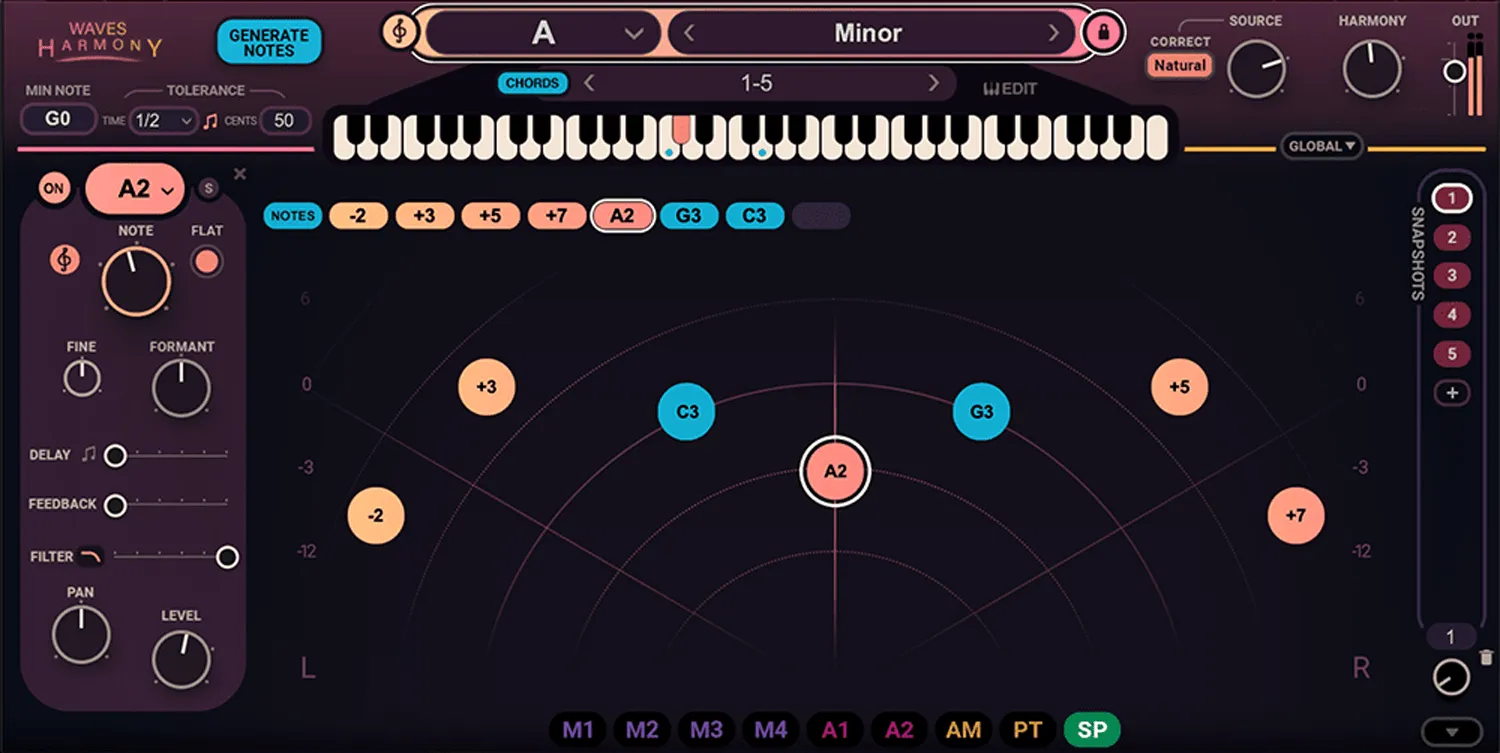
The Main Graph represents harmony voices as markers. The Y axis is Level, range -∞ to +6 dB. The X axis is Pan, range -100 to +100, with center at 0. [1]
A clicked marker starts as U (Unison), meaning no pitch offset. Ctrl+click creates a flattened voice, default C3. Empty Voice Tabs can also create a new marker. Harmony supports up to eight simultaneous harmonies. [1]
Markers show either absolute notes or relative pitch intervals. Relative markers display semitones and cents; flattened/note-driven voices show note names. [1]
Marker gestures
- Drag a marker to change its pan and level.
- Double-click it for direct pitch entry.
- Mouse-wheel vertically over it to change pitch/note.
- Horizontal wheel movement, where available, changes formant.
- Right-click deletes the marker.
- Shift-select or drag around multiple markers to open Multi-Selection. [1]
These are interface gestures, not separate processing stages.
Harmony Panel: every per-voice control
The Harmony Panel controls the selected marker/voice. Harmony Tabs select the corresponding voice. [1]
Voice On/Off
Turns the selected harmony voice completely on or off. An off voice produces no output and its marker becomes colorless. [1]
Harmony Value / Name
Shows the interval or fixed note for the voice. The manual lists absolute note values C1 to C5 in this panel. Relative pitch offset elsewhere is -24 to +24 semitones. [1]
Solo and X
Solo solos the selected harmony and shows that state on both the panel and tab. X deletes a fixed harmony; in the Notes Panel it resets parameters. [1]
Harmony Correction
The musical-symbol button toggles pitch correction for that voice. Correction happens after flatten, pitch shift and modulation calculations, quantizing the output pitch to active Key/Scale. With no Key/Scale active, correction is chromatic. [1]
Pitch
Pitch offsets the harmony by -24 to +24 semitones, default 0. [1]
Fine
Fine adds -50 to +50 cents after pitch correction, default 0. The manual specifically says Fine cannot be modulated. [1]
Flatten
Flatten On/Off forces the harmony to one selected absolute note instead of maintaining only a relative interval. [1]
Formant
Formant offsets that voice's formant by -12 to +12 semitones, default 0. [1]
Delay and sync
Delay ranges from 1–1000 ms. It can switch to musical note values with the note-symbol control; synced range is 1/64t to 1 Bar. [1]
Feedback
Feedback controls gain in the selected voice's feedback loop. Range 0–100%, default 0. [1]
Filter
Each voice has a filter. Filter Type cycles among low-pass, high-pass and band-pass. Cutoff ranges from 20 Hz to 20 kHz, default 20 kHz. [1]
Pan
Pan ranges -100 to +100, default 0. [1]
Level
Level ranges from -∞ to +6 dB, default 0 dB. The manual notes that the Notes Panel Level is normally connected to ADSR1. [1]
Multi-Selection
Select several fixed markers and the Multi-Selection panel controls them together. Dragging controls preserves relative positions; direct numeric entry sets all selected markers to the same value for that control. Split lines show the minimum and maximum values across the selected voices. [1]
This is a batch-editing convenience, not an additional harmony voice.
Snapshots
Harmony can store up to 32 snapshots. Snapshots store Harmony controls only. They do not store Global controls, Note Mapper choices or Modulator settings, although modulator assignments are stored. [1]
Use + to add a snapshot, click a snapshot to recall it, and use the trashcan or right-click menu to delete/copy/paste. The Snapshot Selection knob browses snapshots and can be automated or MIDI-learned. [1]
This makes snapshots suitable for changing harmony arrangements through a song without pretending they are complete plugin presets.
Global controls
When Global is collapsed, changing a hidden Global parameter causes an asterisk indicator next to the Global button. [1]
Glide and Glide Sync
Glide controls transition time between pitches. Unsynced range: 1–1000 ms. With Glide Sync on: 1/64t to 1 Bar. [1]
The note-symbol switch toggles host-tempo sync.
Correct Formant
Correct Formant ranges 0–100%. Waves describes 100% as maximum formant compensation during pitch shifting and 0 as no formant correction. [1]
Global Pitch
Applies a pitch shift after Note Mapping and Pitch Correction. Range: -12 to +12 semitones. [1]
Global Formant
Applies formant shift to the overall process. Range: -12 to +12 semitones. [1]
Spread
Spread adjusts overall stereo width. The retrieved manual explains the function but does not publish a numeric range/default for the Global Spread control, so none is invented here. [1]
Mixer and dry-source correction
The Mixer is the final stage where generated harmonies and the original source are combined. [1]
Correct: Natural, Hard, Notes, Off
The small Correct control affects pitch correction on the dry/source path:
- Natural: quantizes detected pitch using the Note Mapper; with multiple mapped notes it chooses the closest legal note. If Note Mapper is off, correction is chromatic.
- Hard: same basic process with faster transitions between notes.
- Notes: forces source pitch correction to generated or incoming MIDI notes for deliberate hard-tuned effects.
- Off: no source correction; input passes through unprocessed on that path. [1]
Source, Harmony, Output
Source level: -∞ to +6 dB, default 0 dB.
Harmony level: -∞ to +6 dB, default 0 dB.
Output level: -∞ to +6 dB, default 0 dB. [1]
Modulation assignments
Drag a modulator label onto a control outlined as modulatable, or right-click one of a control's modulation slots. Up to four modulators can be assigned to one modulatable control. [1]
Dragging vertically over a populated slot changes modulation depth. Colored arcs around a knob show individual modulation depths, while a white moving dot shows the effective summed knob position in real time. [1]
At 100% modulation depth, a normal control can span its full minimum-to-maximum range. For pitch-related controls, the manual says 100% depth spans two octaves down and two octaves up, four octaves total. [1]
MIDI CC modulation sources are assigned from the slot menu rather than the bottom modulator bar. Documented options include Velocity, Keyboard, PitchWheel, ModWheel and AfterTouch. [1]
M1–M4 LFO / Sequencer modulators
There are four M modulators. Each can switch between LFO and SEQ. [1]
In Sequencer mode values are quantized to whole numbers -24 to +24; when assigned to Tune/Frequency at 100% depth they represent semitones. In LFO mode Rate describes a full cycle; in Sequencer mode it describes one step. [1]
Shape and user shapes
Shapes can be drawn, erased, or loaded from the factory browser. User-drawn shapes can be saved and deleted; factory shapes cannot be deleted. [1]
Trigger Mode
Documented trigger modes are:
- Synced: follows host BPM and transport position.
- Legato: resets on a new note unless another note is already playing.
- Retrigger: resets on every new note.
- Poly: separate modulator instance per voice/new note for polyphonic destinations.
- Free: free-running, no reset. [1]
Play Mode
The four play modes are One Shot, Loop, Seesaw and Hold. One Shot runs once; Loop repeats; Seesaw moves back and forth; Hold pauses at the current position, with Phase available to change relative position. [1]
Steps, Rate, Sync, Phase, Warp, Smooth, Level
- Steps (SEQ only): 2–16.
- Rate: 0.06–30 Hz unsynced or 1/64 bar to 8 bars synced.
- Rate Sync: switches Rate between host-synced notation and Hz.
- Phase: sets starting position.
- Warp: 0.1–100, with 1 linear; changes speed distribution while preserving overall cycle timing.
- Smooth: 1–1000 ms.
- Level: 0–1; at 0 no modulation occurs. [1]
A1 and A2 ADSR modulators
Two ADSRs are triggered by incoming notes. A1 is normally connected to Level for the selected harmony. [1]
- Attack: 0.1–10,000 ms.
- Decay: 0.1–10,000 ms.
- Sustain: 0–1.
- Release: 0.1–10,000 ms.
- Curve for Attack/Decay/Release: 0.1–10; 1 is linear, below 1 exponential, above 1 logarithmic. [1]
If there are no incoming notes from Generate Notes or MIDI, the ADSRs are not triggered. [1]
AM amplitude modulator
AM follows the amplitude envelope of the source voice. Attack and Release each range 0.1–1000 ms. Level ranges 0–2 and 0 disables modulation output. [1]
PT pitch modulator
PT derives modulation from detected source pitch. Smooth ranges 0.1–1000 ms, Offset ranges -1 to +1, and Level ranges 0–2. [1]
SP Spreader modulator
SP gives incoming notes individual modulation values so polyphonic voices can diverge. Waves highlights pan as an obvious use, but it can modulate other eligible controls. [1]
Spreader Mode choices are Inward, Outward and Random. Trigger behavior includes Retrigger and Poly. The manual also names Spread (range of the spread algorithm) and Level (amount sent to destinations), but the retrieved guide does not publish numeric ranges/defaults for those two controls. They remain intentionally unspecified here. [1]
Ghost Markers
When graph parameters are modulated, low-opacity ghost markers show the resulting movement. They represent the summed modulation in real time. [1]
This is a visual readout, not another voice or stored marker.
Note Map Editor
The editor maps each incoming note—generated or MIDI—to up to eight output notes. Mapping repeats in each octave. [1]
Color/readout states documented by Waves include selected-note, played-note, assigned-note and triggered-note indicators. Velocity values can be edited for triggered notes and are scaled by incoming MIDI velocity. [1]
Spread / Fold
Spread transposes mapped outputs by octave along with the incoming note. Fold keeps triggered output notes at their originally mapped octave regardless of incoming octave. [1]
Erase clears the Note Mapper preset.
Scale Editor
The Scale Editor defines the legal-note behavior for a 12-note octave. Each note has three states:
- Empty / Legal Note: passes that note value.
- NoteUp [>]: corrects to the next legal note above.
- NoteDown [<]: corrects to the next legal note below. [1]
User scales can be saved into the Scale menu; factory presets cannot be overwritten. [1]
WaveSystem toolbar and tooltips
The toolbar provides undo/redo, preset save/load, settings compare, resize, tooltips on/off and user-guide access. Tooltips show control descriptions and, when controls move, their current value either in the tooltip area or a dedicated box. [1]
A practical order of decisions
Choose Key/Scale, then decide whether the notes come from Generate Notes, MIDI or fixed markers. If using automatic generation, set Min Note and Tolerance before building a dense chord map; otherwise detector chatter can create more note changes than intended.
Build or choose the harmony map, then balance each voice with Pitch/Fine/Formant, Delay/Feedback/Filter and Pan/Level. Use snapshots when the arrangement changes through the song.
Only then add Global correction and modulation. Start with one modulation destination at a time, watch the colored depth arcs/white effective-position dot and ghost markers, and keep Source/Harmony/Output levels under control in the final Mixer.
That is editorial workflow guidance based on documented signal relationships. No preferred preset, vocal performance or sonic result was tested.
Limitations
Harmony is designed around a detected monophonic vocal input for automatic note generation; Chord Maps can turn a generated note into several harmony notes. [1]
Several controls are described functionally without numeric ranges/defaults in the retrieved manual, notably Global Spread and the SP modulator's Spread/Level. Those values are not guessed.
The current product page says MIDI keyboard support is unavailable in SuperRack SoundGrid, SuperRack Performer and eMotion LV1. Other host/MIDI behaviors were not independently tested. [2]
No latency, CPU, tuning accuracy, vocal artifact, formant quality, MIDI timing or automation benchmark was performed.
Related plugins
The live Vocal Rider guide addresses vocal level riding rather than harmony generation. The live Sibilance guide addresses de-essing, and the live F6 guide covers dynamic EQ.
Those tasks are separate from pitch-generated harmony. Use the Waves Audio Post Resources hub for the site's already-live Waves workflow and licensing references.
The live Waves Tune Real-Time guide covers live pitch correction, while Vocal Bender focuses on pitch and formant transformation. Those are different tasks from Harmony's generated vocal parts.
Bottom line
Waves Harmony separates note generation from voice design. First determine what notes should exist; then shape each of the up to eight voices; then use snapshots, Global controls and modulation to make the arrangement move.
The Note Mapper, per-voice panel and modulation system are related but distinct. Keeping those layers separate makes the interface much easier to understand than treating every visible control as one giant harmonizer panel.
Sources
Checked September 20, 2026. No listening, MIDI, CPU, latency or host test was performed.
- Waves Harmony User Guide, 36 pages. Official overview, Harmony Panel and modulation-assignment pages were visually inspected.
- Waves Harmony product page, including the current SuperRack/eMotion MIDI-keyboard limitation note.
- Waves Graphic Library, current Waves Harmony entry and product-image attribution/backlink condition.
Frequently Asked Questions
How can Waves Harmony create harmony notes?
Harmony can derive notes from a monophonic vocal with Generate Notes, receive played MIDI notes, or use fixed graphical harmony markers. These are distinct ways of supplying the notes that voices will sing.
How many harmony voices and snapshots are available?
The manual documents up to eight harmony voices and up to 32 snapshots. Snapshots store harmony controls, not every global, mapping or modulator setting.
What do Min Note and Tolerance control?
Min Note sets the lowest pitch considered by Generate Notes. Tolerance Cents and Tolerance Time determine how much and how long a pitch change must persist before a new generated note is created.
Do snapshots store the entire Waves Harmony setup?
No. Snapshots store Harmony controls and modulator assignments, but not Global controls, Note Mapper choices or Modulator settings. A snapshot is not a complete plugin preset.
What is the difference between Global Pitch and a voice's Pitch control?
A voice's Pitch is part of that individual voice design. Global Pitch shifts the overall result after Note Mapping and Pitch Correction, so the two controls act at different levels of the workflow.
Does MIDI keyboard control work in every Waves live host?
No. Waves' current product page says MIDI keyboard support is unavailable in SuperRack SoundGrid, SuperRack Performer and eMotion LV1. Other host behavior was not independently tested for this article.

About the Author
Joseph Nilo has been working professionally in all aspects of audio and video production for over twenty years. His day-to-day work finds him working as a video editor, 2D and 3D motion graphics designer, voiceover artist and audio engineer, and colorist for corporate projects and feature films.