
JJP Strings & Keys combines common dynamics and EQ with parallel processed returns for strings and keyboard sources. Its Main fader sets the direct contribution; Master controls that branch and the returns together.
Its other important distinction is Sensitivity naming. The guide identifies a different range and the automation label Sens 2 for several Types, without supplying numeric limits.
This guide follows the complete official manual and authentic panel. I have not auditioned the processor or tested an installation; the artist's sonic intentions are not listening results from this article.
My Short Version
Choose among Synth, Hi Strings, Lo Strings and Piano. These are Types within the processor, not four channel components.
Sens 2 is conditional naming, not an extra knob. The guide associates it with Hi Strings, Lo Strings and Piano and does not publish its range.
The returns are parallel and pre-Main-fader. Main changes the direct contribution; Master changes the combined output.
SPACE, DOUBLER, PRSNCE and GIRTH are return labels. They do not establish hidden reverb times, modulation settings or EQ specifications.
Best for and when to choose another tool
Best for: a compact source-oriented panel when you want to shape a common dynamics/EQ treatment and balance additional processed contributions for keyboard or string material.
The artist's introduction describes both spacious and more direct treatments. That is a creative intention, not a promise that one Type produces an appropriate result on every recording.
Choose another tool when: you need independent EQ frequency/Q, compressor timing or a fully specified modulation, delay or reverb editor.
A label such as GIRTH or SPACE should not be mistaken for a published model with known parameter values.
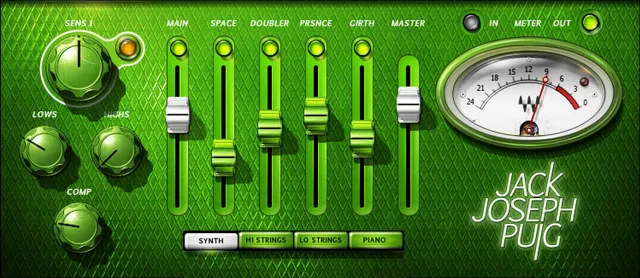
Components and mono-to-stereo Pan
The two documented components are JJP Strings & Keys m>s, with mono input and stereo output, and JJP Strings & Keys Stereo, with stereo input and stereo output.
m>s is mono-to-stereo, not Mid/Side. The guide does not list a mono-to-mono component.
Pan is available in mono-to-stereo. No numeric range, pan law or default is specified. The authentic Stereo image's lack of Pan is consistent with that condition.
The guide does not document a Phase reversal switch for this processor. Such a control should not be imported from another JJP product.
Four Types and their starting settings
The Type selector offers Synth, Hi Strings, Lo Strings and Piano.
Waves says JJP optimized the defaults for each Type, with additional adjustment potentially needed after setting Sensitivity.
Certain faders may change depending on Type. The manual does not list every alternate label or provide a numeric initialization table.
Nor does it state that changing Type resets every parameter. Keep the supplied starting context separate from an undocumented full-reset behavior.
Sensitivity and the Sens 2 automation label
Sensitivity helps establish how the signal reaches the processing. The guide recommends using the part of the track with the highest peaks.
Its detailed note says the Sensitivity ranges of Hi Strings, Lo Strings and Piano differ and use the automation label Sens 2.
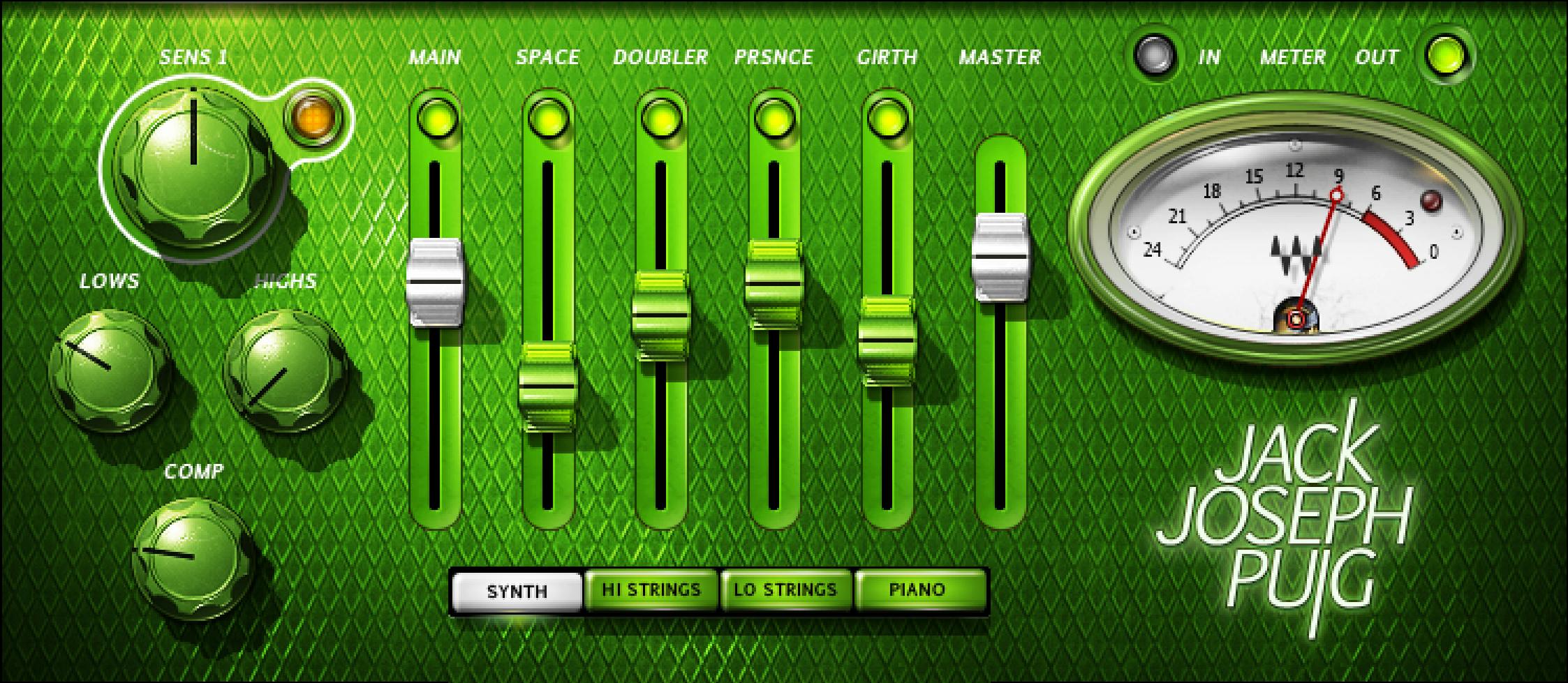
The official Synth panel shows SENS 1, while the guide's Hi Strings example shows SENS 2. These are documented source-context differences, not a second independent Sensitivity control or proof of incompatible interface versions.
No numeric range, default, scale conversion or fixed relationship between Sens 1 and Sens 2 is given.
If you are organizing automation, note the Type and the parameter label rather than assuming a number on one Sensitivity scale has an established equivalent on the other.
Sensitivity LED: guidance, not a requirement
The manual describes Off as too low, green as good, yellow as optimal and red as very hot.
Its quickstart targets yellow. The detailed Strings & Keys section also explicitly says good results can occur without the optimal yellow indication.
That makes yellow a recommended starting reference, not a reason to force every passage into one color.
The guide supplies no numeric LED thresholds or calibrated headroom reference. The Sensitivity LED is not the separate output Clip indicator and does not prove that the combined result cannot clip.
Lows, Highs and Comp: common treatment
LOWS and HIGHS are the panel's broad low- and high-frequency shaping controls. COMP supplies its basic dynamics adjustment.
The Main Section influences all processing before the signal divides into direct and additional processed branches.
The guide does not give the tone controls filter types, center/corner frequencies, Q values or gain ranges. Comp has no published independent threshold, ratio, attack or release settings here.
These omissions do not prevent using the named broad controls, but they do limit technical interpretation. A pictured knob position is not an undocumented hertz, decibel or millisecond setting.
Main, the pre-fader returns and Master
The signal leaves the common Main Section and splits into the direct branch through Main and additional processed returns.
Those returns are fed before the Main fader. They join the direct branch at a summing point, followed by Master, which controls the combined output level.
Lowering Main therefore changes the direct-to-return balance. It does not reduce the pre-fader feeds in the same way as lowering the combined Master output.
A round button is visible above Main. The guide does not separately define its complete switching behavior or color-state convention; it should not become an assumed global bypass or reset.
Numeric ranges and defaults for Main and Master are not published in this guide.
SPACE, DOUBLER, PRSNCE and GIRTH
Each Center fader controls an auxiliary return with additional processing. Each has a dedicated mute button above it.
| Return label | Supported interpretation |
|---|---|
| SPACE | Blend its named processed return; no particular room, decay or predelay specification is provided. |
| DOUBLER | Blend its separate return; no voice count, detune amount or delay setting is exposed in the guide. |
| PRSNCE | The panel's abbreviated presence label; no center frequency, Q or calibrated boost scale is published. |
| GIRTH | Another return balance, not a documented fixed bass boost or low-frequency cutoff. |
The source treats these as parallel contributions alongside Main, not a SPACE→DOUBLER→PRSNCE→GIRTH serial chain.
Some faders may change with Type. The authentic image establishes the pictured labels; it is not a complete matrix of every Type's possible state.
Use the return mutes to compare contributions in a planned evaluation, rather than assuming that any single fader is a master amount for all processing.
IN/OUT meter and Clip reset
The Meter switch chooses input or output monitoring, shown by IN/OUT.
The Strings & Keys guide says Clip lights when levels exceed 0 dBFS. Click the indicator to reset it.
Its quickstart recommends lowering the output level when Clip repeatedly lights or stays lit. Master is the documented combined-output control.
The meter is not a limiter or acoustic SPL instrument. The guide does not specify automatic clipping prevention, a monitoring-safety setting or detailed meter ballistics.
Toolbar and a deliberate evaluation sequence
The WaveSystem toolbar provides preset save/load, setting comparison, undo/redo, resizing and access to the WaveSystem Guide.
The manual shows the shared toolbar, while the full-size Library original crops it out. That crop does not establish removal of those utilities.
Choose the component and Type first, noting any Sens 2 automation context. Follow the guide's highest-peak Sensitivity method, then shape the common Lows/Highs/Comp treatment.
Balance Main and the processed returns, using their mutes for separate comparisons. Adjust Master and recheck output metering after changing that balance.
This is conceptual workflow advice, not a tested preset, verified level match or guaranteed result on a particular instrument.
Related Waves guides
For individually adjustable dynamics parameters, see the Renaissance Compressor guide. The F6 guide covers frequency-selective control beyond broad Lows and Highs adjustments.
The WLM Plus guide explains separate level/loudness metering; it does not supply missing Sensitivity LED thresholds.
The Waves Audio Post Resources hub collects other live articles. Read subscription versus perpetual licensing separately from this control explanation.
Sources and documentation limits
Checked October 19, 2026, America/New_York. The official JJP Strings & Keys product page links the complete eight-page user guide, read in full.
Page 4 defines components; pages 5–6 establish Types and panel sections; page 7 explains Sensitivity/Sens 2, Main and returns; page 8 covers Master, meters, routing and utilities. The authentic Graphic Library original corresponds to the Stereo/Synth view.
Numeric ranges/defaults, exact internal algorithms, a full Type-label matrix and runtime/audio results are not established. Sens 1/Sens 2 naming and pictured positions do not fill those gaps.
FAQ
What does JJP Strings & Keys do?
It combines common dynamics/EQ controls with a direct Main branch and additional parallel processed returns for strings and keyboard sources. The illustrated returns are SPACE, DOUBLER, PRSNCE and GIRTH. Its Types offer source-oriented starting settings; the guide does not publish the exact internal effect algorithms or define the panel as a serial four-effect chain.
Which Types are available?
The four Types are Synth, Hi Strings, Lo Strings and Piano. Waves says their defaults were optimized and that certain faders may change with Type. The guide does not provide a full numeric initialization table, every alternate fader label or a promise that switching Type resets all settings. Their names describe starting contexts rather than mandatory source restrictions.
What does m>s mean, and when is Pan available?
The m>s component accepts mono input and produces stereo output. The Stereo component accepts stereo input and produces stereo output. Pan is documented only in mono-to-stereo. The source does not define Mid/Side processing, a mono-to-mono component, a numeric Pan range or a Pan law. The official Stereo picture's lack of Pan is consistent with that component difference.
Why do I see Sens 1 or Sens 2?
The guide says Hi Strings, Lo Strings and Piano have different Sensitivity ranges and are labeled Sens 2 for automation. The official Synth image shows SENS 1, while the guide's Hi Strings example shows SENS 2. This is a documented conditional naming difference, not a second independent knob or evidence of a version mismatch. Numeric ranges and a conversion are not supplied.
Does the Sensitivity LED have to stay yellow?
The quickstart targets yellow using the section with the highest peaks. The detailed Strings & Keys guide also says good results may occur without the optimal yellow indication. Its states are Off for too low, green for good, yellow for optimal and red for very hot. No numeric thresholds or guarantee of output clipping protection are specified.
How does Main differ from Master?
Main adjusts the direct branch after the common Main Section. The additional processed returns are fed before that fader, then join the direct branch before Master. Master controls the combined output level. Moving Main changes the balance against the returns; it does not change their pre-fader feed level in the same way as reducing the combined Master output.
What do SPACE, DOUBLER, PRSNCE and GIRTH control?
Each is a level fader for an additional processed return, with a dedicated mute above it. Those returns run alongside the Main branch rather than in a documented serial order. The guide does not supply a reverb time for SPACE, voice/detune settings for DOUBLER, a frequency for PRSNCE or a fixed bass-boost specification for GIRTH.
What does Clip mean, and how do I reset it?
The Strings & Keys guide says Clip lights when levels exceed 0 dBFS; click it to reset. IN/OUT changes the meter's monitoring view between input and output. The quickstart recommends reducing output when Clip repeatedly lights or stays lit. This is metering guidance, not a documented automatic limiter, calibrated acoustic-level measurement or guarantee against clipping elsewhere.

About the Author
Joseph Nilo has been working professionally in all aspects of audio and video production for over twenty years. His day-to-day work finds him working as a video editor, 2D and 3D motion graphics designer, voiceover artist and audio engineer, and colorist for corporate projects and feature films.