
L3-LL Ultramaximizer is the compact interface to Waves' five-band Peak Limiting Mixer. Its exposed limiter controls are Threshold, Out Ceiling, nine Profiles and a profile-relative Release multiplier, plus IDR output-depth preparation.
It uses the LL family's phase-compensated crossovers, rather than standard L3's linear-phase approach. The low-latency claim is the manufacturer's, not a zero-latency measurement made here.
The guide has a Cosy & Warm/Warm & Cosy label-order difference. That is retained as one qualified Profile entry, not expanded into a tenth choice.
I read the complete 22-page combined guide and current official source. I have not auditioned profiles, measured latency or tested an installed menu.
My Short Version
Threshold drives both limiting and makeup. Ceiling is a separate output-scaling decision.
Profile chooses internal band settings. It is not a bank of exposed per-band knobs on Ultra.
Release spans ×0.1–×10, default ×1. It multiplies profile times; the number is not milliseconds.
IDR gray does not mean unprocessed audio. Quantize remains active at the selected output depth.
Best for and when to choose another interface
Best for: a broad multiband limiting workflow when a Profile and one relative Release adjustment are preferable to editing each band's priorities.
The current product describes instruments, groups and final mixes, including stage/studio use. Those are intended applications, not tracking-performance tests or measured sound-quality findings.
Choose another interface when: you need independently editable crossover frequencies, band Gain/Priority/Release, Separation, band Solo or graph gestures. The official L3-LL Multi page describes that larger interface.
The F6 guide addresses a different frequency-specific workflow, while WLM Plus covers independent loudness and level measurement.
Five-band engine and components
The LL engine splits audio into five phase-compensated bands, then uses one central Peak Limiting Mixer to allocate attenuation under the overall limit.
It is not five unrelated hard limiters. ARC adjusts release behavior automatically within the internal band settings.
The guide explicitly lists Mono and Stereo Ultramaximizer components. It does not establish a mono-to-stereo, Mid/Side or independent left/right parameter interface.
No particular sample count, millisecond latency, oversampling mode or current-host compatibility is verified here. “Low latency” is not rewritten as “no latency.”
Threshold
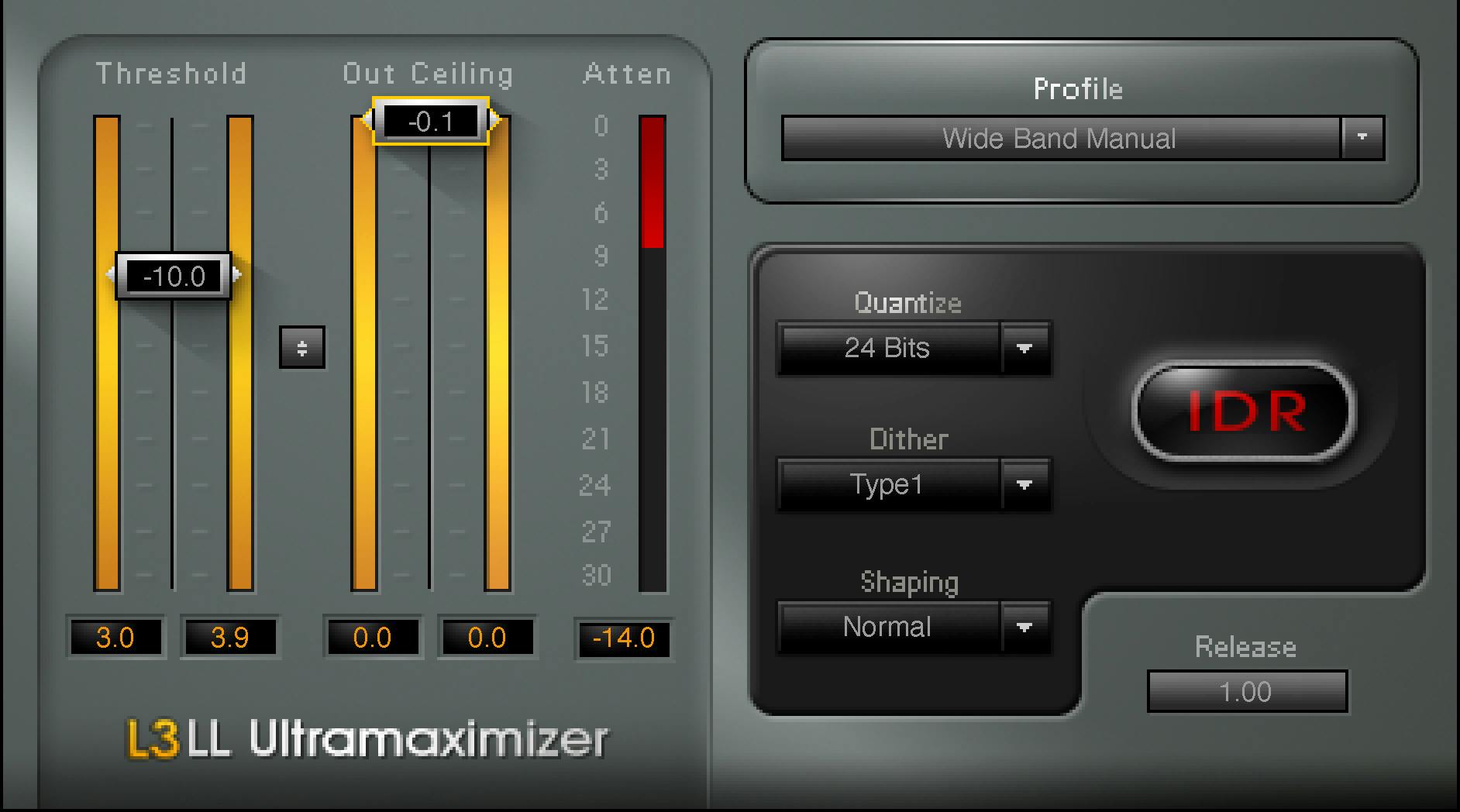
Threshold spans −30 to 0 dB, default 0 dB. It sets the common limiting reference and applies opposite-value makeup.
The guide's example says −6 dB Threshold corresponds to 6 dB makeup. This is a description of the control relationship, not a guarantee of greater perceived loudness or unchanged spectral balance.
The Threshold fader sits on the input meter. Its parameter range should not be used as the full input-meter scale.
No editable attack, ratio or knee is documented on Ultra.
Out Ceiling and the linked control
Out Ceiling spans −30 to 0 dB, default 0 dB, scaling maximum sample output.
The Threshold/Out Ceiling Link moves both together, allowing comparison of limiter behavior without the entire makeup increase.
It is not a separately specified loudness-match algorithm or another independently ranged gain control.
The manual's −0.2 dB quick-start recommendation is distinct from the default 0 dB control value. Neither is a true-peak certification or a guarantee against all later EQ, encoding or playback peaks.
All nine Profiles and the naming caveat
The page 11 list gives:
- Basic Profile, the stated default.
- Extreme Analog.
- Semi Separated.
- WideBand ARC.
- WideBand Manual.
- Cosy & Warm.
- Loud & Proud.
- Lean & Mean.
- Low Level Loudness.
The appendix on page 20 instead writes Warm & Cosy. The order difference is preserved; the sources do not establish a tenth Profile or prove one exact current runtime spelling.
Each Profile contains internal per-band Priority, Release and Separation settings. The guide does not publish a complete numerical algorithm for every name.
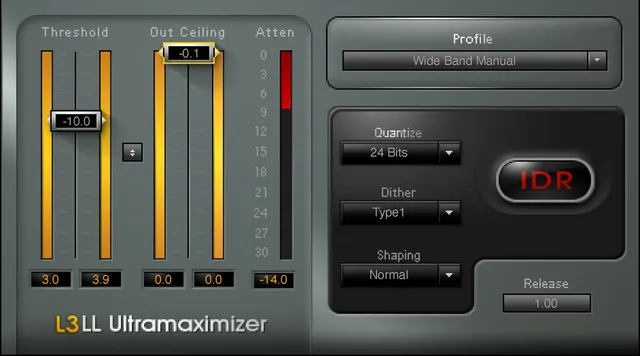
The official original shows Wide Band Manual selected. That illustrated state does not replace Basic Profile as the documented default or establish that all displayed settings are factory values.
Release: a multiplier, not a time
Release spans ×0.1 to ×10.0, default ×1.0.
It proportionately shortens or lengthens the selected Profile's internal release constants: lower values shorten them; higher values lengthen them.
The same multiplier under another Profile need not describe the same per-band times. It is not a 0.1–10 ms control or Multi's independently editable band reference range.
An increment is not stated. The illustrated 1.00 confirms a displayed multiplier format, not a measured release response.
Meters and numeric peak resets
The input and output sections include level meters and numeric peak indicators that can be clicked to reset.
The guide does not provide a complete numerical input/output meter range, ballistics or a universal hold duration.
The Attenuation meter spans −30 to 0 dB and shows overall gain reduction. Its readout is not a fourth limiter parameter, a noise meter or an independent loudness target.
No additional attenuation-reset gesture or true-peak mode is established here.
Quantize and selected-depth rounding
Quantize offers 24, 22, 20, 18 and 16 bits; default 24. It sets the output word length in the guide's account.
Page 18 explicitly says Quantize is always active, including floating-point environments. With Dither and Shaping None, the output remains rounded according to the selected Quantize depth.
That explicit LL wording is not replaced with a different non-LL manual's No Dither description. A shared product family does not make every older wording dispute this interface's specification.
Select the target with the intended delivery medium in mind. A control selection alone does not prove an exported file's actual format.
Dither, Shaping and IDR status
Dither: Type1, Type2 or None; default Type1.
The guide describes Type1 as prioritizing low distortion, and Type2 as lower added noise with some low-level distortion. Type2 is described as auto-muting with no input. These are vendor behaviors, not measurements made here.
Shaping: Normal, Moderate, Ultra or None; default Normal. It redistributes dither/quantization noise toward less audible frequency regions and can operate separately from dither.
The IDR logo is red when Dither or Shaping is engaged. With both None it turns gray, but selected-depth rounding remains.
The appendix reserves Ultra shaping for genuinely final preparation and warns against further editing. Its 44.1 kHz noise figures and perceived-resolution descriptions are conditional vendor context, not proof of extra literal output bits or independent noise tests.
What Ultra does not expose
The combined guide's four editable crossovers, Gain/Priority controls and links, band Solo, per-band Release, Master Release mode selector, Separation and graph-marker gestures belong to Multi.
Ultra's Profile encapsulates internal band settings rather than revealing those controls. Multi's contradictory LM/HI ranges are therefore not presented as exposed Ultra settings or used to invent a hidden parameter bank.
The two owners still have their own guide sections and source limits. Ultra's explicit Release multiplier bounds/default are not omitted merely because another L3 interface has missing values.
Toolbar and a practical sequence
The common WaveSystem toolbar provides save/load presets, comparison, undo/redo, resizing and access to its guide. The Library panel does not picture the strip; that is not evidence of removal.
My suggested sequence: consider Threshold/Ceiling together, compare the documented Profiles, then use Release as a relative adjustment. Keep IDR's output-depth decision separate from peak-limiting level.
This is a conceptual workflow, not a tested preset or a preference based on listening. References are in the Waves resources hub; licensing choices are separate.
Sources and documentation limits
Checked October 19, 2026, America/New_York. The official Ultra page independently links the complete combined 22-page L3-LL guide, read in full.
Pages 5–8 explain the engine/components; 10–11 globals/nine Profiles; 12 Release; 18 IDR; 19 toolbar; 20 appendix; 21–22 dither/shaping context. The Multi sections were also read to establish the interface boundary.
Critical actual pages and the genuine Graphic Library Ultra original were inspected. Cosy & Warm/Warm & Cosy remains explicitly qualified; no tenth option, unlisted current gesture, meter scale or measured latency is invented.
FAQ
What is L3-LL Ultra's processing model?
It is the simplified interface to a five-band phase-compensated Peak Limiting Mixer with automatic release behavior. One central limiter allocates attenuation across the bands. Mono and Stereo components are documented; low-latency marketing is not a measured zero-latency or compatibility result here.
How do Threshold, Ceiling and their link work?
Threshold and Out Ceiling each span minus 30 to 0 dB and default to 0. Threshold sets the reference and opposite-value makeup; Ceiling scales sample output. The link moves them together for comparison, not a verified perceptual loudness match. A recommended minus 0.2 dB setting is not the factory default.
Which nine Profiles are documented?
Page 11 names Basic Profile, Extreme Analog, Semi Separated, WideBand ARC, WideBand Manual, Cosy & Warm, Loud & Proud, Lean & Mean and Low Level Loudness. Basic Profile is the default. Page 20 reverses one label to Warm & Cosy; that is a qualified name difference, not a tenth Profile.
What does Release's number mean?
It is a unitless multiplier of the selected Profile's internal times, from times 0.1 to times 10, default times 1. Lower values shorten and higher values lengthen those times. It is not milliseconds, and no increment or measured response is supplied.
Which metering resets are documented?
Input/output numeric peak fields can be clicked to reset. Overall Attenuation spans minus 30 to 0 dB. The guide does not supply complete input/output meter scales, ballistics, universal hold durations, an attenuation-reset gesture or a true-peak mode.
Does Quantize remain active with IDR gray?
Yes. Quantize offers 24, 22, 20, 18 and 16 bits, default 24. Page 18 explicitly says output remains rounded according to the selected depth when Dither and Shaping are None. Gray status is not whole-plugin or quantization bypass.
How do Dither and Shaping differ?
Dither offers Type1, Type2 and None, default Type1; the guide describes Type2 auto-muting with no input. Shaping offers Normal, Moderate, Ultra and None, default Normal, redistributing noise energy. Either active makes IDR red. Their vendor noise/resolution descriptions were not measured here.
Can I edit Multi's band controls inside Ultra?
No exposed Multi crossovers, band Gain/Priority/Release, Solo, Separation, Master Release modes or graph gestures are documented for Ultra. Profiles contain internal band settings, not a hidden editable Multi panel. The common toolbar separately provides presets, comparison, undo/redo, resizing and help.

About the Author
Joseph Nilo has been working professionally in all aspects of audio and video production for over twenty years. His day-to-day work finds him working as a video editor, 2D and 3D motion graphics designer, voiceover artist and audio engineer, and colorist for corporate projects and feature films.