
Waves L3 Multimaximizer is a five-band peak limiter and bit-depth requantizer built around Waves’ Peak Limiting Mixer. Instead of running five independent limiters, L3 analyzes the bands together and distributes attenuation across them while keeping the summed output under one global threshold. The full Multimaximizer interface adds per-band Gain, Priority and Release controls, adjustable linear-phase crossovers, Separation, a dynamic gain/frequency display and IDR dithering/noise shaping. [1][2]
The current L3 manual also describes a simpler L3 Ultramaximizer interface that controls the same core multiband engine through Profiles rather than exposing all per-band parameters. This article focuses on the full L3 Multimaximizer. L3-16 and L3-LL are separate Waves products. [1][2]
My Short Version
Start with Threshold and Out Ceiling. Lowering Threshold increases the amount of limiting and automatically applies opposite make-up gain; Out Ceiling sets the documented sample-peak output ceiling; it is not a true-peak guarantee. Then use the per-band controls only when the spectrum is being treated unevenly: Gain changes a band before limiting, while Priority asks the Peak Limiting Mixer to preserve more of that band relative to the others. [1]
Use Separation to decide how independently the five bands’ detectors behave. Use crossover points and band Solo to define useful frequency regions, then treat Release as an adaptive system: each band’s reference Release is modified by the selected global Release Behavior and ARC. [1]
The IDR section is a final bit-depth/dither stage. Set it according to the actual delivery path rather than because more noise shaping looks “better.” I did not master, render or measure audio with L3 for this article; this is documentation-led. [1]
How the L3 engine differs from five separate limiters
Waves describes L3 as a five-band peak limiter with one central Peak Limiting Mixer. The engine calculates attenuation for all bands together so the recombined result stays peak-limited. This gives the optimizer choices about where attenuation is applied rather than forcing every band to behave as an independent limiter. [1]
The bands are split with linear-phase crossovers. The guide says the linear-phase band-splitting path adds a constant 80 ms delay before limiting.
Separately, Waves' current product-page latency table lists the L3 Multimaximizer at 3528 samples (native 44.1 kHz), 3840 (48 kHz), 7056 (88.2 kHz), 7680 (96 kHz), and 3843 (TDM 48 kHz). These are separate vendor statements; the table figures are published sample counts, not measurements from this article or a guarantee across hosts/configurations. [1][2]
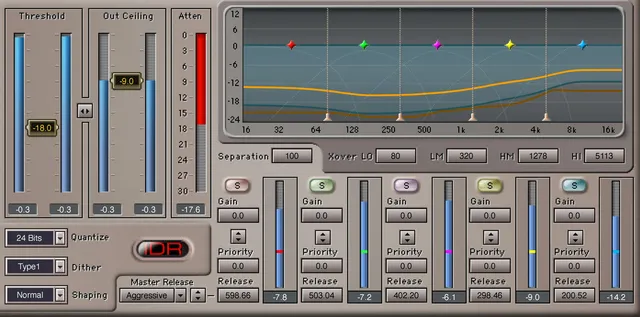
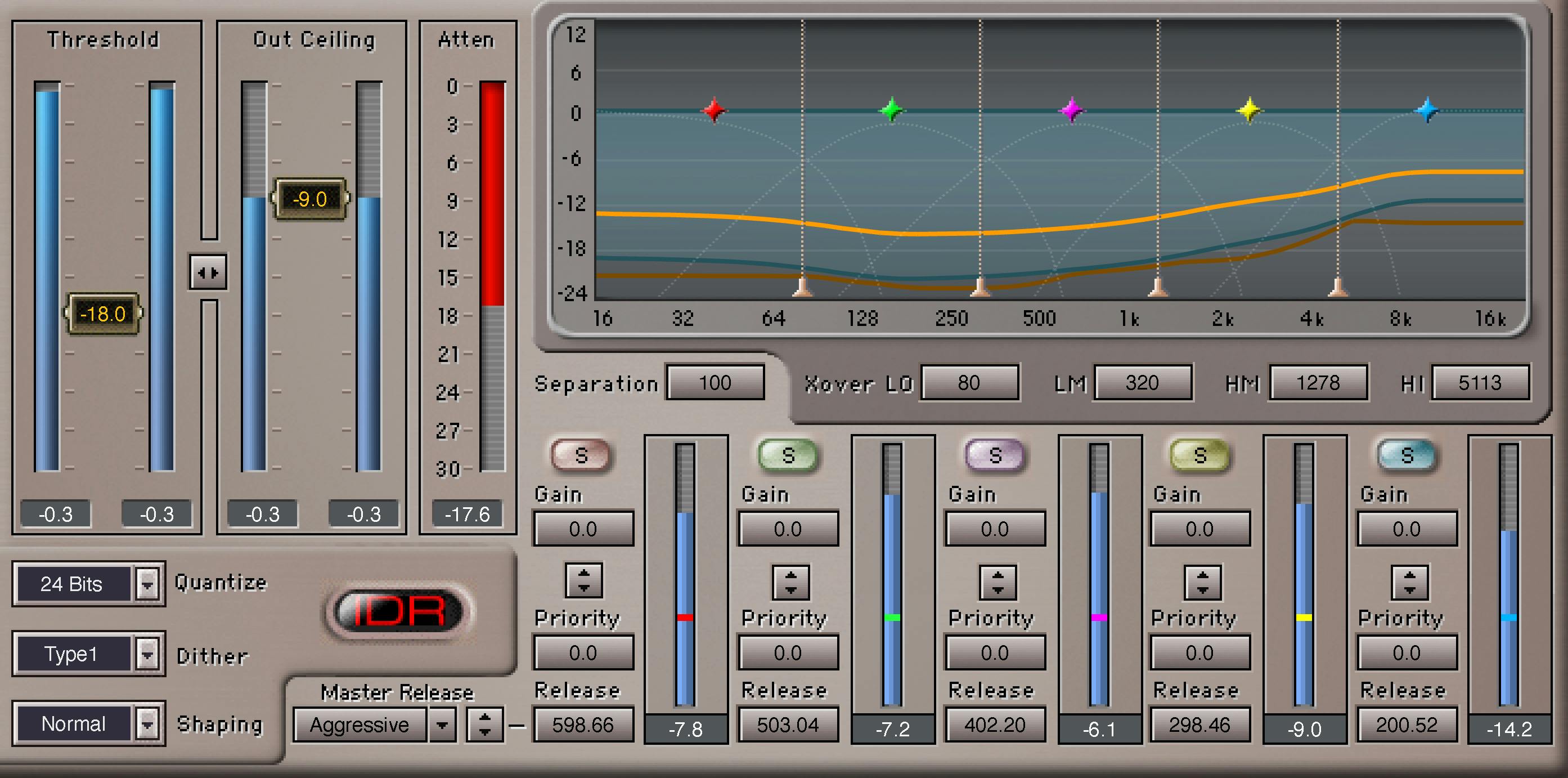
Threshold, Out Ceiling and linked adjustment
Threshold is the global limiting threshold.
- Range: 0.0 to -30 dBFS.
- Default: 0 dBFS. [1]
When energy exceeds Threshold, L3 applies attenuation and also adds make-up gain opposite to the Threshold amount. Lowering Threshold therefore both drives the limiter harder and raises the compensated level. [1]
Out Ceiling scales the limiter output to the user-set sample-peak maximum; it does not guarantee a true-peak ceiling after downstream conversion or oversampled playback.
- Range: 0.0 to -30 dBFS.
- Default: 0 dBFS. [1]
The linked control between Threshold and Ceiling moves both together. Waves describes it as a way to assess the effect of limiting apart from a simple overall level change. The manual’s quick-start example later raises Ceiling separately after finding a suitable amount of attenuation; its historical -0.2 dBFS example is not a universal modern delivery target. [1]
Attenuation Meter
The Attenuation Meter shows the overall summed attenuation applied across the multiple bands.
- Display range: 0 to -30 dB. [1]
It is a gain-reduction readout, not a loudness-compliance meter.
Master Release and Release Behavior
L3 combines per-band release references with global behavior. Master Release scales the five per-band Release settings together. The guide does not publish a numeric range or default for this control. [1]
The manual explicitly describes these Release Behavior choices:
- ARC — the nominal/default behavior and Waves’ general-purpose starting point.
- Warm — more adaptive behavior in low-frequency bands and more manual behavior toward the highs.
- Scaled — more adaptive behavior in high-frequency bands and more manual behavior toward the lows.
- Aggressive — designed for more extreme loudness behavior, with Waves specifically discussing transient-dominant beat material.
- Manual — minimal ARC; per-band release settings dominate. [1]
The guide is internally inconsistent about this menu. Its Contents page lists Manual, ARC, Smoothed and Scaled; the Controls page says the popup selects “1 of 4”; and the Release Behavior section explains ARC, Warm, Scaled, Aggressive and Manual.
The static interface figures show Scaled and Aggressive as selected states, but neither displays the popup's full list. This article reports the manual's descriptions without deciding whether there are four or five selectable entries or equating “Smoothed” with another label. [1]
L3 Ultramaximizer Profile and Release
The companion L3 Ultramaximizer interface uses a single Release control as a multiplier for the per-band release values contained in the selected Profile. The Profile defaults to Basic and packages internal per-band settings, Release Behavior, crossover frequencies and Separation. [1]
The simplified interface provides useful context, but this guide focuses on the full Multimaximizer. Profile belongs to the Ultramaximizer interface rather than the full Multimaximizer control panel. [1]
Crossover controls
L3 has four adjustable crossovers defining five frequency bands. The manual documents these ranges/defaults: [1]
- Low: 40–350 Hz; default 80 Hz.
- Low Mid: 150–3000 Hz; default 320 Hz.
- Hi Mid: 1022–4757 Hz; default 1278 Hz.
- Hi: 4–16 kHz; default 5113 Hz. [1]
Waves notes that moving a crossover recalculates the linear-phase filters and the new position is set when the mouse is released. The manual describes Solo buttons for hearing each band while adjusting boundaries. The guide does not state a numeric range or default for these buttons. [1]
The practical use is not to chase standard crossover numbers. Put the boundaries where the material makes sense, then judge whether the limiter is distributing attenuation naturally.
Separation
Separation controls how much each band feeds the energy detectors of the other bands.
- Range: 0–100.
- Default: 100. [1]
At 100, each band feeds only its own detector. At 0, all bands feed every detector, so attenuation behavior becomes more wideband-like even though per-band Gain, Priority and Release remain separate. [1]
Per-band Gain
Each of the five bands has Gain before the limiter.
- Range: -12 to +12.
- Default: 0. [1]
Waves describes this as an EQ-like offset after the crossover and before limiting. Adding Gain raises the continuous level of a band, but that does not automatically raise the band’s permitted peaks because the peak-limiting optimizer still applies its relative threshold. [1]
Per-band Priority
Each band also has Priority.
- Range: -12 to +12.
- Default: 0. [1]
Higher Priority asks the Peak Limiting Mixer to apply less attenuation to that band when possible, at the expense of more attenuation elsewhere. Use it when limiting is suppressing one spectral region disproportionately. [1]
Priority is not ordinary EQ gain. If you want both the sustained level and the allowed peaks of a band to rise, Waves specifically describes increasing Gain and Priority together.
Gain/Priority Link
The Gain and Priority Link moves the two controls together for a band. That implements the combined adjustment described above without forcing you to match two moves manually. [1]
Per-band Release
Each band has a Release reference control.
- Published range: 0.1 to 5000. [1]
The current manual calls this a reference release time but does not attach a unit to the published range on the control page. This article therefore does not silently label the values milliseconds. The selected Release Behavior and ARC modify the reference value to determine actual release behavior. [1]
Gain/Frequency graph and grab markers
The graph is a live view of what L3 is doing across frequency. The manual documents: [1]
- an orange Dynamic Gain line for current gain changes;
- a semi-transparent blue ghost/trail that smooths the fast-moving gain line;
- a darker blue peak-hold line showing maximum attenuation reached across frequency;
- five band markers that move left/right to change band width and up/down to adjust linked Gain/Priority;
- four crossover markers for viewing/adjusting crossover frequencies. [1]
The graph is an operational display, not proof that a setting sounds better.
IDR Quantize
Quantize sets the target output bit depth.
- Options: 24, 22, 20, 18, 16 bit.
- Default: 24 bit. [1]
The current manual says Quantize cannot be disabled and that the output is quantized to a maximum of 24 bits even in a floating-point environment. Treat that statement as current L3 documentation, not a measurement made here. [1]
IDR Dither Type
Type selects:
- Type 1 — designed for no nonlinear distortion/modulation noise at low levels and for clean cascading;
- Type 2 — lower dither level with some low-level distortion; the manual also describes auto-black behavior at digital black;
- None — no dither. [1]
Default: Type 1. [1]
IDR Noise Shaping
Shaping options are:
- Moderate — light noise shaping;
- Normal — Waves’ recommended general choice;
- Ultra — stronger high-frequency shaping intended for final-stage use;
- None — leaves quantization/dither noise unshaped. [1]
Default: Normal. [1]
The manual cautions that Ultra is best reserved for the last stage because later processing can make heavy high-frequency shaping undesirable. Dither and noise shaping belong at a genuine bit-depth conversion stage, not automatically on every instance.
IDR Active/Bypass indicator
The guide says the IDR indicator is red whenever Dither or Noise Shaping is engaged, and gray when both Type and Shaping are set to None. Gray means no resolution enhancement is engaged; it does not turn off Quantize, which the guide says always sets output to a target bit depth of at most 24 bits. [1]
WaveSystem toolbar
The WaveSystem toolbar at the top of the plugin lets you save and load presets, compare settings, undo and redo steps, and resize the plugin. The guide points to Waves' separate WaveSystem Toolbar documentation for further details. [1]
A practical L3 workflow
Set Out Ceiling for the intended sample-peak limit, with separate true-peak/delivery checks where required, then use the linked Threshold/Ceiling control to find a sensible amount of limiting without letting a simple loudness increase make the decision for you. [1]
Next, watch the attenuation and gain/frequency displays. If a frequency region is being pushed down too hard, adjust Priority before reaching for arbitrary EQ. Use Gain when you genuinely want an EQ-like level change, and link Gain/Priority if both sustained level and relative peak allowance need to move together. [1]
Set crossovers by listening to the bands rather than by copying fixed values. Use Separation to decide how independent the detector behavior should be. Then compare Release Behavior choices at moderate settings; use per-band Release only as needed. [1]
Finally, set IDR according to the destination bit depth. This is editorial workflow guidance derived from the documented control relationships, not a mastering test result.
Best for / skip if
L3 is best for mastering or bus work where one spectral region needs different limiting behavior without abandoning a single global peak ceiling. It is particularly useful when you want to steer the optimizer with Priority rather than merely EQ before a wideband limiter. [1][2]
Skip it when you need integrated-LUFS metering or a specified true-peak ceiling inside the limiter itself. The current L3 guide and product page do not document those functions; the guide explains why a sample-peak ceiling may not prevent later inter-sample clipping after conversion or oversampled playback. The manual separately documents an 80 ms pre-limiting delay, while the product page publishes latency sample counts; neither was measured here. [1][2]
Limitations and evidence boundary
This article is documentation-led. I did not audition Release Behavior types, benchmark the 80 ms delay, measure crossover phase response, test IDR noise spectra, compare L3 with L1/L2/L4, or validate output bit depth independently.
The guide prints the per-band Release range without a unit and gives inconsistent Release Behavior counts and names. It does not resolve the popup’s complete inventory; no installed-build behavior was tested here. [1]
Related L3 products
Waves lists the L3 Ultramaximizer, L3-16 Multimaximizer, and L3-LL Multimaximizer as separate products. Their interfaces and specifications should not be assumed interchangeable with the full L3 Multimaximizer.
Bottom line
L3’s defining control is not simply Threshold—it is the relationship between one global peak target and five bands whose Gain, Priority and Release can be steered independently. Gain changes spectral level, Priority changes how the limiting optimizer protects that band, Separation changes detector coupling, Release Behavior/ARC changes timing, and IDR handles final bit-depth conversion. [1]
If a wideband limiter is flattening one spectral area more than another, L3 gives you a documented way to redistribute the work rather than only pushing the entire signal harder.
Sources
Sources rechecked October 18, 2026. No listening, native-host, mastering, latency, loudness, true-peak or IDR measurement test was performed.
- Waves L3 Multimaximizer User Guide, current product-linked guide (26 rendered pages); printed pages cited in this article.
- Waves L3 Multimaximizer product page, current product identity, variants, manual link and named latency table. Its latency values are vendor-published sample counts, not measurements in this article.
- Waves Graphic Library, current L3 Multimaximizer listing and reuse condition requiring an image backlink to the relevant Waves product page.
FAQ
What does L3 Multimaximizer do?
Waves describes L3 as a five-band peak limiter with one central Peak Limiting Mixer, rather than five independent limiters. It distributes attenuation across the bands under one global threshold and includes IDR bit-depth processing.
How are Gain and Priority different in L3?
Per-band Gain is an EQ-like offset after the crossover and before limiting. Priority affects how the Peak Limiting Mixer distributes attenuation: higher Priority asks for less attenuation on that band when possible, at the expense of other bands. The Gain/Priority Link moves both together.
What does Separation change?
At 100, each band feeds only its own energy detector; at 0, every band feeds every detector. The guide says per-band Gain, Priority and Release remain separate.
Is L3 Multimaximizer the same interface as L3 Ultramaximizer?
No. The guide describes them as different interfaces for the same essential L3 engine. Ultramaximizer uses Profiles and a multiplier-style master Release control; the full Multimaximizer exposes the crossover and per-band controls described in this article.
Does the L3 Out Ceiling guarantee a true-peak ceiling or show integrated LUFS?
The current L3 guide documents a sample-peak output ceiling and attenuation meter, but does not describe integrated-LUFS metering or a true-peak ceiling. It separately warns that peaks can rise after sample-rate conversion or oversampled playback. No true-peak or loudness measurement was performed here.
Should I enable IDR dither and noise shaping on every L3 instance?
The guide presents Quantize, Dither Type and Shaping as word-length/requantization controls and recommends that the output bit depth match the delivery medium. It describes Ultra shaping as a final-stage choice. Whether to use these settings depends on the delivery chain; this article did not test an audio path.
Why does the L3 manual list four or five Release Behavior types, and what unit is per-band Release?
The guide's Contents page lists Manual, ARC, Smoothed and Scaled; the Controls page says “1 of 4”; its narrative Release Behavior section explains ARC, Warm, Scaled, Aggressive and Manual. The figures show Scaled and Aggressive selected but do not show the complete popup list, so the documentation does not resolve the conflict. The per-band Release range is printed as 0.1–5000 without a unit.
What latency does Waves currently publish for L3 Multimaximizer?
The current Waves product table lists 3528 samples at native 44.1 kHz, 3840 at 48 kHz, 7056 at 88.2 kHz, 7680 at 96 kHz, and 3843 for TDM 48 kHz. These are vendor-published table values, not independent measurements or a guarantee for every host/configuration. The manual separately states an 80 ms constant delay before limiting.

About the Author
Joseph Nilo has been working professionally in all aspects of audio and video production for over twenty years. His day-to-day work finds him working as a video editor, 2D and 3D motion graphics designer, voiceover artist and audio engineer, and colorist for corporate projects and feature films.