
Magma Lil Tube is a compact tube-saturation plugin with a Sensitivity switch, Drive knob and Output knob. Sensitivity changes how the input hits the processing; Drive changes saturation; Output sets outgoing level.
Turning Drive to minimum does not remove the effect. The guide says a small amount of harmonic distortion remains. Use bypass when you want none of that processing.
This explanation follows the complete three-page guide and official interface. I have not auditioned the plugin, measured its response or tested a build.
My Short Version
Sensitivity is an input decision. Soft, Normal and High change input gain and saturation behavior; no numerical gain offsets are published.
Drive is not a wet/dry control. Its minimum still processes the signal, and changing it can change level.
Use Output deliberately. Sensitivity's compensation statement is not a guarantee that every Drive adjustment is loudness-matched.
There is one lamp. The guide describes both adjusted input level and saturation as influences on its brightness, without defining a calibrated meter algorithm.
Best for and when to choose something else
Best for: a deliberately simple saturation workflow when broad input sensitivity, amount and output level are the useful decisions.
Waves suggests mild harmonic coloring, stronger distortion and separating instruments through different amounts of saturation. Those are manufacturer applications, not listening results here.
Choose another workflow when: you need a mix control, a specified EQ, a tube-model selector, published oversampling choices or a calibrated numerical distortion meter. None is documented in this short reference.
The F6 guide addresses frequency-specific EQ, while Renaissance Compressor covers a separately controlled dynamics task. Neither is claimed to duplicate Lil Tube.
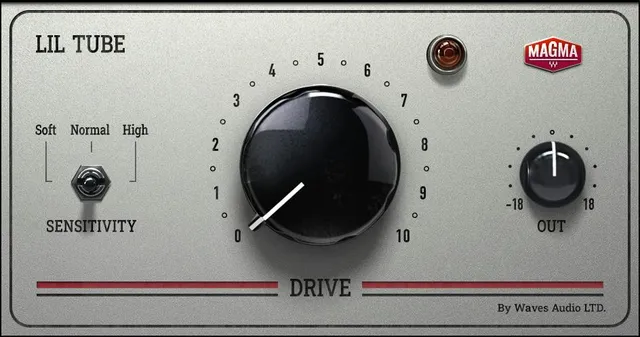
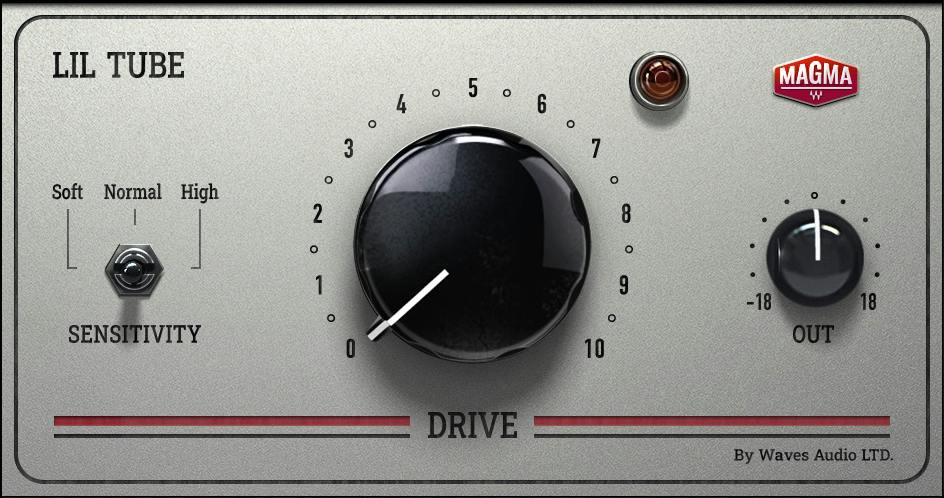
Sensitivity: Soft, Normal and High
Sensitivity controls input gain, which influences saturation behavior. Its three positions are Soft, Normal and High.
The guide recommends setting it using the loudest section of the source or its highest peak. It does not supply numerical input targets or gain differences between positions.
It also says these input adjustments are compensated at the end of the chain so output gain remains the same. That statement concerns Sensitivity adjustments; it should not be expanded into a universal automatic matching feature for the whole plugin.
A pictured Normal position does not establish a factory default. No switch default or numerical gain offset is stated.
Drive and its illustrated scale
Drive controls the amount of tube saturation. The official interface prints a 0–10 scale, but the prose does not assign it a physical unit, increment or factory default.
The guide explicitly says that some harmonic distortion remains at minimum Drive. Zero on this scale is therefore not documented as transparent bypass.
It also says Drive adjustments inevitably change signal gain. More Drive should not be interpreted as a fixed amount of decibel boost, a mix percentage or a measured harmonic count.
One lamp, two documented descriptions
The genuine panel has one lamp near the upper right.
The Sensitivity paragraph says a brighter LED indicates a higher adjusted input signal. The separate Drive LED paragraph says brightness indicates saturation, influenced by the DAW input and Drive.
Both descriptions belong in the explanation. They do not establish two separately located indicators, numerical color thresholds or a way to read input dBFS or distortion percentage from brightness.
The useful boundary is simple: it is a qualitative indication, not a calibrated measurement display in the retained documentation.
Output and level comparison
Output Level controls the plugin's outgoing gain. The guide tells you to use it to compensate the level changes caused by Drive.
The pictured OUT knob has −18 and +18 endpoints, but no physical unit, step or default is printed. Those markings should not silently become a verified ±18 dB specification.
My practical suggestion is to treat Output as a separate decision after a Drive change. If level comparison matters, use an independent meter rather than assuming the lamp or a compensated Sensitivity switch proves equal loudness.
The WLM Plus guide explains that separate metering role. No loudness test or calibrated comparison was performed for this article.
Bypass, components and common controls
The guide's advice for no saturation is to bypass the plugin. It does not document a separate Mix control or a plugin-specific bypass implementation beyond that instruction.
The current product identifies mono and stereo components. The short guide does not publish a detailed component-difference matrix, stereo-link behavior or independently editable left/right controls.
The manual figure shows a common toolbar with undo/redo, a preset selector, previous/next, A→B, Setup A, Save and menu affordances. Its presence is different from having a fully documented Lil Tube-specific hidden menu.
The Library panel omits that toolbar. This is an artwork framing difference, not evidence that current software removed those controls. A startup GUI size or extra processing options cannot be inferred from the image.
A useful adjustment order
My suggested sequence: choose Sensitivity while considering the source's louder passages, adjust Drive for the intended degree of treatment, then reconsider Output.
Compare processed and bypassed signal as separate states. Minimum Drive is not the unprocessed reference described by the guide.
This is a conceptual approach to the documented controls, not a tested preset or a claim that every track benefits from saturation. Other published guides are in the Waves resources hub; licensing choices are a separate question.
Sources and documentation limits
Checked October 19, 2026, America/New_York. The official Lil Tube page links the complete three-page user guide, read in full.
Page 2 gives the intended applications; page 3 defines Sensitivity, Drive, the LED and Output. The actual page 3 figure and genuine Graphic Library original were inspected.
The illustrated scales are identified as such. Physical units, increments, factory defaults, a precise lamp transfer function and detailed component differences remain unspecified. Current promotions, bundle availability and vendor character descriptions are not price promises, compatibility tests or independent listening findings.
FAQ
What does Magma Lil Tube do?
It is a tube-saturation processor with a three-position Sensitivity switch, Drive and Output controls. Waves describes applications from mild harmonic coloring to stronger distortion. Those are intended uses, not listening results or measured improvements in this guide.
What do Soft, Normal and High change?
They change input gain and saturation behavior through Sensitivity. The guide recommends setting this using the loudest section or highest peak and describes compensation at the end of the chain. It does not publish numerical gain offsets or a factory switch default.
Does Drive at zero bypass Lil Tube?
No. The guide says a small amount of harmonic distortion remains even at minimum Drive, and recommends bypass when none of the effect is wanted. The printed 0–10 scale has no stated physical unit, increment or factory default.
Does Lil Tube automatically match every Drive change?
The guide's compensation statement concerns Sensitivity adjustments. It separately says Drive changes signal gain and tells you to compensate with Output. This does not establish universal automatic loudness matching or a tested level-comparison result.
What does the single LED indicate?
The guide describes its brightness in two ways: higher adjusted input level in the Sensitivity paragraph, and more saturation influenced by DAW input and Drive in the Drive LED paragraph. The actual panel has one lamp; no calibrated dBFS threshold or distortion-percentage reading is supplied.
What is the Output range?
The official panel prints minus 18 and plus 18 endpoints, while the text identifies Output as outgoing gain. No physical unit, increment or factory default is printed. The illustrated endpoints are not silently converted into a verified decibel specification.
Which components and extra controls are documented?
The current product identifies mono and stereo components, but the guide does not define their detailed differences. No Mix, EQ, tube-model, oversampling or automatic-level switch is documented. Their absence from this reference is not a tested inventory of an installed build.
What do the toolbar and official image establish?
The guide figure shows common preset, comparison, undo/redo, navigation, Save and menu affordances. The Library panel omits the toolbar without proving its removal from software. Neither image establishes hidden processing options, a startup GUI size or default parameter values.

About the Author
Joseph Nilo has been working professionally in all aspects of audio and video production for over twenty years. His day-to-day work finds him working as a video editor, 2D and 3D motion graphics designer, voiceover artist and audio engineer, and colorist for corporate projects and feature films.