
Waves Magma Springs is a spring-reverb plug-in with seven named tank settings and controls for Drive, Feedback, pre-delay, tail length, tone, mix and output. The manual describes the tank choices as distinct impulse-response snapshots. This guide maps what each control does and keeps the manual’s exact distinction between the output signal and the signal sent after pre-delay.
This is a manual-based explainer, not a listening review. Waves lists Mono, Stereo and Mono-to-Stereo in current product metadata. Its linked manual describes a Stereo/Mono selector “(stereo component)” but does not provide a separate component inventory or explain Mono-to-Stereo routing.
My Short Version
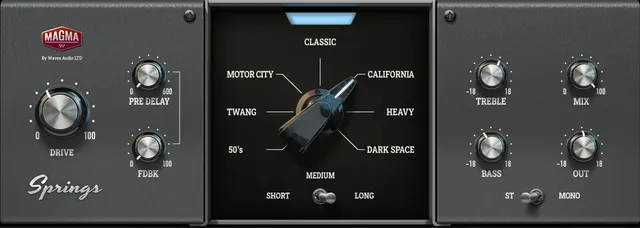
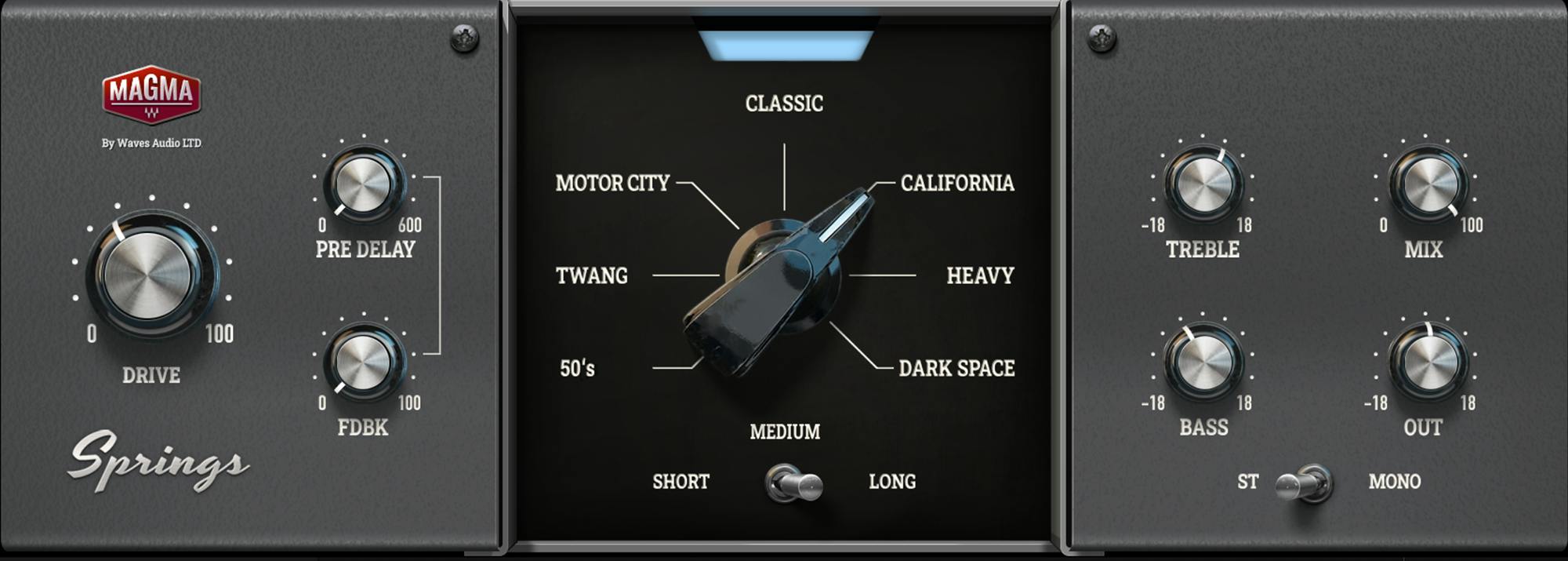
Choose one of the seven Reverb Tank names—Classic, Motor City, California, Twang, Heavy, 50's or Dark Space—then set the tail length and pre-delay around the task. The manual does not identify a factory-default tank or tail length, so the pictured selection should not be read as a default.
Drive raises input gain; the guide says increasing it increases harmonic distortion and reduces peaks. Feedback sets headroom and influences Drive behavior. Waves says those adjustments are compensated at the end so output gain remains the same; treat that as the manual’s description, not an independently measured level guarantee.
The Mix control is documented as a 0–100 blend between the output signal and the post-delay input signal. The guide does not state a default or label this control simply as a wet/dry percentage. Output is a separate post-mix level control. Keep those stages distinct when following the signal path.
What Magma Springs is
Waves describes Magma Springs as a collection of seven spring-reverb types. The linked manual explains the tank selector as seven impulse-response “sound snapshots,” with each position producing a distinct effect. That description comes from Waves; it is not a comparison I auditioned. The plug-in also has controls to shape the input, delay before reverb, tail, post-reverb tone, blend and output.
The product page lists versions V14–V17 and Mono, Stereo and Mono-to-Stereo component flags. The manual describes a Stereo/Mono output selector “(stereo component)” but does not provide a separate component inventory. Do not generalize the selector’s instructions into undocumented routing details for the product-page variants.
Controls at a glance
| Control | Documented behavior | Range, options and limits |
|---|---|---|
| Drive | Input gain. The manual says increasing it increases harmonic distortion and reduces peaks. | 0–100; no unit or default stated. |
| Pre Delay | Delays the input before it reaches the reverb. | 0–600 ms; no default stated. |
| Feedback | Sets headroom and influences Drive behavior. Waves says adjustments are compensated at the end so output gain remains the same. | 0–100; no default stated. The compensation statement is a vendor description, not a measured invariant. |
| Reverb Tank | Selects one of seven distinct tank impulse-response snapshots. | Classic, Motor City, California, Twang, Heavy, 50's, Dark Space; no default stated. |
| Reverb Tail Length | Selects a short, medium or long tail. Medium is the full original impulse-response length; Short and Long are derived from the original. | Short / Medium / Long; no numerical duration or default stated. |
| Treble / Bass | Post-reverb high shelf / low shelf. | Each −18 to +18 dB; no defaults stated. |
| Mix | Sets the mix between the output signal and post-delay input signal. | 0–100; no default stated. Preserve this manual wording rather than assuming an undocumented wet/dry label. |
| Output | Adjusts output after the wet/dry stage. | −18 to +18 dB; no default stated. |
| Stereo/Mono selector | In the Stereo component, Stereo sends both impulse-response channels to stereo output; Mono copies the left IR channel to the right to create mono. | Stereo / Mono; scope is the manual’s Stereo component. |
Drive and Feedback
Drive is the input-gain control, with a 0–100 range. The manual says that increasing Drive increases harmonic distortion and reduces peaks. It does not specify a unit, a default, or a numerical transfer curve. Feedback also ranges from 0 to 100; Waves describes it as setting headroom and influencing Drive behavior. The guide further says these adjustments are compensated at the end so output gain remains the same. That is a vendor-stated design behavior, not a runtime measurement or promise about every signal and host.
Because the controls interact, treat Drive and Feedback as related rather than as two independent output-level knobs. If you change either, check the result in your own session instead of assuming the compensation makes level matching unnecessary.
Pre-delay, tank and tail
Pre Delay ranges from 0 to 600 ms and delays the input before the reverb. It is different from lengthening the tail: it changes when the signal reaches the reverb, while Reverb Tail Length offers Short, Medium and Long options. The manual defines Medium as the original impulse response’s full length and says Short and Long are derived from that original; it does not give durations for those positions.
The seven tank labels are Classic, Motor City, California, Twang, Heavy, 50's and Dark Space. They refer to distinct IR snapshots according to the guide. No default tank is documented, and the control illustration is not evidence of a saved or factory setting.
Tone, Mix and Output
Treble is a post-reverb high shelf and Bass is a post-reverb low shelf. Each ranges from −18 to +18 dB. The manual does not state their defaults.
Mix ranges from 0 to 100 and is described as a blend between the output signal and the post-delay input signal. Output, by contrast, is a post-wet/dry output-level control from −18 to +18 dB. The source does not state defaults for either. Use the Mix control for the blend and Output for the level after that stage; do not infer a 0–100 wet/dry calibration beyond the manual’s stated endpoints and wording.
Mono, Stereo and the toolbar
The current product page lists Mono, Stereo and Mono-to-Stereo components. The manual only describes a Stereo/Mono selector “(stereo component)”: Stereo sends both impulse-response channels to stereo output, while Mono copies the left IR channel to the right to create mono. The guide does not provide a separate component inventory or document Mono-to-Stereo routing. Confirm that behavior in current Waves documentation rather than extrapolating from the selector description.
The manual’s WaveSystem toolbar provides preset save/load, setting comparison, undo/redo, interface resizing and access to the WaveSystem Guide. These window utilities are not additional reverb controls. The manual does not document a global reset control or meter-reset procedure for Magma Springs.
A conservative way to approach the controls
- Choose the component that matches the channel path you intend to use; verify Mono-to-Stereo behavior from current Waves documentation if that component is selected.
- Select a tank by name, then choose Short, Medium or Long tail and set pre-delay. These are different controls: one selects a tank snapshot, one chooses tail length, and one delays the input to the reverb.
- Adjust Drive and Feedback together, keeping in mind the manual’s stated relationship and its vendor-described output compensation. Check the actual level in your session.
- Use Bass and Treble for their documented post-reverb shelves. Set Mix for the stated output/post-delay-input blend and Output for level after the mix stage.
- Recheck the resulting level and balance in context. This sequence is derived from documented control functions; it is not a preset recommendation or a claim that the plug-in was tested.
Who it may suit—and when to look elsewhere
The layout may suit someone looking for named spring-tank IR choices plus straightforward pre-delay, tail, tone and blend controls. If you need a published factory default, exact short/long tail times, or authoritative Mono-to-Stereo routing details, the checked manual does not provide them. Confirm those details with Waves before relying on them.
Related Waves tools
For a different reverb structure, Waves describes H-Reverb Hybrid Reverb as an algorithmic FIR reverb; its product page and manual are the appropriate references for that separate control set. Manny Marroquin Reverb is another distinct Waves reverb product, with its own six types, three sizes and additional processing controls described in its guide. The live Waves Audio Post Resources hub is a broader site starting point. These links identify different documented approaches, not a comparative listening recommendation.
Sources
Primary sources checked October 18, 2026. Waves Magma Springs product page, which lists product metadata and links the manual; Magma Springs User Guide, five pages; and the Waves Graphic Library. No plug-in installation, compatibility check, audio processing, listening test or measurement was performed.
FAQ
What does Waves Magma Springs do?
Waves describes Magma Springs as a spring-reverb plug-in with seven tank settings. Its manual calls them distinct impulse-response snapshots and documents controls for Drive, Feedback, pre-delay, tail length, tone, Mix and Output. This is a source-based description, not a listening comparison.
What are the seven Magma Springs tank settings?
The manual’s labels are Classic, Motor City, California, Twang, Heavy, 50's and Dark Space. It does not identify a factory-default position, so the illustration should not be used to infer one.
How do Drive and Feedback interact?
Drive is input gain from 0 to 100; Waves says increasing it increases harmonic distortion and reduces peaks. Feedback is also 0–100 and sets headroom while influencing Drive behavior. The manual says the adjustments are compensated at the end so output gain remains the same; that is a vendor description, not a measured guarantee.
What does Pre Delay change?
Pre Delay ranges from 0 to 600 ms and delays the input before it reaches the reverb. It is distinct from Reverb Tail Length, which selects Short, Medium or Long.
What do Short, Medium and Long mean?
Medium is the full original impulse-response length; Short and Long are derived from that original. The guide gives no numerical durations or default selection for the three tail options.
What do Bass and Treble control?
They are post-reverb shelves: Bass is a low shelf and Treble is a high shelf. Each has a documented range of −18 to +18 dB; the manual does not state their defaults.
What does Mix blend, and what does Output do?
Mix is 0–100 between the output signal and the post-delay input signal, using the manual’s wording. Output is a separate post-wet/dry level control from −18 to +18 dB. The guide does not specify defaults for either.
Does the manual explain Mono-to-Stereo routing?
Not separately. The current product page lists Mono, Stereo and Mono-to-Stereo components. The manual only describes a Stereo/Mono selector “(stereo component)”: it sends both IR channels to stereo output or copies the left IR channel to the right for mono. The guide provides no separate component inventory and does not document Mono-to-Stereo routing.

About the Author
Joseph Nilo has been working professionally in all aspects of audio and video production for over twenty years. His day-to-day work finds him working as a video editor, 2D and 3D motion graphics designer, voiceover artist and audio engineer, and colorist for corporate projects and feature films.