
Manny Marroquin Delay combines a stereo delay path with four parallel effects branches: Reverb, Distortion, Doubler and Phaser. The guide documents separate direct and delayed paths, timing choices, per-channel feedback, linked filters and monitor options—but not numerical startup defaults.
This is a guide to Waves’ documentation, not an auditioned review. I have not run the plug-in or processed audio. The manual’s signal-flow diagram and Dry/Wet description are the basis for the routing explanation below.
My Short Version
The plug-in comes in Mono-to-Stereo and Stereo components. Set the delay using milliseconds or host tempo; adjust left and right delay and feedback independently, or link their settings. The guide says linking copies the left settings to the right, and previous right-side values do not return when you unlink.
Dry/Wet balances the direct signal against the Delay plus HP/LP path. Reverb, Distortion, Doubler and Phaser are separate branches and are not affected by this control. That distinction matters if you want the additional effects without the delay path.
Components and timing
The manual lists MannyM Delay – Mono-to-Stereo and MannyM Delay – Stereo. It does not describe these labels as Mid/Side processing.
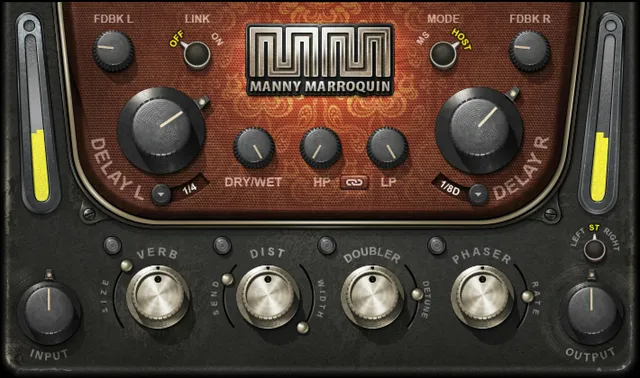
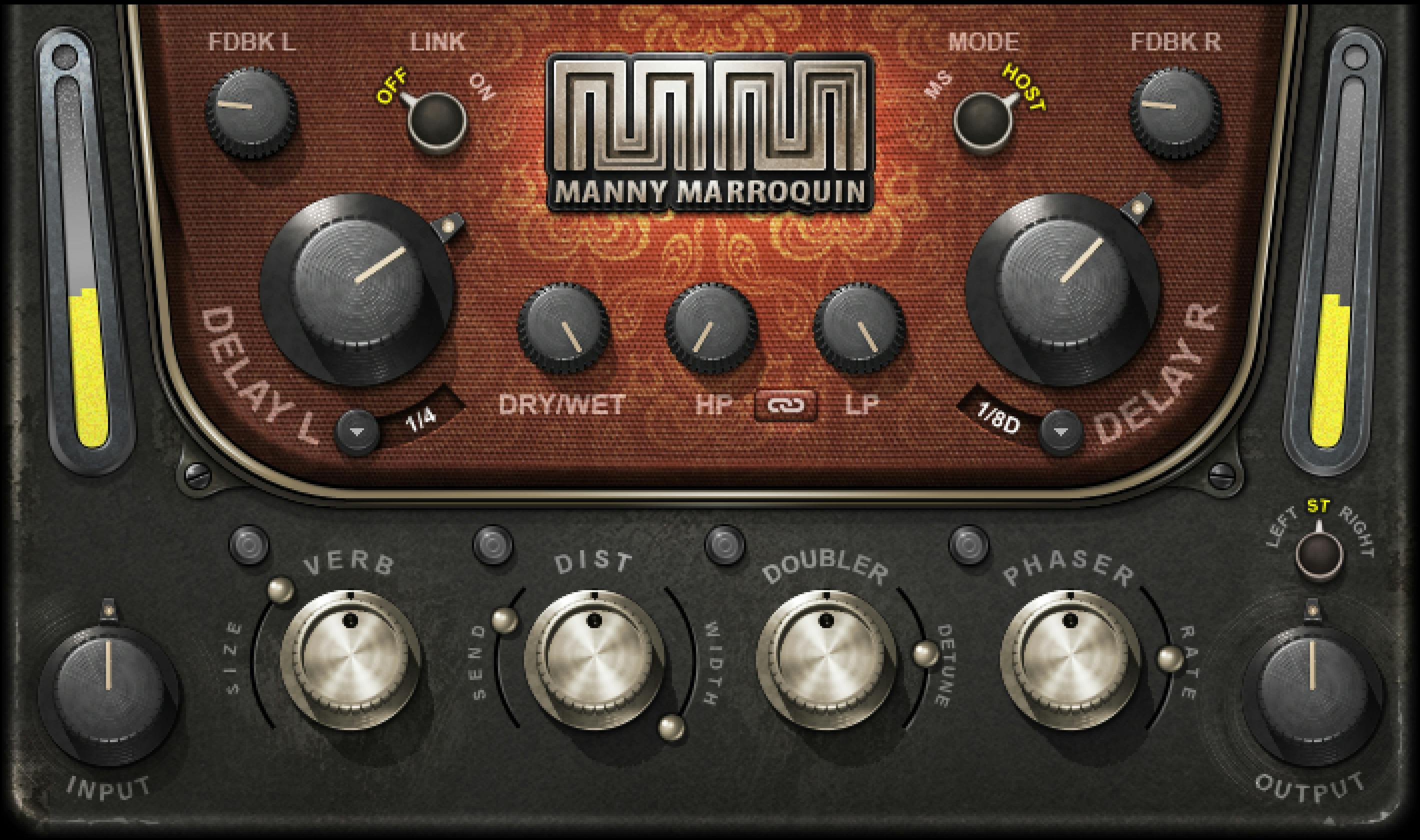
Input sets the level into the plug-in from −18 to +18 dB. Mode selects MS or Host timing. The Delay L and Delay R controls set each channel’s time. In MS mode, the range is 0–2000 milliseconds in 4 ms increments. In Host mode, the choices run from 1/64 triplets through a whole note. The guide says the delay is capped at two seconds, so Whole Note is unavailable at tempos below 120 BPM. It does not state the initial values for these controls.
FDBK L and FDBK R set feedback per channel, each from 0–100%. Link can apply left-channel settings to the right, or leave them independent. Once linked, earlier right-channel settings are not restored when the channels are unlinked; save any value you need before linking.
Dry/Wet, HP/LP and the documented signal flow
The manual’s diagram shows a Direct path to output and a parallel Delay → LP/HP path. That filtered delay branch then feeds the Reverb, Distortion, Doubler and Phaser branches, which also route to output.
Dry/Wet ranges from 0–100% and balances the direct path with the Delay plus HP/LP path. The manual specifically says Reverb, Distortion, Doubler and Phaser are unaffected, so they can be used without the delay. HP/LP filtering is on the Delay path; with Dry/Wet at 0, these filters do not affect the dry signal.
HP ranges from 16 Hz to 21,357 Hz and can be Off at the fully counter-clockwise position. LP spans 21,357 Hz down to 16 Hz and can be Off fully clockwise. The manual describes HP/LP Link as an inverse link: moving one filter causes the other to move in the opposite direction. Its example changes HP from 150 Hz to 600 Hz while LP moves from 8 kHz to 1,990 Hz.
There is a specific linked-filter limit: once HP and LP meet at 1 kHz, the controls lock and “may not be moved forward, only backward,” according to the guide. The manual does not document a broader reset or release behavior; do not assume one.
Reverb, Distortion, Doubler and Phaser
The effects are separately controlled. Verb Size and Verb Level each range from 0–100; Verb On/Off enables or disables Reverb.
Distortion Send ranges from 0–100 and controls the level sent into Distortion. Distortion Width ranges from 0–100, with 0 described as mono and 100 as full stereo. Distortion Level also ranges from 0–100, but the manual says it changes the distorted signal’s level in the overall mix—not the amount of distortion. Distortion On/Off switches that effect.
Doubler Detune ranges from −100 to +100 cents; Doubler Level ranges from 0–100; Doubler On/Off switches it. Phaser Rate ranges from 0 to 20 Hz, Phaser Level from 0–100, and Phaser On/Off switches the effect. The manual gives no numeric defaults for these controls.
Monitor, Output and toolbar
Monitor selects Left Side Only, Stereo, or Right Side Only output monitoring. Output ranges from −18 to +18 dB. The guide does not specify the initial Monitor selection or a default Output value.
The WaveSystem toolbar saves and loads presets, compares settings, undoes or redoes changes, resizes the plug-in and opens the WaveSystem Guide. The manual does not describe a separate global reset control.
A careful way to use the manual
Keep the Direct path distinct from the Delay-plus-filter path, and treat the four effects as parallel branches rather than assuming they are controlled by Dry/Wet. If you use Link, remember that the manual says unlinking does not restore the previous right-channel settings. These are reading notes from the guide, not a tested setup recipe.
Related Waves guides
The live Waves F6 guide covers a separate dynamic equalizer, and the Renaissance Compressor guide explains a dedicated compressor. The Waves Audio Post Resources hub collects current live Waves references. These are adjacent tools, not comparative listening results.
Sources and documentation limits
Checked October 19, 2026 (America/New_York). The official Manny Marroquin Delay product page links the ten-page Manny Marroquin Delay User Guide, read in full. The guide documents ranges and routing but no numeric control defaults. Its signal-flow drawing is presented as vendor documentation, not as a runtime test. No plug-in, host or audio test was performed.
FAQ
Which components does Manny Marroquin Delay include?
The guide lists Mono-to-Stereo and Stereo components. It does not describe either as Mid/Side processing.
How can I set the delay time?
Choose MS for 0–2000 milliseconds in 4 ms increments, or Host for note values from 1/64 triplets through a whole note. The guide says the two-second limit makes Whole Note unavailable below 120 BPM.
What happens when I link the left and right channels?
Link applies the left-channel settings to the right. The manual warns that previously stored right-channel settings are not restored when you unlink.
What does Dry/Wet control?
It balances the direct signal with the Delay plus HP/LP path. Reverb, Distortion, Doubler and Phaser are not affected, so those branches can be used without the delay.
How do HP/LP Link and its 1 kHz limit work?
HP/LP Link moves the high-pass and low-pass controls inversely. The guide’s example moves HP from 150 to 600 Hz while LP moves from 8 kHz to 1,990 Hz; when they meet at 1 kHz, it says the controls lock and can move only backward.
What do the four effects controls cover?
Reverb has Size, Level and On/Off; Distortion has Send, Width, Level and On/Off; Doubler has Detune, Level and On/Off; Phaser has Rate, Level and On/Off. The guide gives ranges but does not state numerical defaults.
What monitoring options are available?
Monitor selects Left Side Only, Stereo or Right Side Only. Output ranges from −18 to +18 dB. The manual does not state the initial monitor choice or output value.
What does the WaveSystem toolbar do?
It saves and loads presets, compares settings, undoes/redoes changes, resizes the plug-in and opens the WaveSystem Guide. The manual does not describe a separate global reset.

About the Author
Joseph Nilo has been working professionally in all aspects of audio and video production for over twenty years. His day-to-day work finds him working as a video editor, 2D and 3D motion graphics designer, voiceover artist and audio engineer, and colorist for corporate projects and feature films.