
Manny Marroquin EQ is a four-band equalizer with hardware-inspired frequency choices and separate high- and low-pass filters. Use the middle bands to shape a sound’s body and presence, then use Band 4 to choose between a broad high shelf and a bell centered on one of its five frequencies.
This guide is based on Waves’ documentation. I have not run the plug-in or processed audio. The cover is an AI-generated editorial illustration.
My Short Version
The manual lists Mono and Stereo components. Input and Output each range from −18 to +18 dB. HP is Off or continuously adjustable from 16 to 750 Hz; LP is Off or continuously adjustable from 1.8 to 21 kHz.
The four bands each have a gain control and a frequency selector. Band 4 also lets you choose between Shelf and Bell. The guide gives no numerical defaults for these controls.
Components, Input and filters
The guide lists MannyM EQ – Mono and MannyM EQ – Stereo. It does not describe additional channel-format options.
Input adjusts the level into the plug-in from −18 to +18 dB. HP selects the high-pass cutoff, from Off through 16–750 Hz. LP selects the low-pass cutoff, from 1.8–21 kHz or Off. The guide gives no numeric defaults for these controls.
Waves attributes the high- and low-pass designs to filters on Manny’s SSL 9080 XL K desk. The manual says the frequency anchors shown around the controls are points Manny selected for quick access; it does not present them as measured results.
Four bands and cutoff choices
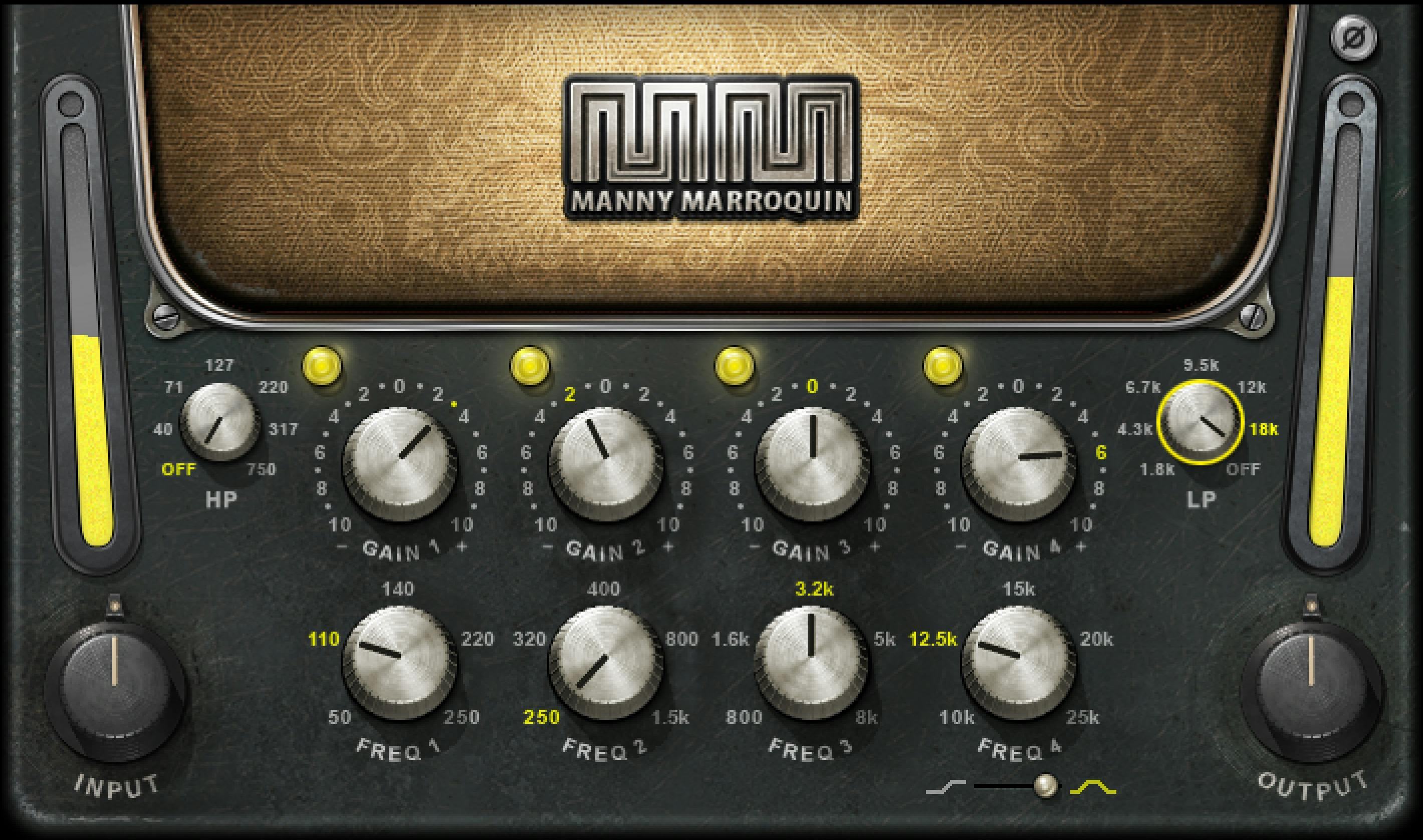

Each band has a Gain control from −10 to +10 dB. Freq 1 selects 50, 110, 140, 220 or 250 Hz. The guide attributes 50, 140 and 250 Hz to a Quad 8, and 110 and 220 Hz to a Neve 1073; its prose describes the 50/140 Hz choices as wide bells, 250 Hz as narrower, and the 110/220 Hz choices as shelves.
Freq 2 selects 250, 320, 400, 800 Hz or 1.5 kHz. The guide attributes 250, 400 and 1,500 Hz to a Quad 8 and 320/800 Hz to a Motown. It notes that 250 Hz overlaps Band 1.
Freq 3 sets the high-mid band’s frequency. Both the manual’s overview and control table include 1.6, 3.2, 5 and 8 kHz. Adjust Gain 3 to boost or cut the chosen area.
Freq 4 selects 10, 12.5, 15, 20 or 25 kHz. The manual attributes this band to an Avalon 2055 and says Freq 4 Type switches between Shelf and Bell. The guide supplies no default values for band gains, cutoff selections or the Band 4 filter type.
Phase and output
Phase Invert reverses the output signal’s phase and offers In or Out. Output controls the plug-in’s output level from −18 to +18 dB. Neither control has a documented default in this guide.
The manual describes small curve inconsistencies and gain changes when moving between cutoff points from different source EQs. Its example says a 4.5 dB setting on one band might become 4.9 dB on another. That is the guide’s explanation, not a measurement made for this article.
WaveSystem toolbar
The manual says the WaveSystem toolbar can save and load presets, compare settings, undo and redo changes, resize the plug-in, and open the WaveSystem Guide. It does not describe a separate global reset control.
Shape a track with the middle bands
For a vocal or other lead sound, start by listening for the area you want to change. Try Band 2 for lower-mid buildup or Band 3 for presence. Make a modest cut or boost and check it in the mix. If you change frequencies, listen again at a similar output level. Waves notes that the response and gain can shift between frequency choices.
Related Waves guides
The Waves F6 guide covers EQ bands that can respond dynamically to the signal. The Renaissance Compressor guide explains level control with compression. Find more audio tools in Waves Audio Post Resources.
Sources and documentation limits
Reviewed November 25, 2026. The Manny Marroquin EQ product page links the eight-page Manny Marroquin EQ User Guide. The prose and control table give different Band 3 lists, so this guide covers the choices they share. The figure is from the Waves Graphic Library.
Frequently Asked Questions
Which components does Manny Marroquin EQ include?
The guide lists Mono and Stereo components. It does not identify a Mid/Side component.
What do the HP and LP controls do?
HP selects Off or 16–750 Hz; LP selects Off or 1.8–21 kHz. The manual gives no default values for either filter.
What are the Band 1 frequency choices?
The control table lists 50, 110, 140, 220 and 250 Hz. The guide attributes those points to Quad 8 or Neve 1073 sources and describes different filter shapes in its prose.
What are the Band 2 frequency choices?
The table lists 250, 320, 400, 800 Hz and 1.5 kHz. The manual notes that 250 Hz overlaps with Band 1.
What do Freq 3 and Gain 3 do?
Freq 3 selects the high-mid frequency and Gain 3 sets its boost or cut. Both parts of the Waves manual list 1.6, 3.2, 5 and 8 kHz among the choices.
What choices does Band 4 have?
The table lists 10, 12.5, 15, 20 and 25 kHz; its Type selector offers Shelf or Bell. The guide does not state default values.
What does Phase Invert do, and what is the Output range?
Phase Invert reverses output phase and selects In or Out. Output ranges from −18 to +18 dB. No defaults are provided.
What does the WaveSystem toolbar provide?
It saves and loads presets, compares settings, undoes/redoes changes, resizes the plug-in and opens the WaveSystem Guide. A separate global reset is not documented.

About the Author
Joseph Nilo has been working professionally in all aspects of audio and video production for over twenty years. His day-to-day work finds him working as a video editor, 2D and 3D motion graphics designer, voiceover artist and audio engineer, and colorist for corporate projects and feature films.