
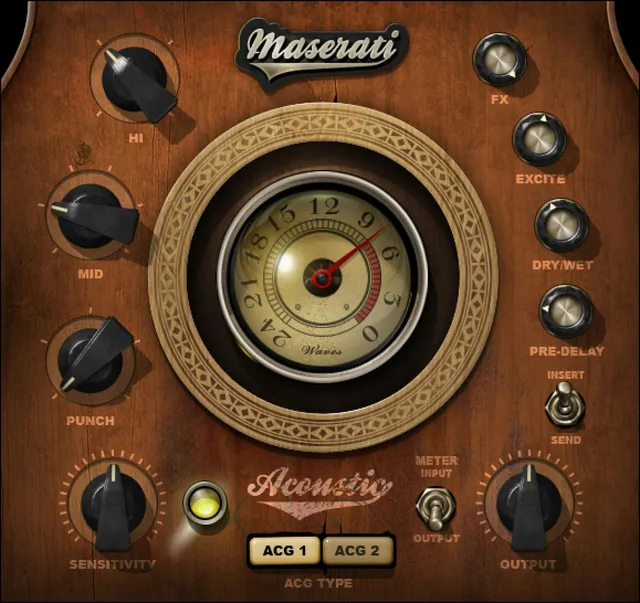
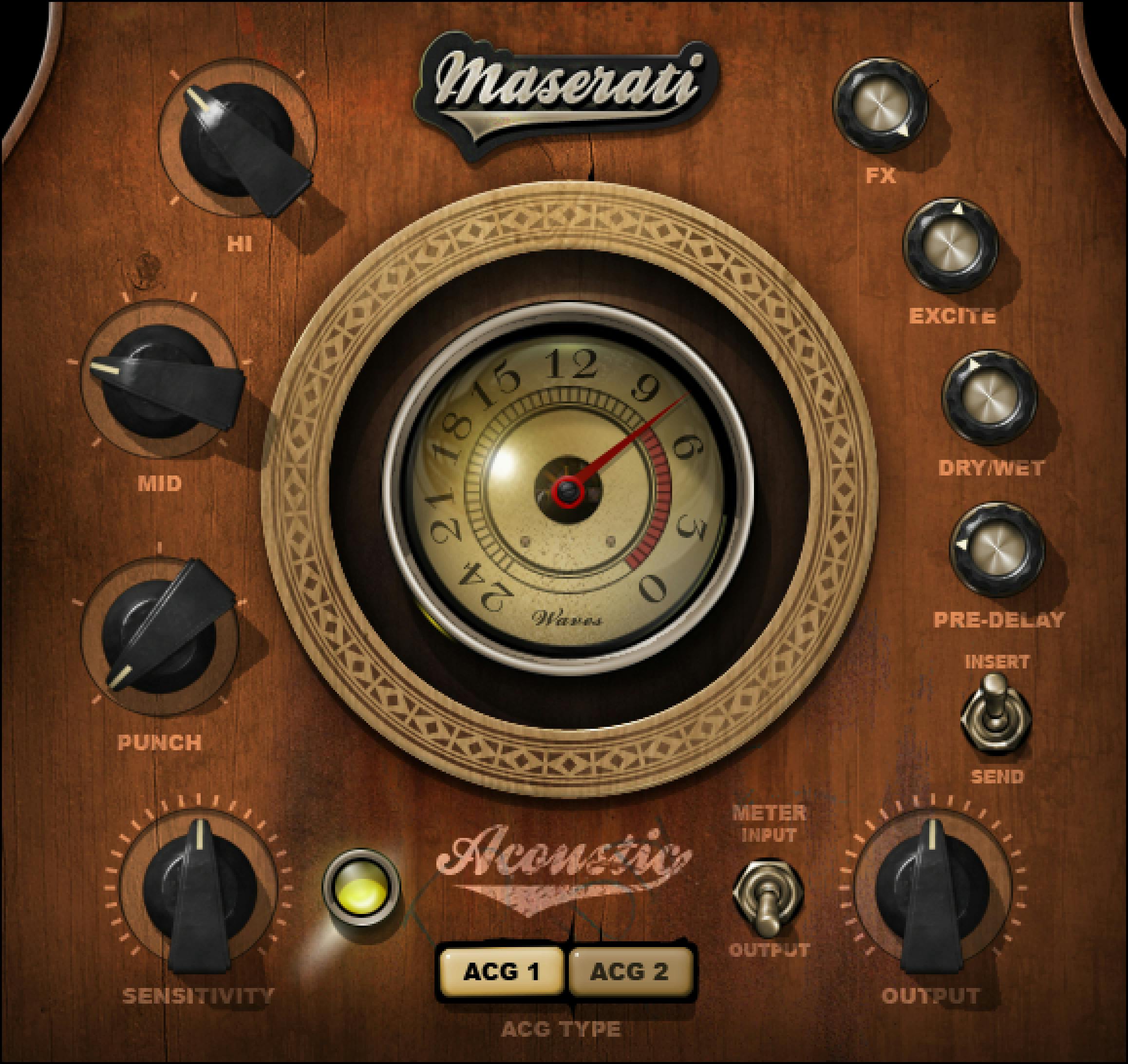
Waves Maserati ACG is an acoustic-guitar processor with two effect types, a Sensitivity input control, tone shaping, effects and an Input/Output meter. Its Insert/Send switch changes the processing scope: Insert uses compression, EQ and effects, while Send includes the effects section only. The manual says some controls become unavailable in Send mode and appear grayed out; it does not enumerate every affected control.
This guide explains the controls Waves documents. It is not an auditioned review: I have not run the plugin or processed audio. The product page lists V9–V17 and Stereo/Mono-to-Stereo components; this page listing does not prove compatibility or behavior on a specific system.
My Short Version
Choose ACG 1 or ACG 2 first. The manual describes ACG 1 as emphasizing level and top/bottom shaping, while ACG 2 has more built-in compression for bringing out live-performance subtleties. These are the manufacturer’s descriptions, not results from a listening comparison.
Set Sensitivity by watching its LED, then use Punch, Mid and Hi for the tone controls and FX, Excite, Dry/Wet and Pre-Delay for the effect section. The interface provides an Input/Output meter selector and a −24 to 0 dBFS meter readout. It is an indication, not proof of calibration.
Keep the manuals’ numerical scales in context. Sensitivity is ±50 in 0.1 steps; FX is −∞ to 0 in 0.1 steps; Output is ±12 in 0.1 steps. The guide does not specify units for these scales, so this article does not relabel them as dB or milliseconds. It also gives no universal control defaults.
What the ACG modes do
The ACG Type selector toggles between ACG 1 and ACG 2. Tony Maserati’s introduction says ACG 1 is intended to maximize level and shape top and bottom, while ACG 2 has more built-in compression for bringing out subtleties in live performances. The introduction also says both types have room settings that can be dialed in at varying levels. Those are product descriptions, not independently verified results or settings.
The Insert/Send switch selects how much of the plugin is used. Insert includes compression, EQ and effects. Send includes only the effects section for a send/return configuration. The manual says some controls are unavailable and gray in Send, and that switching Type while in Send keeps the plugin in Send when applicable. It does not identify every control that grays out or specify a host routing procedure.
The current product page lists a Stereo and a Mono-to-Stereo component; the manual names Maserati ACG m>s (mono in to stereo out) and Maserati ACG stereo (stereo in to stereo out). These are channel formats, not descriptions of a particular DAW setup.
Input Sensitivity and its indicator
Sensitivity controls input level and has a documented range of −50 to +50, in 0.1 steps. The guide does not give a unit or default. Treat this as the plugin’s stated scale rather than converting it to dB.
The Sensitivity LED indicates level status: green means “good,” yellow “optimal,” and red “very hot,” according to the guide. This is a qualitative indicator description. The manual does not establish a calibrated threshold for those colors, and the LED is not a substitute for the host’s meters.
The quickstart recommends adjusting Sensitivity until the indicator shows proper levels, then shaping the sound with the other controls. That is Waves’ suggested setup approach, not a verified level target for every acoustic guitar or recording chain.
Shape the tone: Punch, Mid and Hi
Three controls shape the instrument’s tonal character:
- Punch controls what the guide calls signal “punchiness,” with a range of 1–5.
- Mid offers midrange control, with a range of 1–6.
- Hi controls the high-frequency range, with a range of 1–4.
The manual does not assign units, detailed frequency bands or defaults to these scales. Use the labels and ranges as documented; do not translate the numbers into dB, frequency or a guaranteed tonal result.
Effects: FX, Excite, Dry/Wet and Pre-Delay
FX controls the amount of signal sent to the effect section, over −∞ to 0 in 0.1 steps. The manual does not specify a unit or default for this scale.
Excite is described as adding dynamic excitement to the effect. Its range is 0–100 in 0.1 steps. The manual does not define the scale in units or state an initial value.
Dry/Wet controls the amount of reverb, with a range of 0–100 in 0.1 steps. The manual does not say that the scale is percent, provide a default, or explain whether endpoints are a hard bypass; this guide keeps to the printed range and label.
Pre-Delay controls effect pre-delay and is also shown as 0–100 in 0.1 steps. The guide does not give a time unit, default or millisecond conversion. It would be misleading to read the number as a particular time without further documentation.
Output and metering
Output controls output level over ±12, in 0.1 steps. The manual does not state a unit or default. Do not infer a dB range from the scale alone.
The Meter Switch selects Input or Output monitoring. The Meter displays the selected signal on a printed −24 dBFS to 0 dBFS range. The guide does not specify calibration or measurement accuracy, nor does this source review test levels in a host.
Presets and toolbar
The shared WaveSystem toolbar provides preset save/load, Compare, Undo, Redo, Resize and access to the WaveSystem Guide. The manual does not document a dedicated reset button, universal initial settings or a default state for the controls described here. A value shown in the Library artwork is an illustration, not proof of the plugin’s starting position.
A conservative way to work through the controls
This is a practical reading of the documented controls, not a tested preset:
- Choose ACG 1 or ACG 2 based on the manual’s descriptions, then select Insert or Send according to whether the compression/EQ processing is needed in this instance.
- Adjust Sensitivity while watching the LED and the host’s own input level. The color descriptions are not calibrated thresholds.
- Shape Punch, Mid and Hi; then adjust FX, Excite, Dry/Wet and Pre-Delay. Keep the printed numeric ranges and units as documented rather than converting the unitless scales.
- Select Input or Output on the meter switch to monitor the relevant side. The plugin meter’s printed range is not an independent loudness or calibration check.
- Save or compare a setup with the shared toolbar. Listen in your own session before making mix decisions; no sound-quality result is claimed here.
Related Waves tools
For electric guitar rather than acoustic-guitar processing, see Waves’ official Maserati GTi Guitar Toner. For a broader instrument or mix-bus compression workflow, the official Renaissance Compressor is a separate dynamics processor, not an ACG mode. The Waves Audio Post Resources hub collects the site’s live Waves guides.
Sources and documentation limits
Checked October 19, 2026 (America/New_York). The official Maserati ACG product page lists versions V9–V17 and Stereo/Mono-to-Stereo components. It links the 10-page Maserati ACG User Guide, which was read in full; the interface and control pages were visually inspected. Component names and processing descriptions above are attributed to their respective product-page/manual sources.
The Waves Graphic Library requires attribution and a link from each product image to its relevant official product page. The image is vendor artwork, not a verified live instance or default-state reference. No plugin, host or audio test was performed for this guide. Units/defaults absent from the manual remain unspecified.
FAQ
What is the difference between ACG 1 and ACG 2?
The manual describes ACG 1 as emphasizing level and top/bottom shaping. It describes ACG 2 as having more built-in compression for live-performance subtleties. These are Waves’ descriptions, not comparative listening results from this guide.
What changes when I switch from Insert to Send?
Insert uses the plugin’s compression, EQ and effects. Send includes only the effects section for a send/return configuration. Some controls appear grayed out in Send, but the manual does not identify every affected control or configure host routing.
What does the Sensitivity LED tell me?
The guide labels green as good, yellow as optimal and red as very hot. It does not provide calibrated thresholds for those colors. Sensitivity itself is shown on a −50 to +50 scale in 0.1 steps, with no unit specified.
What are the Punch, Mid and Hi ranges?
Punch is 1–5, Mid is 1–6 and Hi is 1–4. The manual does not supply units, detailed frequency bands or defaults for these scales, so they should not be converted to dB or frequency values.
Are FX and Pre-Delay measured in dB and milliseconds?
The linked manual gives FX as −∞ to 0 and Pre-Delay as 0–100, both in 0.1 steps, but does not state units or give a millisecond conversion. This guide preserves the printed ranges without inferring units.
What does the Dry/Wet control mix?
The manual describes Dry/Wet as controlling the amount of reverb and gives a 0–100 range in 0.1 steps. It does not specify a unit, default or whether the endpoints act as a hard bypass.
What does the ACG meter display?
The Meter Switch selects Input or Output monitoring. The meter’s documented scale is −24 dBFS to 0 dBFS. The guide does not establish calibration or measurement accuracy, and no runtime signal was tested here.
Does the manual specify default settings for the controls?
No universal defaults are stated for the controls covered here. Values in the Library image are illustrations, not proof of initial settings in a current installed build.

About the Author
Joseph Nilo has been working professionally in all aspects of audio and video production for over twenty years. His day-to-day work finds him working as a video editor, 2D and 3D motion graphics designer, voiceover artist and audio engineer, and colorist for corporate projects and feature films.