
Waves Morphoder combines a modulator and a carrier to create a vocoder effect. The modulator supplies a changing spectral and dynamic contour; the carrier supplies the sound being shaped. An internal eight-voice synthesizer provides a carrier, or you can use an available external source.
That distinction is the first thing to understand when nothing comes out. Playing a synth note does not supply a missing modulator, and a vocal track does not necessarily provide a playing carrier. Once both are present, the source selectors, contour controls and four-path output mixer become much easier to reason about.
This guide follows the complete current product-linked manual and authentic vendor imagery. I have not auditioned Morphoder or tested host/MIDI operation. The Library image uses an older gray design rather than the blue interface in the linked 2025 guide; its appearance and values are not treated as current-build or factory-state proof.
My Short Version
For the guide's basic arrangement, put Morphoder on a track carrying a modulator, such as voice or percussion, and use Internal as the carrier. Play notes on its keyboard or route supported MIDI to the internal synth. Both a useful modulator and an active carrier matter.
Use Pressure to change how strongly the modulator's dynamics influence the result, Formant to shift its contour, and Smoothing/Release to change how that contour follows and fades. The guide gives numeric scales for Smoothing and Release without units; do not read those numbers as milliseconds here.
The five-band EQ shapes the morphed sound, not the original sources mixed alongside it. Use Carrier and Modulator faders to check those original paths, Noise for modulated noise and Morph for the modulated carrier. The small Solo/Mute buttons belong to individual paths.
When MIDI is on, keyboard automation recording and the on-screen Sustain interaction change. Read those rules before treating a held note as a stuck control or trying to record new mouse-keyboard automation.
Carrier and modulator: two different jobs
The official Morphoder page presents a vocoder and creative sound-design processor. Its guide describes analyzing the modulator and applying its characteristics to the carrier. A vocal modulator with the synth carrier is one example; a percussion modulator with another sustained source is another conceptual use.
The carrier determines pitch in the guide's explanation, while the modulator supplies the contour being applied. Formant is therefore not a replacement for choosing or playing carrier notes. It changes that contour rather than simply transposing the carrier melody.
Morphoder supplies an internal synth but does not generate its own modulator. The guide recommends auditioning a section with signal in both paths, or sustaining internal notes while the modulator plays. These are setup instructions, not proof of a particular result.

Source selectors and component scope
Modulator Select offers Track for mono, Left, Right, Left+Right, and SideChain where available. The guide states Track as the default. Choices vary with channel configuration; a screenshot showing Left or Left+Right is not another default statement.
Carrier Select offers Internal, Left, Right, Track, and SideChain where available, with Internal the default. Unlike the modulator selection, the guide says Track can carry a true stereo carrier signal. Do not assume both source menus support identical channel arrangements.
The current product lists Mono, Stereo and Mono-to-Stereo, across versions V17–V9. The manual explains conditional source choices rather than every option in every component/host. It does not establish a Mid/Side workflow or universal sidechain availability. Check the supported configuration instead of assuming an absent menu item is a malfunction.
Noise Generator: Filter and Freq
The internal Noise Generator is always active according to the guide. Its audible contribution is controlled in the output mixer; switching the filter Off does not mean the generator itself is turned off.
Filter offers Hi-Pass, Low-Pass and Off, default Off. Freq sets the selected filter's cutoff, defined as its −3 dB rolloff point. Its range is 16–16000 Hz, with an explicit 250 Hz default.
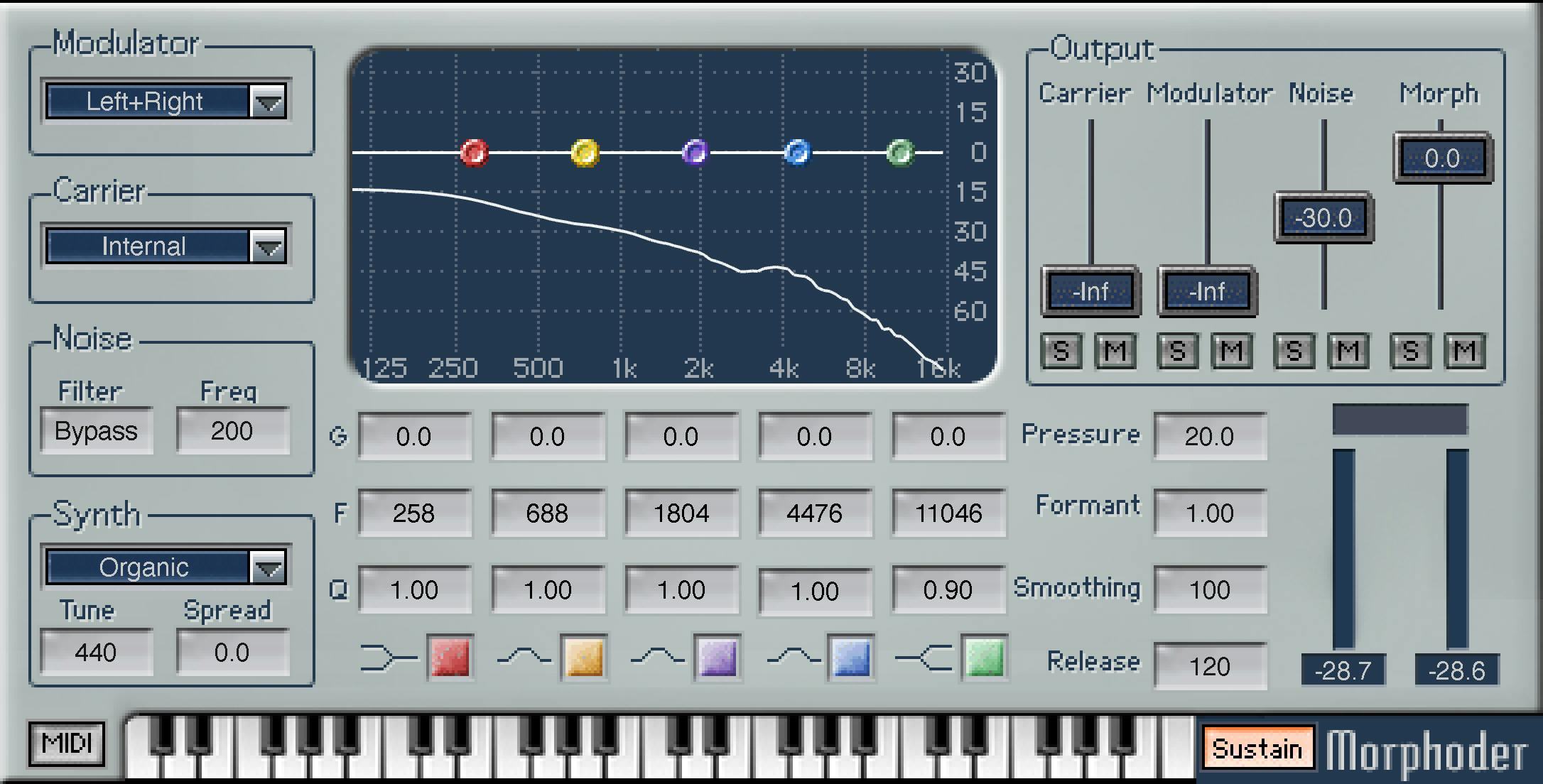
The legacy Library artwork labels the filter-disabled state Bypass and shows 200 in its frequency field. Those are visible artwork details, not grounds to replace the current manual's labels or explicit default.
The output Noise fader controls modulated noise. This is different from adding an unprocessed noise source directly to the recording, and different from selecting the carrier source.
Internal synth: sound, Tune and Spread
The internal synthesizer has eight polyphonic voices and a menu of ten factory sounds. The manual names Organic as the default, but does not enumerate the full ten-sound menu in its control section. No additional sound names are inferred from the closed menu artwork.
Tune adjusts the internal synth's tuning over 220–880 Hz, with 1 Hz resolution and a 440 Hz default. It is separate from the note selection on the keyboard and the modulator-contour Formant control.
Spread ranges from 0.0 to 1.0, default 0.0. At zero, voices are centered for a mono image; increasing it distributes active voices across the stereo field. The guide relates that distribution to the number of voices playing, not to a fixed left/right position for every note.
The guide suggests the Carrier Solo button for checking the synth, while emphasizing that the intended reference is the sound after modulation. A good-sounding isolated synth is not evidence that the modulator is routed correctly.
Five-band EQ contour
The EQ affects only the morphed signal. It does not equalize the original modulator or original carrier when their faders bring them into the final mix.
Bands 1 and 5 are low and high shelves; 2–4 are bells. Each strip contains G, F, Q and On/Off, with the curve and draggable points above. The manual describes shaping by moving graph points or editing value fields; it does not define an additional live-spectrum trace from the older artwork.
G, Gain is −30 to +30 dB, default 0.0 dB. F, Frequency has a published numerical range of 86–16020. The guide does not supply a unit in that specification, so none is added here.
| Band | Filter | Documented F default | Documented Q default |
|---|---|---|---|
| 1 | Low shelf | 258 | 2.00 |
| 2 | Bell | 689 | 1.00 |
| 3 | Bell | 1804 | 1.00 |
| 4 | Bell | 4478 | 1.00 |
| 5 | High shelf | 11046 | 2.00 |
Q ranges 0.26–6.50. Higher values make shelves steeper and bells narrower; lower values make the corresponding shapes gentler or broader. On/Off defaults On for each band and permits comparison of that filter's contribution.
Do not replace these documented defaults with the older image's displayed frequencies or Q values. The fixed shelf/bell roles are not a documented free-choice filter-type menu.
Pressure and Formant
Pressure reduces the influence of the modulator's dynamic contour by applying compression and limiting before morphing. It runs 0.0–50.0 dB, default 20.0 dB. The guide's working advice describes bringing up weaker signals and compressing stronger ones; it does not define adjustable compressor ratios, attack or threshold fields here.
Pressure is not a final-output limiter or a clipping guarantee. A path may still be too loud after mixing it with others.
Formant shifts the modulator's frequency contour before it shapes the carrier. Its range is 0.50–2.00, default 1.00. The guide describes higher values as moving the contour upward and lower values downward, with 1.00 preserving its natural formant reference.
Treat the guide's brighter/deeper character descriptions as vendor explanations, not audition results. The carrier still supplies pitch; Formant does not replace the synth keyboard or MIDI note source.
Smoothing and Release
Smoothing determines how closely the filter follows the modulator's changing frequency contour. The manual gives 60–800, default 60, without a unit. It describes lower values as more articulated and higher values as smoother with a clarity tradeoff.
Release determines the fade/hold of the last active filter when meaningful modulator input disappears. Its published scale is 50–inf, default 100, again without a supplied unit. The guide describes an infinite setting that retains the contour while a carrier remains present.
Smoothing concerns changes within material such as words; Release concerns what happens between them. The manual suggests comparing these together. Do not convert their numbers into a timing formula or promise that equal-looking values produce a measured response.
Neither control generates a missing carrier or a missing modulator. A long contour hold is also not the same thing as holding a synth note with Sustain.
Output mixer, Solo and Mute
Four faders balance separate paths at the output:
| Fader | Path | Range | Default |
|---|---|---|---|
| Carrier | Original carrier source | −inf to 0.0 dB | −inf |
| Modulator | Original modulator source | −inf to 0.0 dB | −inf |
| Noise | Modulated noise | −inf to 0.0 dB | −14 dB |
| Morph | Modulated carrier | −inf to +6.0 dB | 0.0 dB |
Each path has S, Solo, and M, Mute, for monitoring and comparison. Their initial states and multiple-solo interaction are not specified. These are path controls, not a documented global plugin bypass.
Raise the Modulator path when checking the incoming source and the Carrier path when checking that source separately, as the guide recommends. Return their levels to the balance you intend instead of mistaking those diagnostic dry paths for the morphing effect.
VU meters, graph and utility limits
The manual identifies output VU meters beside the mixer. It does not publish their calibrated range, ballistics, peak/clip handling or reset rules. The numerical level displays in the illustrations do not establish those specifications.
The EQ curve and its points have documented editing roles. An additional white contour and an unlabeled rectangular display appear in the legacy image, but the linked guide does not independently define their behavior. Do not treat either as a verified spectrum analyzer, clip-reset control or another processing parameter.
The linked 15-page guide also does not explain a WaveSystem toolbar or detailed preset/reset commands. No extra toolbar buttons, shortcuts or reset defaults are inferred here from other products. Use documentation for the installed shared utility interface when needed; its presence is separate from the processing controls described above.
Keyboard, Sustain and eight voices
The on-screen keyboard spans four octaves, with Note On/Off and a documented all-notes-off default. In Normal mode, a mouse-played note sounds while held and stops on release. In Sustain mode, it remains active until clicked again or Sustain is switched off, subject to the special MIDI behavior below.
The guide also describes clicking and dragging for glissando effects. Sustain's factory state is not specified in the control prose; a setup instruction to enable it is not a default statement.
The synth allocates mouse-played notes to Voice 1, Voice 2 and onward up to eight. Once all voices are occupied, additional notes are ignored until one becomes available. Each voice shares the chosen synth sound but can play a different note.
For keyboard automation, each voice has its own parameter: the minimum value represents note off and higher values represent note on. Recorded voice activity can be edited separately. That does not establish unlimited polyphony or a current-host automation test.
MIDI button and automation interactions
Engage MIDI to let a supported external MIDI track or controller play the internal carrier synth. The guide lists Note On, Note Off, Velocity, Sustain Pedal and Pitch Wheel messages, with a ±200-cent pitch-wheel span.
In MIDI mode, note velocity comes through MIDI. Mouse-played on-screen keys use a fixed volume instead of supplying separate velocity values.
Two interactions are especially important:
- New keyboard automation recording is disabled while MIDI is active. Previously recorded keyboard automation still plays, and automation of other parameters remains available according to the guide.
- The on-screen keyboard operates in Sustain mode while MIDI is on. Pressing an on-screen key again does not release it; the guide instructs you to switch Sustain off manually.
External routing and feature availability depend on the host. A product listing or a diagram is not proof that a particular DAW supports the intended MIDI/sidechain arrangement.
A practical vocoder setup
This is a conceptual sequence based on documented relationships, not a tested preset.
- Supply a clear modulator and select its correct source. Use the Modulator mixer path temporarily to confirm what is arriving.
- Choose Internal or an available external carrier. With Internal, play or sustain notes while the modulator runs; use Carrier Solo when diagnosing that source.
- Set Pressure and Formant for the contour you want, then compare Smoothing and Release through phrases and gaps. Preserve their published unitless specifications.
- Shape the morphed result with the five EQ bands. Remember that the original dry-source paths bypass this EQ.
- Balance Morph, Noise and any original source paths deliberately, using Solo/Mute for comparison rather than as assumed bypass switches.
- If using MIDI, check routing, note handling and the keyboard-automation/Sustain rules. Confirm output level in the host as well as the plugin meters.
Best for and useful comparisons
Morphoder is a candidate for combining a source's articulation with another sound's pitch and texture: speech-shaped synth parts, rhythmic carrier textures and related effects. It is not ordinary vocal pitch correction or automatic intelligibility restoration.
For doubling rather than vocoding, Waves Doubler is a different product to investigate. For ordinary source dynamics or frequency control, compare the Renaissance Compressor guide and F6 guide. These comparisons distinguish tasks; no chain or audible result was tested.
The Waves Audio Post Resources hub collects related live guides. See the subscription versus perpetual guide for licensing context rather than inferring a purchase recommendation from these control descriptions.
Sources and documentation limits
Primary sources checked October 18, 2026.
- Waves Morphoder product page: current named product, linked guide, channel-component and V17–V9 listing.
- Morphoder User Guide, complete 15-page PDF, metadata dated October 20, 2025. Source routing pp. 6–7; synth p. 8; EQ p. 9; contour controls pp. 10–11; keyboard/MIDI p. 12; extended workflow and voice automation pp. 13–15.
- Waves Graphic Library and its legacy Morphoder original: authentic older vendor reference, not the blue design shown by the linked guide.
The guide's Smoothing, Release and EQ Frequency specifications omit units; none is supplied by inference. VU calibration, reset behavior and detailed toolbar commands also remain unspecified. Component-dependent menus are described conditionally, not as identical across every channel format and host.
The legacy illustration differs from the linked guide in design and some labels/readouts. Its Bypass label, 200 cutoff readout, EQ values, Noise level and timing values are illustrative artwork, not alternative verified defaults. No installed-version correspondence is claimed from its availability in the Library.
FAQ
Why does Morphoder need both a modulator and a carrier?
The modulator supplies the changing contour, while the carrier supplies the sound being shaped. Morphoder includes an internal synth carrier but does not generate its own modulator. Playing synth notes alone does not replace a missing or weak modulator input.
Can the carrier and modulator use the same source-menu options?
Their options depend on channel configuration, and the guide distinguishes them. Carrier Track can be true stereo, while the modulator uses its documented mono or channel/sum choices. Internal is an additional carrier choice; sidechain options are available only where supported.
Do Pressure and Formant change the carrier's notes?
Pressure changes the modulator's dynamic influence through compression and limiting before morphing. Formant shifts its frequency contour. The carrier supplies pitch, so these controls do not replace keyboard or MIDI note selection, and Pressure is not a final-output safety limiter.
Are Smoothing and Release specified in milliseconds?
The linked guide gives Smoothing 60–800, default 60, and Release 50–inf, default 100, without stating units. This guide therefore does not call them milliseconds or convert them to another time scale. Smoothing follows contour changes; Release governs its fade or hold when the modulator falls away.
Does Morphoder's EQ affect the original carrier and modulator?
No. The manual says the five-band EQ affects the morphed signal, not the original carrier or modulator mixed into the output. Bands 1 and 5 are shelves, bands 2–4 are bells, and each band has Gain, Frequency, Q and On/Off controls.
What do the four mixer faders and S/M buttons control?
Carrier and Modulator mix the original sources, Noise mixes modulated noise, and Morph mixes the modulated carrier. Each path has Solo and Mute buttons for comparison. The guide does not specify their initial states or multiple-solo rules, and they are not a global plugin bypass.
What changes when MIDI is switched on?
Supported external MIDI can play the internal synth, including note velocity and a ±200-cent pitch wheel. New keyboard automation recording is disabled, but existing keyboard automation still plays and other parameter automation remains available. The on-screen keyboard sustains, and a repeated click cannot release a key; switch Sustain off manually.
Does the Library image show the current guide's interface or verified defaults?
No current-version equivalence is established. The Library image uses a legacy gray design, while the linked 2025 guide shows a blue interface. Its displayed values and labels do not override explicit manual defaults, and the image is not evidence of an installed build or a measured response.

About the Author
Joseph Nilo has been working professionally in all aspects of audio and video production for over twenty years. His day-to-day work finds him working as a video editor, 2D and 3D motion graphics designer, voiceover artist and audio engineer, and colorist for corporate projects and feature films.