
Waves NLS Non-Linear Summer is a console-modeling system with separate Channel and Buss components plus session-wide VCA control groups. It models three different analog consoles—labeled Spike, Mike and Nevo—and lets each Channel instance use an individually modeled channel from the selected console rather than applying one identical nonlinear curve everywhere. [1][2]
The practical idea is simple: put NLS Channel on tracks, NLS Buss on buses or the master, and use the VCA Group Console when you want to change groups of NLS instances together. Drive changes how hard the modeled nonlinear stage is pushed; Mic changes the Channel headroom behavior; Noise can be enabled or disabled; Output/Trim handles level; and the three Studio choices switch console families. [1]
The manual describes per-instance channel variation: a newly opened NLS Channel instance is assigned from the pool of 32 modeled Channel choices per console, while duplicating an existing Channel instance duplicates its model. [1]
My Short Version
For a console-style mix setup, insert NLS Channel on the individual tracks and NLS Buss on the receiving bus/master. Pick Spike, Mike or Nevo, start Drive near its default, and level-match with Output or Trim before deciding whether more Drive is useful. [1]
If you want different modeled channels across a session, instantiate NLS Channel directly rather than simply duplicating one existing instance. The manual says a newly opened instance is assigned from a 32-channel model pool, while duplication preserves the existing model. [1]
Use the VCA Group Console for session-wide control. It does not process audio itself; it remotely changes the NLS instances assigned to a group. Group Drive, Trim, Studio, Noise and Bypass can therefore override or offset many individual instances at once. [1]
Everything below is documentary. I did not measure harmonic distortion, noise, crosstalk, latency or hardware similarity.
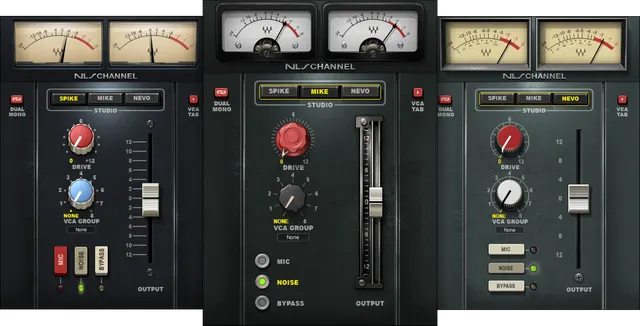
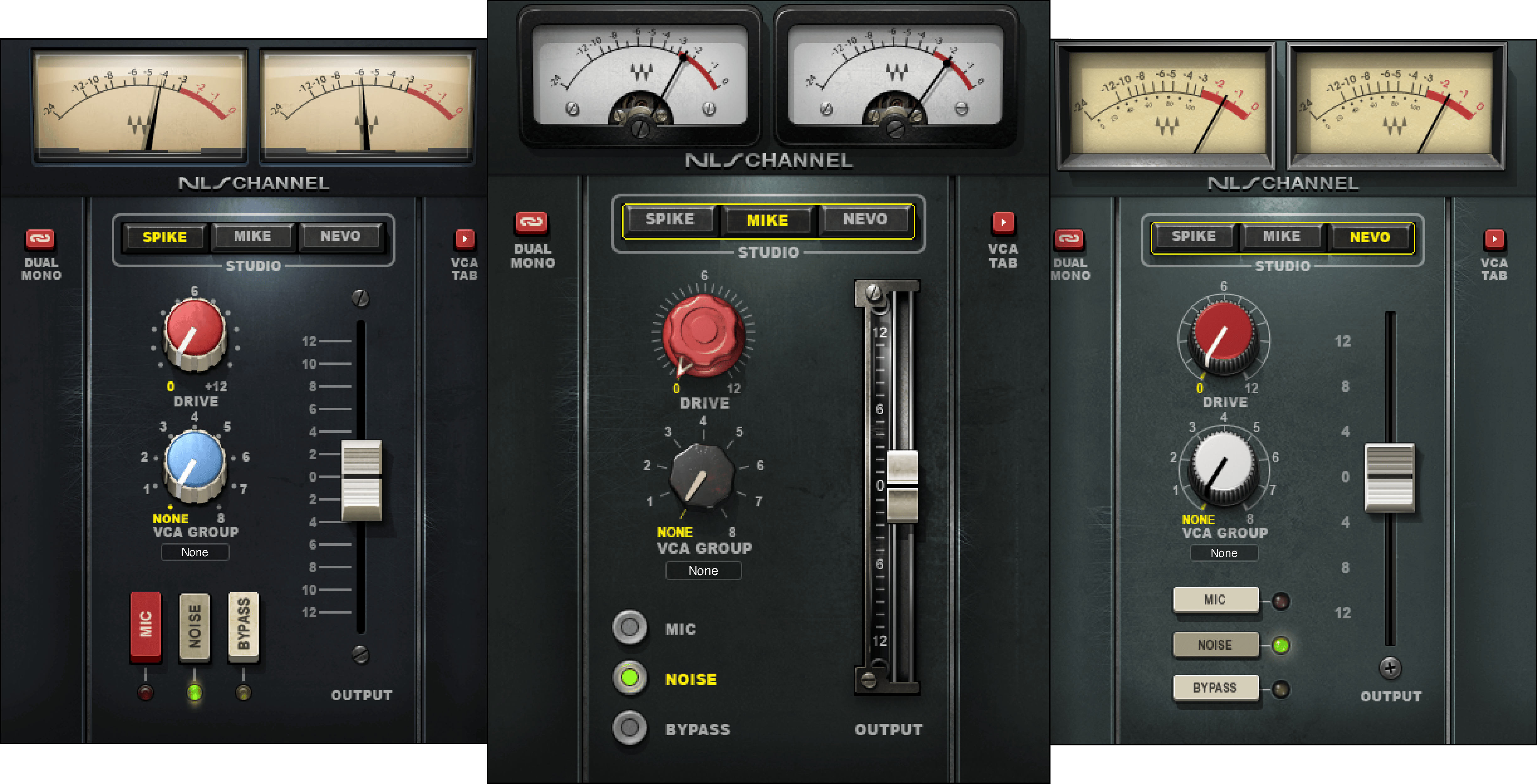
The three Studio models: Spike, Mike and Nevo
Both Channel and Buss components provide the same Studio selector: Spike, Mike, Nevo. Default: Spike. [1]
Waves identifies the three modeled console sources with engineers/producers Mark “Spike” Stent, Mike Hedges and Yoad Nevo. The manual describes the underlying consoles as an SSL 4000G associated with Spike Stent, an EMI TG12345 Mk4 owned by Mike Hedges, and a custom Neve 5116 associated with Yoad Nevo. [1][2]
Those names select different modeled console families. This article does not rank them or describe one as objectively warmer, wider or better; no listening comparison was performed.
Channel and Buss components
The manual lists four components: [1]
- NLS Channel Mono
- NLS Channel Stereo
- NLS Buss Mono
- NLS Buss Stereo
Channel is intended to model the coloration of individual console input channels. Buss models the summing-bus stage. Waves’ suggested console workflow puts Channel on tracks and Buss on the receiving master/bus. [1]
This guide does not state a current latency figure. Check Waves' current latency documentation for your component and sample rate; no host-latency measurement was performed here.
Why different Channel instances can sound different
NLS is designed so that Channel instances can use different modeled channels. The manual says a newly opened NLS Channel chooses a model from a pool of 32 modeled channels per console. [1]
That variation is intentional: analog console channels are not perfectly identical, and NLS models those differences. The manual also warns that duplicating an existing plugin instance duplicates the same modeled channel. If you want the intended channel-to-channel variation, open new instances rather than cloning one. [1]
The preset system includes 32 channel presets plus master-buss presets for each Studio console. [1]
Channel Studio
Studio chooses the console family for the Channel component. [1]
- Range: Spike / Mike / Nevo
- Default: Spike [1]
A VCA Group Studio setting can override this on all instances in that group. If the group is set to INDIV, each instance keeps its own Studio choice. [1]
Channel Drive
Drive increases the modeled nonlinear drive. The manual says it raises the input to the modeled stage, reduces internal headroom, and increases harmonic distortion. [1]
- Range: 0 to +12
- Default: 0 [1]
Waves notes that compensation gain becomes more pronounced at moderate and high Drive settings. In practical use, that means the control changes more than nominal output level, so compare at sensible matched levels rather than assuming “louder” equals “better.” The level-matching advice is editorial; the Drive behavior itself is documented. [1]
Channel Output
Output is the Channel component’s output-gain control. [1]
- Range: -12 dB to +12 dB
- Default: 0 dB [1]
Use it after Drive or other NLS choices when you need to restore a comparable output level. It is not the same control as VCA Group Trim, which applies an offset across a group.
Channel VCA Group
VCA Group assigns the Channel instance to one of eight remote-control groups. [1]
- Range: None / 1–8
- Default: 1 (Grp 1) [1]
The manual’s quick-start workflow consequently starts with all Channel instances in Group 1 unless you reorganize them. The VCA console can then address drums, guitars, vocals or other stems as separate groups if you reassign instances. [1]
Link: Dual Mono versus Stereo modeling
On the stereo Channel component, Link selects the relationship between the left and right modeled channels. [1]
- Dual Mono uses different modeled channels for left and right.
- Stereo uses the same modeled channel on both sides. [1]
Default: Dual Mono. [1]
This affects modeled channel identity; it is not a conventional parameter-link switch for moving two visible faders together.
Mic mode
Mic changes the Channel model’s headroom to emulate driving the modeled mic-input path rather than the clearer line-style input. [1][2]
- Range: On / Off
- Default: Off [1]
The product page describes the choice as line-in for clarity versus the more heavily driven mic-preamp-based input. No claim is made here that Mic reproduces a particular physical gain setting or measured input impedance; those values are not supplied in the retrieved controls documentation. [2]
Channel Bypass
Bypass deactivates NLS’s modeled analog harmonics, noise and frequency-response effects for that instance. [1]
- Range: Bypass / Not Bypassed
- Default: Not Bypassed [1]
A VCA Group Bypass setting overrides the individual instance, so an instance may be effectively bypassed by its group even if its local button is not. [1]
Channel Noise
Noise turns the modeled analog noise on or off. [1]
- Range: On / Off
- Default: On [1]
Again, Group Noise overrides the local setting for instances assigned to that VCA group. [1]
This is modeled noise, not an input noise gate or denoiser.
Channel VCA Tab
VCA Tab switches the visible lower/control area between the normal Channel view and the session-wide VCA Group Console. [1]
- Range: VCA Tab / Channel Tab
- Default: Channel Tab [1]
Changing the view does not itself process the signal.
Channel meter
The Channel meter is an output peak meter. [1]
- Range: -24 dBFS to 0 dBFS [1]
The manual does not publish a separate clip-hold/reset gesture for this meter, so none is invented here.
Buss Studio
The Buss Studio selector also offers Spike, Mike and Nevo, with Spike as the default. [1]
This chooses the modeled summing-bus family. Group Studio can override it when the Buss instance is assigned to a VCA group. [1]
Buss Drive
Buss Drive uses the same documented range and default as Channel Drive. [1]
- Range: 0 to +12
- Default: 0 [1]
The manual describes the same relationship among input level, internal headroom, harmonic distortion and compensation gain. [1]
Buss Trim
Trim is the Buss output-gain adjustment. [1]
- Range: -12 dB to +12 dB
- Default: 0 dB [1]
Channel calls its equivalent local gain control Output; Buss calls it Trim.
Buss VCA Group
The Buss can also be assigned to a VCA group. [1]
- Range: None / 1–8
- Default: None [1]
That default differs from the Channel component, which defaults to Group 1.
Buss Bypass, Noise, Show VCA and meter
Buss Bypass has the same documented effect and default as Channel Bypass: Not Bypassed by default. Group Bypass can override it. [1]
Buss Noise is On by default, and Group Noise can override it. [1]
Show VCA opens/closes the VCA Group Console extension. Range: Show / Hide; default: Show. [1]
The Buss meter is also an output peak meter from -24 dBFS to 0 dBFS. [1]
What the VCA Group Console actually is
In NLS, VCA means Virtual Control Aggregator. The VCA Group Console is a remote-control surface for NLS instances; the manual explicitly says it does not process audio itself. [1]
VCA settings are shared across all NLS instances in the session. The manual also says they do not support Undo/Redo, are the same for plugin Setup A and B, and can be loaded independently through the Waves preset system. [1]
When VCA Group Console controls are automated, Waves instructs users to perform a real-time bounce. That is a vendor workflow requirement, not something tested in this article. [1]
AUTO
AUTO enables VCA Group Console automation writing/reading from one NLS instance. [1]
- Range: On / Off
- Default: Off [1]
Only one NLS instance per session can be AUTO-enabled. The manual also says automation writing and external control-surface operation for VCA Groups are tied to that AUTO-enabled instance. [1]
Group Bypass
Group Bypass deactivates the NLS effect on every instance assigned to that VCA group. [1]
- Range: Bypass / Not Bypassed
- Default: Not Bypassed [1]
The group setting overrides local Bypass buttons.
Group Noise
Group Noise controls modeled noise across the group. [1]
- Range: On / Off
- Default: On [1]
The group setting overrides local Noise buttons.
Group Drive
Group Drive applies a Drive offset to each NLS instance assigned to the group. [1]
- Range: -12 to +12
- Default: 0 [1]
The group value is added to or subtracted from each instance’s local Drive. Waves gives the example of local +8 plus group +5 producing total +13. The manual adds an important asymmetry: negative Group Drive values affect THD but do not change makeup gain. [1]
That makes Group Drive more than a simple mirrored knob position; it is an offset applied to the instances’ existing settings.
Group Trim
Group Trim applies an output-gain offset across the group. [1]
- Range: -12 dB to +12 dB
- Default: 0 dB [1]
The offset is added to or subtracted from each member’s local output/trim setting. [1]
Group Studio
Group Studio can force all group members to one console model or leave each member’s local choice intact. [1]
- Range: INDIV / SPIKE / MIKE / NEVO
- Default: INDIV [1]
INDIV preserves each instance’s own Studio selection. Selecting one of the console names overrides local Studio selections across the group. [1]
Group Name
Group Name lets you rename each VCA group with up to seven characters. [1]
Default labels are Grp1 through Grp8. A changed name propagates to the corresponding group name shown in NLS instances. [1]
WaveSystem toolbar
NLS uses the shared WaveSystem toolbar for presets, setup comparison, undo/redo and interface sizing. [1]
The VCA Group Console is an exception to part of that shared behavior: the manual explicitly says VCA Group controls do not support Undo/Redo and are common to Setup A and B. [1]
A practical console-style workflow
If you want the classic “many channels into a summing bus” architecture Waves documents, instantiate NLS Channel as the last insert on individual tracks and NLS Buss as the first insert on the destination bus/master. Then use new Channel instances rather than cloning one if you want channel variation. [1]
Start with local Drive at 0, choose the desired Studio family, and decide whether Mic and modeled Noise are appropriate. Raise Drive only as needed, then compensate with local Output/Trim and compare at sensible levels. [1]
Organize related instances into VCA groups when session-wide adjustments will help. Group Studio can impose one console across the group, while INDIV preserves mixed console choices. Group Drive and Group Trim are offsets rather than replacements, so remember they interact with each instance’s local values. [1]
Those are conservative workflow suggestions derived from the manual. No listening preference or measured “sweet spot” is claimed.
Practical uses
NLS is designed for session-wide console coloration, not only isolated saturation on one track. Its Channel/Buss split and modeled channel variation are the defining differences from a simple one-knob distortion plugin. [1][2]
You can also use an NLS Channel near the start of a track when the goal is specifically modeled preamp coloration rather than summing-console topology; the manual explicitly describes that as its second supported setup. [1]
VCA Groups are useful in large sessions because they can change Drive, Trim, Noise, Bypass or console selection for related instances without opening each plugin individually. [1]
Limitations and documentation boundaries
The product page and manual describe modeled console behavior, but they do not make this article a measurement of those physical desks. I did not verify harmonic spectra, noise floors, frequency-response deviations or channel-to-channel statistical differences. [1][2]
The guide describes 32 modeled Channel choices per console. That pool should not be treated as a count of every Channel/Buss combination or as an independently measured description of current software internals. [1]
Latency is not measured here, and no current value is reconstructed from the guide's damaged latency text. [1]
No meter hold/reset behavior is documented in the retrieved manual; none is invented.
Related guides and plugins
For compression rather than console coloration, see the Waves RComp guide. The SSL EV2 guide covers a channel-strip approach with EQ and dynamics.
Bottom line
NLS combines three console families, per-instance modeled channel variation, separate Channel and Buss stages, controllable Drive/Mic/Noise behavior and an eight-group VCA remote-control system. The VCA console is especially important: it is not another audio stage, but a session-wide controller that can offset Drive and Trim or override Studio, Noise and Bypass across assigned instances. [1]
The guide covers the documented Channel, Buss and VCA controls without claiming a current latency measurement, hardware equivalence or listening comparison.
Sources
Checked October 17, 2026. No listening, harmonic, noise, latency or automation test was performed.
- Waves NLS User Guide, especially printed pp. 5–8 and 11–18. Official Channel, Buss and VCA control pages were visually inspected in this source review.
- Waves NLS Non-Linear Summer product page, product identity and feature positioning; no current numerical latency claim is used.
- Waves Graphic Library, current NLS product-image entry and attribution/backlink requirement.
FAQ
What is the difference between NLS Channel and NLS Buss?
The manual describes Channel as the modeled console input-channel stage and Buss as the summing-bus stage. Its suggested summing-console setup places Channel on track last inserts and Buss on the master or another bus first insert.
How many channel models does each NLS console offer?
The User Guide says each newly opened NLS Channel instance is assigned from a pool of 32 modeled channels per console. That is the documented Channel model pool, not a count of every Channel/Buss combination.
Does duplicating an NLS Channel instance choose a new modeled channel?
No. The manual says that duplicating an existing Channel instance duplicates its model. It recommends opening each instance directly from the DAW or using its described shortcuts when you want the per-instance channel assignment behavior.
What does the NLS Channel Link control change?
Dual Mono uses non-identical left and right channel models; Stereo uses identical models on both sides. The manual lists Dual Mono as the default.
Does the VCA Group Console process audio?
No. Waves describes it as a remote-control surface for assigned NLS instances. Its settings are shared across instances in the session and do not support Undo/Redo.
How does VCA Group Drive interact with an instance's Drive?
Group Drive is documented as an offset added to or deducted from each assigned instance's local Drive. The guide's example adds group +5 to local +8 for total +13. It also says negative Group Drive affects THD but does not change makeup gain.
Can more than one NLS instance be AUTO-enabled in a session?
No. The manual says only one instance can be AUTO-enabled per session; VCA automation writing and external control-surface operation are tied to that enabled instance.
What bounce mode does Waves recommend after automating VCA Group controls?
The manual instructs users to use the audio host's real-time bounce function when VCA Group Console controls have been automated. This is vendor documentation, not a bounce test performed for this article.

About the Author
Joseph Nilo has been working professionally in all aspects of audio and video production for over twenty years. His day-to-day work finds him working as a video editor, 2D and 3D motion graphics designer, voiceover artist and audio engineer, and colorist for corporate projects and feature films.