

Waves PuigChild is a Fairchild-style compressor collection with two components: the mono PuigChild 660 and the two-channel PuigChild 670. The core controls are deliberately compact—Input, Threshold, Time Constant, Output, power-supply noise and processing on/off—but the 670 adds important channel-linking modes, including independent left/right, linked stereo and lateral/vertical processing. [1][2]
The manual also makes an important distinction between compression and analog modeling. Turning the compressor Off disables the compression action, but the modeled analog behavior remains in the signal path. The Mains control separately selects Off, 50 Hz or 60 Hz for the modeled mains setting; Off does not establish that every modeled noise contribution is absent. [1]
My Short Version
As a starting approach, choose Time Constant 1 and Input near the documented unity-reference setting. Adjust Threshold from its documented 0/no-compression setting while watching gain reduction, then decide whether the long, program-dependent releases of positions 5 or 6 suit the material. [1]
On the 670, choose the link topology before fine-tuning thresholds. Linked applies one control set to both channels and uses the stronger detector signal; Left/Right lets the channels behave independently; Lateral/Vertical converts the stereo signal into sum/difference-style paths before compression and decodes afterward. [1]
Choose Mains Off to switch off the selected modeled mains setting. Use the compressor On/Off control when you want to compare compression while leaving the modeled analog path in place. [1]
Everything here is documentary. I did not compare PuigChild to Fairchild hardware or measure attack, release, distortion, noise, latency or gain-reduction accuracy.
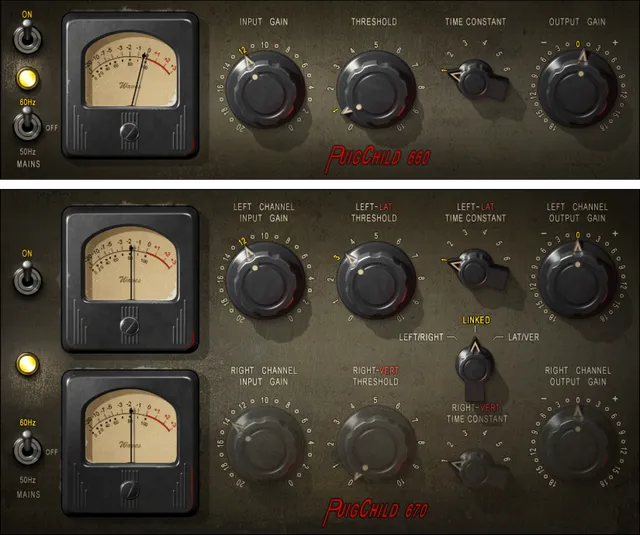
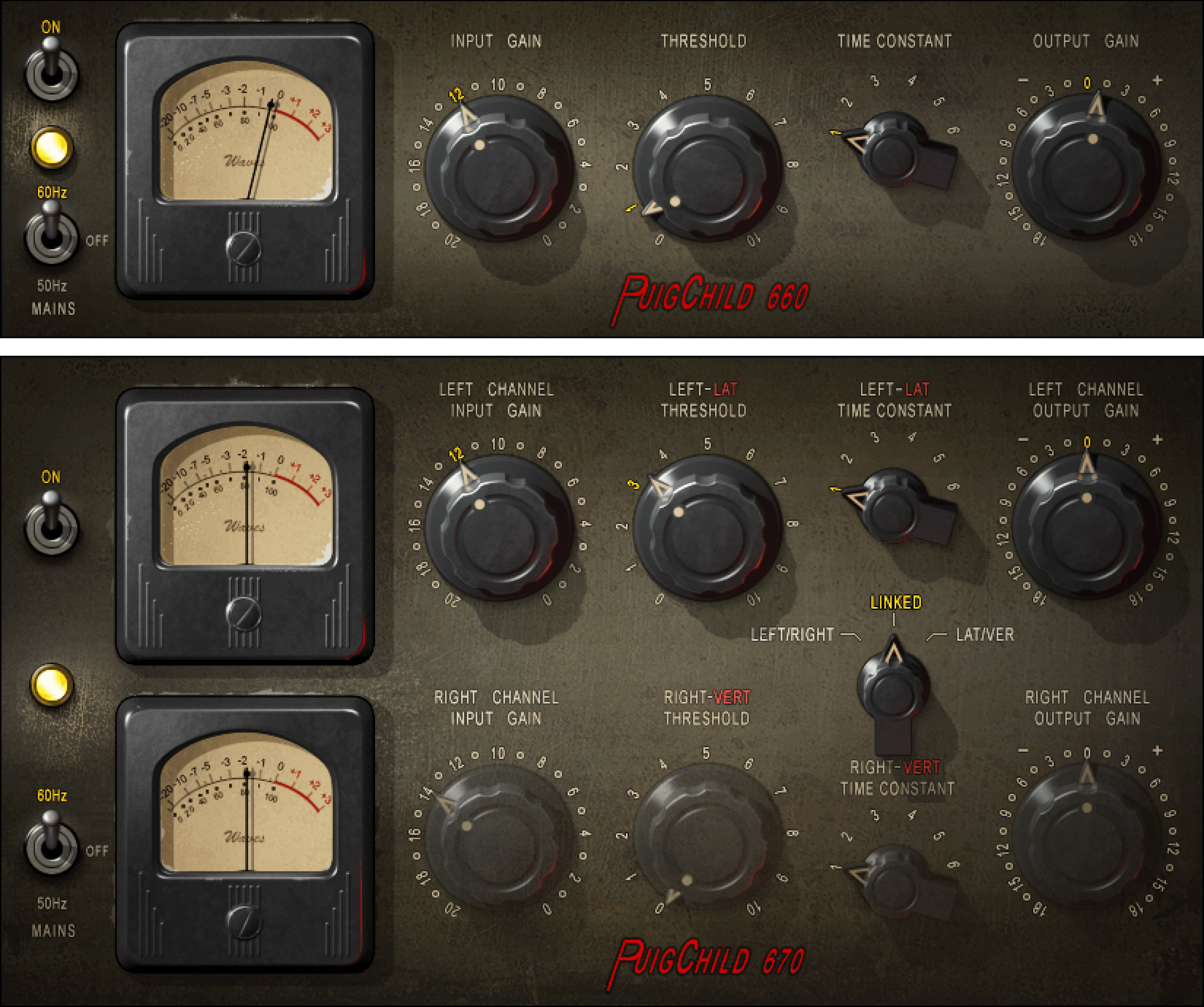
660 versus 670 components
The manual identifies two primary components: [1]
- PuigChild 660 — mono, modeled from the left channel of the 670-style unit.
- PuigChild 670 — stereo/two-channel, with separate detector and compression paths and additional linking/matrix modes. [1]
The current product page describes mono, dual-mono, stereo and M/S-style processing uses. In the plugin, the manual calls the matrixed sum/difference mode Lateral/Vertical. [1][2]
Input
Input controls the level feeding the compressor/model. [1]
- Range: -20 to 0 dB
- Resolution: 1 dB
- Default: -14 dB [1]
The manual identifies the default as the nominal unity-reference point where input and output correspond appropriately in the modeled setup. Because Input changes how hard the modeled compressor is driven, it is part of the compression behavior rather than just a post-effect trim. [1]
Threshold
Threshold sets the amount of signal compression. Its 0–10 scale is non-linear and follows the modeled unit rather than a dBFS threshold scale. [1]
- Range: 0–10
- Resolution: 0.1
- Default: 0, described as no compression [1]
The scale is a modeled-unit control, not a dBFS threshold. Do not translate “5” into a digital threshold value or assume the scale is linear in dB.
Time Constant
Time Constant selects one of six attack/release programs. [1]
The manual warns that historical/published Fairchild timing specifications are only a rough guide because Waves’ measurements of the modeled unit differed. Waves presents the following approximate timing behavior around 10 dB of compression: [1]
| Position | Attack | Release behavior |
|---|---|---|
| 1 | 0.2 ms | 0.3 s |
| 2 | 0.2 ms | 0.8 s |
| 3 | 0.4 ms | 2 s |
| 4 | 0.4 ms | 5 s |
| 5 | 0.4 ms | program-dependent: about 2 s for individual peaks and about 10 s for multiple peaks |
| 6 | 0.2 ms | program-dependent: about 0.8 s for individual peaks, about 10 s for multiple peaks and up to about 25 s for sustained high program |
Default: Time Constant 1. [1]
Positions 5 and 6 are especially important because they are not fixed-release modes. Their recovery changes with program history. This article preserves Waves’ approximate documentary figures rather than presenting them as measurements made here.
Output
Output is post-compression/output gain. [1]
- Range: -18 to +18 dB
- Resolution: 0.1 dB
- Default: 0 dB [1]
Use it to restore or compare output level after compression. Level-matched comparison is an editorial recommendation; no loudness-matched listening test was performed for this article.
Compressor On/Off
The On/Off control enables or disables compression. [1]
- Default: On [1]
The manual explicitly says turning compression off does not remove the analog-modeling behavior. That makes this control different from a total plugin bypass: it lets you remove gain reduction while retaining modeled coloration/noise behavior associated with the plugin path. [1]
Mains
Mains controls the modeled power-supply noise frequency. [1]
- Choices: Off / 50 Hz / 60 Hz
- Default: 60 Hz [1]
This control is about modeled mains hum/noise, not the host/session sample rate or electrical configuration of your computer.
Gain-reduction meters
The PuigChild gain-reduction meters display approximately 0–20 dB of gain reduction. [1]
They are readouts, not editable threshold or makeup controls. The current retrieved manual does not document a separate peak-hold/reset gesture for these meters, so none is invented.
670 Link mode
The 670 adds the Link selector. [1]
Documented choices: [1]
- Left/Right
- Linked
- Lateral/Vertical
Default: Linked. [1]
This selector changes the relationship between the two compression channels, not merely whether two visible knobs move together.
Left/Right mode
In Left/Right mode, the two channels use independent settings and detectors. [1]
That independence can cause the two sides to receive different amounts of gain reduction, which can alter the stereo image when one side triggers harder than the other. The manual presents this as part of the mode’s normal behavior. [1]
Use it when independent channel control is intentional rather than assuming it is the safest default for every stereo source.
Linked mode
In Linked mode, the upper/top channel controls govern both channels. [1]
The detector compares the two channels and uses the stronger detector signal so both channels receive the same compression action. That preserves the left/right relationship more consistently than independent compression. [1]
Linked is the documented default. [1]
Lateral/Vertical mode
Lateral/Vertical is the 670’s matrixed stereo mode. [1]
The plugin converts left/right into two matrixed components before compression, with the upper path representing the summed/lateral information and the lower path representing the difference/vertical information; after processing it decodes back to stereo. [1]
The manual notes two gain-placement details that matter:
- Input Gain is applied after the first matrix.
- Output Gain is applied before the second/decode matrix. [1]
That means the gain controls operate inside the M/S-style processing architecture, not simply before and after the entire stereo plugin.
Why the analog modeling can remain when compression is off
Waves describes PuigChild as modeling more than gain reduction, including transformer/tube-style nonlinearity and power-supply/noise behavior. The manual specifically calls out total harmonic distortion and modeled hum/noise. [1][2]
Because compressor Off leaves analog modeling active, a compressor-off comparison is not the same as a full plugin bypass. If you need to compare the complete plugin path to no plugin at all, use the host/plugin bypass rather than treating the internal compressor Off switch as equivalent.
No claim is made here about the magnitude or audibility of those modeled nonlinearities because no measurement/listening test was performed.
Why long time constants matter
The manual cautions that the long release behavior can persist across repeated loop cycles. [1]
That is practical when auditioning a loop: if the compressor has not fully recovered, restarting the same loop may not begin from a fully released state. Allow time for recovery when you are trying to compare repeatable settings, especially with Time Constants 5 and 6.
WaveSystem toolbar
PuigChild uses the shared WaveSystem toolbar for presets, A/B setup comparison, undo/redo and interface sizing. [1]
Those controls manage the plugin setup rather than adding another stage of compression.
A practical workflow
For a stereo source, decide the 670 link mode first. Linked is the straightforward starting point when you want both sides compressed together. Use Left/Right only when independent behavior is intentional, and Lateral/Vertical when you specifically want separate control of sum/difference information. [1]
Start with Time Constant 1 and moderate drive into the compressor. Adjust Input and Threshold until the gain-reduction meter shows the amount of action you actually need, then compensate with Output. If recovery feels too quick for the material, move through the time constants methodically rather than treating 5/6 as “better” settings.
Choose Mains Off to switch off the selected modeled mains setting. To compare compression while retaining the analog model, use the internal On/Off control; for a true plugin-vs-no-plugin comparison, use host bypass.
Those are conservative workflow suggestions based on documented architecture. No preferred setting or sonic ranking is claimed.
Practical uses
PuigChild is suited to material where slower, program-dependent leveling is useful and where its modeled Fairchild-style architecture is specifically desired. The 670’s independent, linked and matrixed modes make it more flexible for stereo material than the mono 660. [1][2]
The 660 is the simpler choice for mono sources when you do not need the 670’s stereo matrix/linking behavior.
Best for / skip if
It is best for users who want this particular vari-mu/Fairchild-style workflow: a small number of controls, six time constants and optional analog-modeling details. [1][2]
Skip it when you need continuously variable attack/release, a modern digital threshold in dBFS, detailed sidechain filtering or a transparent compressor architecture. Those features are not part of the documented PuigChild control set.
Limitations and documentation boundaries
The time values above are Waves’ documentary figures and the manual explicitly says the modeled unit’s measured timings did not perfectly match published hardware specifications. They are not measurements performed for this article. [1]
No hardware Fairchild comparison, THD/noise spectrum, latency test, channel-match test or plugin-bypass null test was performed. The article therefore does not claim exact hardware equivalence or a quantified amount of analog coloration.
The current manual does not document a meter-reset gesture or additional hidden parameters; none are invented.
Related guides
For a different compressor architecture, see the Waves RComp guide. The Waves L2 guide covers limiting rather than vari-mu compression. More references are in the Waves Audio Post Resources hub.
Bottom line
PuigChild pairs a simple threshold/input/output workflow with six Fairchild-style time constants and, in the 670, three distinct stereo-linking/matrix modes. The internal compressor Off switch leaves analog modeling active, while Mains controls the modeled 50/60 Hz power-supply contribution. [1]
This is a documentation-led controls reference, not a listening test or hardware-equivalence comparison.
Sources
Checked October 18, 2026. No listening, hardware, latency, distortion or host test was performed.
- Waves PuigChild User Guide, current product-linked guide. See the 660/670 component descriptions and control pages.
- Waves PuigChild Compressor product page, current product/component positioning.
- Waves Graphic Library, current product-image entry and attribution/backlink requirement.
FAQ
What is the difference between PuigChild 660 and 670?
The guide describes the 660 as a one-channel mono compressor based on the 670’s left channel. The 670 is a two-channel stereo compressor with separate detector and compression paths.
What does the Input control change?
Input controls the level entering the audio compression path. Its documented range is -20 to 0 in 1 dB steps; the default -14 setting is labeled unity gain (input = output).
Is PuigChild Threshold a dBFS value?
No. The guide documents a 0–10 scale in 0.1 steps, says the default 0 means no compression, and explicitly notes that the scale is nonlinear and follows the modeled unit.
How should I interpret the Time Constant timing figures?
Waves presents them as a rough guide based on 10 dB of compression and says its measurements differed considerably from the Fairchild-published values. They are vendor documentation, not measurements made for this article.
How do Time Constant positions 5 and 6 release?
The manual describes both as automatic based on program material. Position 5 lists about 2 seconds for individual peaks and 10 seconds for multiple peaks; position 6 lists 0.8 seconds for individual peaks, 10 seconds for multiple peaks, and 25 seconds for consistent high program level.
What does Linked mode do on the 670?
The upper channel controls both channels, the lower channel controls are grayed out, and the detector uses the maximum level of the two channels combined to apply compression to both.
What happens in Lateral/Vertical mode?
The 670 feeds a sum/difference matrix into the upper/left and lower/right paths, then decodes through a second matrix. Input level is set after the first matrix and Output gain before the second.
Does switching compression Off remove all analog modeling?
No. The manual says the On/Off control turns compression off but leaves analog modeling. It is distinct from using the host’s full plugin bypass.

About the Author
Joseph Nilo has been working professionally in all aspects of audio and video production for over twenty years. His day-to-day work finds him working as a video editor, 2D and 3D motion graphics designer, voiceover artist and audio engineer, and colorist for corporate projects and feature films.