
Waves Renaissance Axx is a three-control compressor for track-level dynamics and output control. It combines Threshold, Attack and Gain with a fixed, automatically designed ratio curve, automatic release control and an output limiter. Waves describes it as particularly suited to instruments such as guitar and bass.
The useful distinction is that Threshold affects both compression and the amount of output gain, while Gain drives the limiter. Axx can make level control straightforward, but the ratio curve is not an editable control and the limiter’s status light is not a clip indicator. Watch the meters and listen to the actual source rather than assuming the three knobs describe every part of the signal path.
This guide summarizes the supplied Waves manual and captured interface. I have not auditioned or measured the plugin, and I have not checked the currently installed build. The guide PDF has an internal metadata title that conflicts with the cover and body; that source note is explained below.
My Short Version
Start with the source level in your DAW and the Input Meter. Waves suggests placing Threshold just below the signal’s highest peaks as a starting point, then lowering it for more compression. The documented range is −60 to 0 dBFS, with a default of 0 dBFS. The manual says that lowering Threshold also increases output gain, which then makes the output limiter work harder.
Set Attack according to how much of the initial transient you want to preserve. Its documented range is 0–50 ms and its default is 5 ms. Shorter times are described as reducing the initial transient and improving peak control; longer times let more of the attack through, which can preserve articulation but allow peaks to overshoot.
Use Gain to set output level and control limiter activity. Its range is −30 to 0 dBFS, default 0 dBFS. Axx brickwall-limits its output, but Waves warns that persistent red limiter activity can create audible artifacts. If the indicator stays red, reduce Gain, reconsider Attack, or adjust the DAW input level. This is a documented setup approach, not a promise about how any particular source will sound.
What Renaissance Axx does
The official Renaissance Axx page describes a compressor with three controls. The manual adds that it uses a fixed, automatically designed ratio curve and automatic release control. Ratio varies automatically as a function of Threshold and the signal energy above it, eventually reaching infinity. The manual does not provide a numeric ratio-versus-threshold map or an independent ratio control.
The output limiter is part of the level-control design: Gain changes its activity, and the manual says plugin output is brickwall-limited. That does not mean unlimited limiting is desirable. Waves cautions that excessive limiter activity can sound disagreeable and recommends maintaining input headroom; its manual says about 6 dB is usually adequate when feeding the plugin. Treat that as Waves’ guidance, not a universal calibration requirement.
Components and skins
The manual lists two components: mono and stereo. It says they are identical except for the number of input and output channels. Choose the component that matches the host track and routing. The manual does not specify different control ranges, defaults or behavior for the two components.
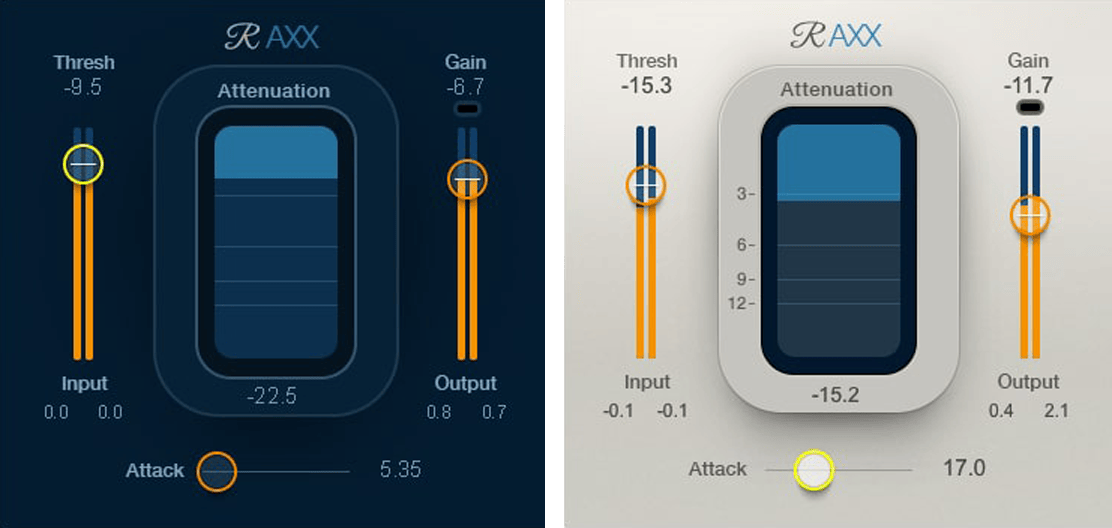
The interface is available in Light, Dark and Legacy skins. The manual says the controls and their values remain the same when changing skins. The skin selected for the current instance becomes the default view for new instances. The manual does not name a factory skin default; the captured Graphic Library image shows Dark and Light views side by side, which are example interface states, not a statement about the user's installed default.
Threshold
Threshold sets the reference level at which gain reduction begins. Its documented range is −60.0 to 0.0 dBFS, and the default is 0.0 dBFS. The control is integrated with the input meter, so the meter can help compare the threshold position with incoming signal peaks.
Waves suggests placing Threshold just below the highest peaks as a starting point. Lowering it causes more signal energy to exceed the threshold and increases compression. The manual also says that output gain rises as Threshold is lowered, so the limiter can become more active even if you do not move the separate Gain control.
The ratio is not set directly: the manual describes a fixed, automatically designed curve in which the ratio varies with Threshold and the energy above it, eventually reaching infinity. Exact curve values are not given. Do not translate a Threshold value into a particular ratio.
Attack
Attack sets how long the gain adjustment takes to reach its target. The documented range is 0–50 ms and the default is 5 ms. A short attack reduces the initial transient, which Waves says can make the sound duller while providing very good peak control. A longer attack lets the initial transient pass more unprocessed; gain reduction then falls more on the sustain, leaving quick picks and plucks more articulate while allowing attack peaks to overshoot.
Those are the manual’s general descriptions, not a guarantee for a specific instrument or setting. Use the attenuation and output displays to see what Axx reports, then judge the balance in the full musical context. The manual does not give a separate numeric release control; release is automatic.
Gain and output limiting
Gain sets Renaissance Axx’s output level and controls the activity of its output limiter. The range is −30.0 to 0.0 dBFS, with a default of 0.0 dBFS. Waves says the output is brickwall-limited, so the plugin output will not clip regardless of the Gain setting. As Gain increases, limiter activity increases.
Keep the distinction between the limiter and the signal path after the plugin: the manual’s claim concerns Axx’s own output. It does not establish that every later DAW bus, effect, converter or export stage cannot overload. Waves advises providing sufficient headroom when returning the signal to the host. If the limiter status remains red, reduce Gain; if attack overshoots seem to contribute, the manual suggests experimenting with a shorter Attack. Changing the DAW input level has a different effect from reducing Gain.
Input, attenuation and output meters
The Input Meter is a full-scale display of incoming signal from −infinity to 0.0 dBFS. Input level is controlled in the DAW, not by a plugin input control. Infinite-hold peak indicators appear below the meters; click the meter or its value box to reset the peak hold.
The central Attenuation Meter displays combined gain reduction from the compressor and output limiter. Its stated range is −30 to 0.0 dBFS. Because it combines both processors, it can show activity even when Threshold is set to zero. A value box shows peak attenuation, and clicking the meter resets peak hold.
The Output Meter displays the plugin’s signal returning to the DAW, with a range from −infinity to 0.0 dBFS. The output Gain control is integrated with this meter display. Peak output appears in the value boxes below it; click to reset.
Above the output meter, the color-coded Limiter Activity Indicator reports limiter activity; the manual explicitly says it is not a clip light. Black means no limiter activity, yellow means normal activity, and red means over-limiting that is probably creating audible artifacts. The indicator’s colors are status categories, not a numerical meter range.
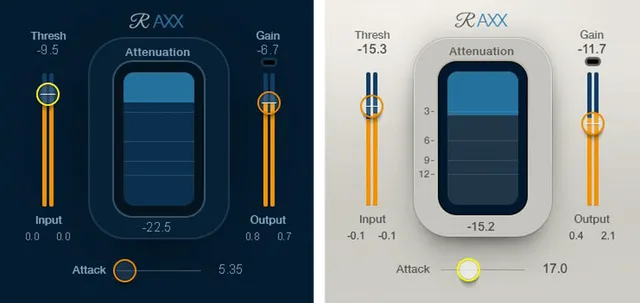
The supplied interface diagram shows two sample views with different Threshold, Gain, Attack and meter readings. These numbers are part of the illustration; they are not factory defaults, recommended settings, benchmark measurements or evidence from an audio test. Consult the manual and the value readouts in your own instance for documented controls and current state.
WaveSystem toolbar
The manual says the bar at the top of the plugin window can save and load presets, compare settings, undo and redo steps, and resize the plugin. It also says the upper-right icon opens the WaveSystem Guide. These are plugin-window utilities, not additional Axx dynamics controls. The Axx manual does not specify numeric ranges or defaults for these toolbar actions.
A cautious setup workflow
- Choose mono or stereo to match the track and routing. Keep enough headroom at the DAW output feeding Axx; Waves says about 6 dB is usually adequate.
- Watch the Input Meter and begin with Threshold just below the highest peaks, as the manual suggests. Lower Threshold gradually to increase compression; remember that this also raises output gain and can increase limiter activity.
- Adjust Attack while watching the attenuation and output displays. Shorter values catch more of the initial transient; longer values pass more of it through and may let peaks overshoot.
- Set Gain while observing the Limiter Activity Indicator. If it remains red, reduce Gain, revisit Attack or lower the source level in the DAW. Use the meter or value box to reset peak holds when you need a fresh reading.
- Compare the processed passage in context and check the DAW signal path after the insert. The manual documents Axx’s limiter; it does not promise that later stages cannot overload or that a particular setting will suit the source.
When to choose another compressor
Choose a different tool when you need to set a specific ratio, choose a release time, or consult documented ratio values for specific Threshold settings. Axx exposes neither an independent Ratio control nor a manual Release control in the documented interface. It may also be a poor fit if you want a compressor without output limiting, since the documented Gain control is tied to limiter activity.
For an adjustable compressor reference, the site's Waves Renaissance Compressor guide covers a separate control set. For broader Waves workflow information, see the Waves Audio Post Resources hub and the Waves Subscription vs Perpetual guide.
Sources and source note
Primary sources checked October 18, 2026.
- Waves Renaissance Axx product page, for official product identity and the linked guide.
- Waves Renaissance Axx Compressor User Guide, cover and body pages 2–8: components and skins (pp. 2–3); controls and meters (pp. 4–7); toolbar and presets (p. 8). Its internal metadata title is “Renaissance Bass user guide,” while the cover and body identify Renaissance Axx Compressor User Guide. The product page links this PDF for Axx; the discrepancy is retained rather than silently normalized.
- Waves Graphic Library interface image, official product interface image showing Dark and Light views.

FAQ
What does Waves Renaissance Axx do?
It is a three-control compressor with automatic release control and an output limiter. Waves says its ratio varies automatically along a fixed, automatically designed curve as a function of Threshold rather than being set with a separate Ratio control.
What are the Renaissance Axx controls?
The manual identifies Threshold, Attack and Gain. Threshold sets where compression starts, Attack sets how quickly gain adjustment reaches its target, and Gain sets output level while controlling limiter activity.
What is the default Threshold setting?
The manual gives 0.0 dBFS as the default, with a documented range of −60.0 to 0.0 dBFS. It suggests starting just below the highest input peaks, then lowering Threshold for more compression.
Does Renaissance Axx have a Ratio or Release control?
No separate Ratio or manual Release control is listed in the Axx guide. Ratio varies automatically along a fixed, automatically designed curve according to Threshold, and release is automatic; the manual does not give numeric ratio-curve values or a user-adjustable release range.
What does the Attack control change?
Attack ranges from 0 to 50 ms and defaults to 5 ms. The manual says shorter settings reduce the initial transient, while longer settings let more of it pass before attenuation is applied to the sustain.
What does the red limiter indicator mean?
Red indicates over-limiting that is probably creating audible artifacts; the manual says the indicator is not a clip light. It suggests reducing Gain, considering a shorter Attack if peaks contribute, or changing the DAW input level.
Can the output limiter prevent clipping everywhere after Renaissance Axx?
The manual says Axx's own output is brickwall-limited, but also advises sufficient headroom when returning the signal to the host. That does not establish that later DAW stages or an export cannot overload.
Does Renaissance Axx have mono and stereo components?
Yes. The manual lists mono and stereo components and says they are identical except for the number of input and output channels. It does not document different control ranges or behavior between them.

About the Author
Joseph Nilo has been working professionally in all aspects of audio and video production for over twenty years. His day-to-day work finds him working as a video editor, 2D and 3D motion graphics designer, voiceover artist and audio engineer, and colorist for corporate projects and feature films.