
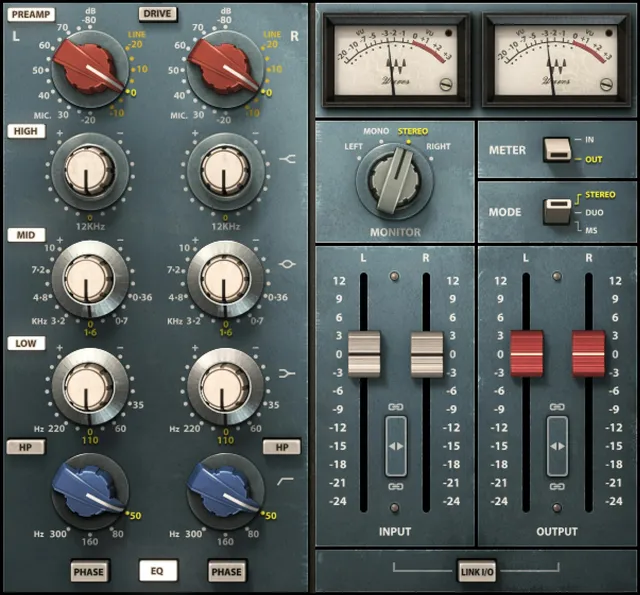
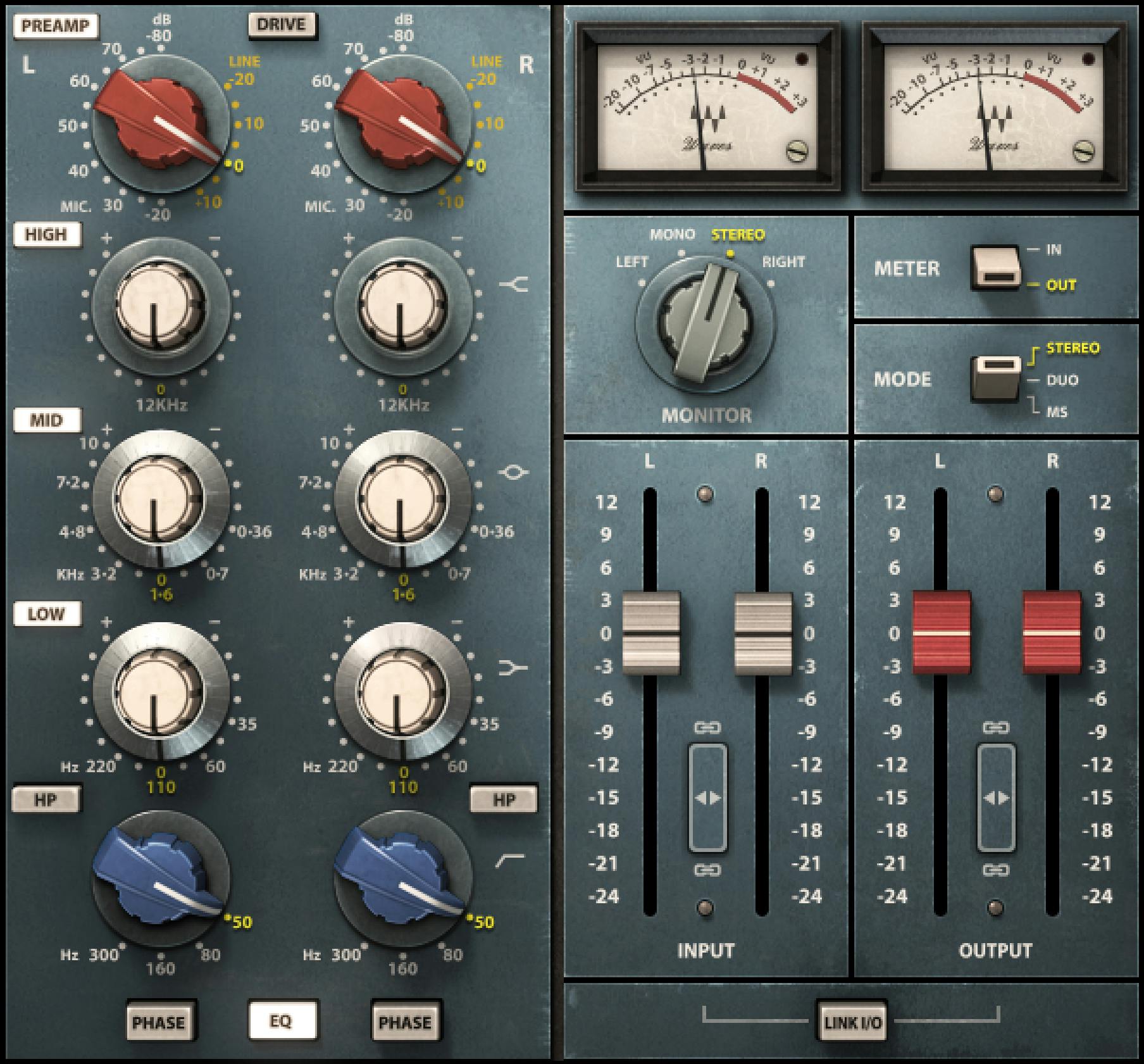
Waves Scheps 73 is a modeled three-band EQ and preamp based on the classic 1073-style module, with a fixed 12 kHz high shelf, seven selectable mid frequencies, four selectable low-shelf frequencies, a third-order high-pass filter, controllable preamp coloration/Drive, and stereo features for linked, independent left/right, and Mid/Side processing. [1][2]
The plugin goes beyond the original-style EQ layout with input/output faders, monitoring choices, switchable input/output VU metering, adjustable VU headroom, phase reversal, fader linking, inverse input/output linking and an M/S matrix in the stereo component. [1]
The current manual is unusually specific about EQ ranges and defaults, but it only labels a few interface controls—most notably Pre-Amp On/Off and Collapse—without giving them separate prose parameter tables. This article accounts for those controls while avoiding unsupported claims about hidden transition behavior or undocumented defaults.
My Short Version
Use the Pre-Amp selector when you want the modeled input-stage coloration, then use Drive when you deliberately want the much more aggressive mic-preamp-overdrive state. Drive automatically moves the preamp to Mic -20 and makes the Line positions unavailable. [1]
Shape tone with the fixed 12 kHz high shelf, the seven-position mid bell, the four-position low shelf, and the 18 dB/octave high-pass filter. Use the stereo component’s Stereo, Duo or M/S modes depending on whether you want linked channels, independent left/right EQ, or separate Mid and Side processing. [1]
Watch gain staging with the Input/Output faders and VU meters. The calibration control sets the digital level indicated by 0 VU; the guide does not describe this meter-reference adjustment as changing audio gain. [1]
Everything below is documentary. I did not compare the plugin to hardware, measure harmonics, or run latency/meter calibration tests.
Components
The manual lists two plugin components: [1]
- Scheps 73 Mono
- Scheps 73 Stereo
The current Waves technical data likewise lists Mono and Stereo components. The M/S workflow lives inside the Stereo component; Waves does not list a separate M/S component. [2]
The stereo component adds channel-mode, monitor, paired-fader and linking controls that do not apply to the mono component.
Pre-Amp selector: Line and Mic scales
The Pre-Amp control changes the modeled harmonic coloration. Waves documents two stepped scales: [1]
- Line: -20L to +10L
- Mic: -20M to -80M
- Step size: 5 dB
- Default: 0L [1]
Waves describes the default Pre-Amp setting as mild harmonic coloration without increased gain. That statement does not establish the gain behavior of every Line/Mic selector position. [1]
Do not read the Line/Mic numbers as a simple output-gain setting. At the documented default setting, the Pre-Amp adds harmonic distortion without increasing gain. The manual describes Input and Output as the separate pre- and post-processing level controls. [1]
Pre-Amp On/Off
The official interface labels a Pre-Amp On/Off control. [1] The guide does not explain what it toggles, give a factory default, or describe transition behavior; this reference records the label without assigning a more specific operation.
Drive
Drive puts the preamp into its aggressive drive state. [1]
- Range: On / Off
- Default: Off [1]
When Drive is switched on, Scheps 73 emulates feeding line-level signal into the microphone preamp. Waves says the Line selections become unavailable and the Pre-Amp automatically switches to Mic -20. Unlike the normal preamp-coloration state, Drive can increase gain and create heavy distortion. [1]
That makes Drive more than a generic saturation amount switch: it changes the available preamp operating state.
High shelf Gain and On/Off
The high band is a fixed 12 kHz shelf. [1]
High Gain:
- Range: ±15 dB
- Resolution: 0.1 dB
- Default: 0 dB [1]
High On/Off:
- Range: On / Off
- Default: On [1]
Because the frequency is fixed, there is no separate high-frequency selector.
Mid Frequency, Gain and On/Off
The mid band is a bell with seven selectable frequencies: [1]
Mid Frequency options:
- 360 Hz
- 700 Hz
- 1.6 kHz
- 3.2 kHz
- 4.8 kHz
- 7.2 kHz
- 10 kHz
- Default: 1.6 kHz [1]
Mid Gain:
- Range: ±15 dB
- Resolution: 0.1 dB
- Default: 0 dB [1]
Mid On/Off:
- Range: On / Off
- Default: On [1]
Waves describes the 10 kHz bell as an additional frequency found in schematics rather than one of the six positions associated with the most familiar original layout. [1][2]
Low Frequency, Gain and On/Off
The low band is a shelf with four selectable frequencies: [1]
Low Frequency:
- 35 Hz
- 60 Hz
- 110 Hz
- 220 Hz
- Default: 110 Hz [1]
Low Gain:
- Range: ±15 dB
- Resolution: 0.1 dB
- Default: 0 dB [1]
Low On/Off:
- Range: On / Off
- Default: On [1]
High-pass filter frequency and On/Off
The high-pass filter is a third-order, 18 dB/octave filter with four frequency choices: [1]
- 50 Hz
- 80 Hz
- 160 Hz
- 300 Hz
- Default frequency: 50 Hz [1]
HP Filter On/Off:
- Range: On / Off
- Default: Off [1]
The manual notes an important stereo detail: the HPF is the only band with a separate On/Off control for left and right because the frequency selector itself has no 0/Off position. [1]
Phase
Phase reverses the phase of the signal after the EQ stage. [1]
- Range: On / Off
- Default: Off [1]
This follows the manual’s terminology and stated placement without translating it into a different named control.
EQ In/Out
EQ In/Out enables or bypasses the complete EQ section. [1]
- Range: In / Out
- Default: In [1]
EQ In/Out is documented separately from Drive and the interface's Pre-Amp On/Off label. The guide does not explain the latter's operation. [1]
Stereo EQ Mode: Stereo, Duo and M/S
The Stereo component has an EQ Mode selector with three modes. Default: Stereo. [1]
Stereo
In Stereo mode, corresponding EQ controls and faders are linked: moving one side moves the other to the same value. If you previously created left/right differences in Duo or M/S, those differences are preserved when you return to Stereo so they can reappear if you switch back. [1]
Duo
In Duo mode, left and right EQ controls/faders can be adjusted independently. [1]
Waves’ current product page calls out independent left/right processing as a modern extension of the modeled design. [2]
M/S
In M/S mode, Scheps 73 applies a Mid/Side matrix to the plugin input. The left-hand controls operate on Mid (sum) and the right-hand controls operate on Sides (difference); the interface labels the two sides M and S. [1]
This is an internal Stereo-component mode, not a separate M/S plugin component. [1][2]
Monitor selector
The Stereo component’s Monitor selector changes what you hear while working. [1]
In Stereo and Duo modes, the choices are:
- Left — left channel only
- Mono — left + right summed to mono
- Stereo — normal stereo
- Right — right channel only [1]
In M/S mode, the choices are:
- Mid — left + right
- Mono — stereo signal summed to mono
- Stereo
- Sides — left - right [1]
Default: Stereo. [1]
Monitor changes the audition source; it is not an EQ mode itself.
VU meters
The VU meters can display either input or output level depending on the Meter I/O switch. [1]
Documented meter scale: -20 VU to +3 VU. [1]
The top-right Clip Indicator lights on peak clipping. The manual does not document a click-to-reset or hold time for this clip indicator, so no reset gesture is invented here.
Meter I/O
Meter I/O chooses what the VU meters display. [1]
- Input — post-Input-fader level, before the remaining plugin processing.
- Output — post-processing, post-Output-fader level.
- Default: In [1]
That position distinction is useful for gain staging: Input metering shows the level driving the processing after the input fader, while Output metering shows the final plugin output.
VU headroom calibration
The calibration screw at the lower-right of each VU meter sets the digital level corresponding to 0 VU. [1]
The current manual says the meter defaults to 18 dB of headroom, gives the control range as -8 to -24 dBFS, and then prints the default as “18 dBFS.” [1]
Those printed statements do not establish a consistently signed factory value. This guide does not infer a corrected default or claim a native reset test.
Adjusting VU calibration changes the meter reference; it is not documented as changing audio gain.
Input fader
Input adjusts level before plugin processing. [1]
- Range: +12 to -24 dB
- Default: 0 dB [1]
Input controls level before processing; the Pre-Amp selector chooses the modeled preamp setting. Waves' no-gain statement concerns the default Pre-Amp setting, not every selector position. [1]
Output fader
Output adjusts gain after plugin processing. [1]
- Range: +12 to -24 dB
- Default: 0 dB [1]
Use it to compensate for level changes created by EQ, Drive or Input gain. That is standard gain-staging guidance, not a claim about an optimum level.
Faders Link
The Stereo component has Faders Link controls between the paired Input faders and paired Output faders. [1]
When linked, a pair moves together while preserving any existing relative offset. If one fader hits the end of its range, linked movement stops rather than forcing the offset past the available limit. [1]
The manual documents separate linking for the input pair and output pair. It does not publish a factory On/Off default for these link buttons.
Link I/O
Link I/O inversely links input and output levels. [1]
- Range: On / Off
- Default: Off [1]
When On, increasing Input produces a corresponding decrease in Output, and vice versa. This is useful when you want to change how hard the modeled circuit is driven while approximately counter-moving the final output control. [1]
The manual describes the fader relationship, not a guarantee of perceptual loudness matching.
Collapse
The interface labels a Collapse control in the top bar. [1]
The interface labels a Collapse control. The guide does not describe its target or default; this reference records the label without assigning an operation.
WaveSystem toolbar
Scheps 73 uses the shared Waves toolbar for preset loading/saving, setup management, A/B comparison, undo/redo and help/interface functions. [1]
Those are shared interface utilities rather than Scheps 73 tone parameters.
Latency and sample-rate information
Consult Waves’ current latency documentation for your component, version and sample rate. This guide does not measure host latency or establish current compatibility.
A practical gain-staging workflow
Start with the EQ flat and Drive off. Decide whether you want preamp coloration at all; if you do, choose the normal Line/Mic preamp position first. Then set EQ bands and HPF for the tonal job. [1]
If you deliberately want heavier distortion, enable Drive and note that the preamp jumps to Mic -20 and the Line options disappear. Use Input to control the level hitting the processing and Output to compensate after processing. Link I/O can make that drive-versus-level experiment faster, but still verify actual output level on the meter. [1]
For stereo material, choose Stereo for linked moves, Duo for independent L/R work, or M/S when you want separate center/side decisions. Use Monitor to audition the relevant channel, mono sum, Mid or Sides while making those adjustments. [1]
That is editorial workflow guidance derived from the documented controls. No listening comparison or hardware-matching result was performed.
Practical uses
Scheps 73 is suited to jobs where broad, stepped EQ choices and modeled preamp coloration are part of the workflow: vocals, drums, guitars, bass, buses or other sources where fixed-frequency shelves/bells are acceptable. Waves positions it as a tone-shaping and harmonic-color tool rather than a surgical parametric EQ. [1][2]
The stereo component is particularly flexible for image-specific work because Duo permits independent L/R settings and M/S lets the same modeled EQ/preamp structure address Mid and Side separately. [1][2]
Drive is intentionally more aggressive than the normal preamp setting. It should be treated as a distortion state, not merely “more of the same” gentle color. [1]
Limitations and documentation boundaries
Scheps 73 does not provide continuously variable EQ frequencies or Q controls. The high shelf is fixed at 12 kHz, the mid/low/HPF frequencies are stepped, and the band gain range is ±15 dB. [1]
The manual does not separately publish factory defaults or deeper transition behavior for the visible Pre-Amp On/Off, Collapse and Faders Link buttons. Pre-Amp On/Off and Collapse are identified by label only; their detailed operation is not established in the guide. Faders Link is documented, but its factory default is not stated.
The VU calibration wording is also preserved exactly enough to avoid a false sign normalization: Waves describes 18 dB headroom, a range of -8 to -24 dBFS, and a printed default of 18 dBFS. No native meter-calibration test was performed to rewrite that source.
Related guides and plugins
For a modern surgical/dynamic EQ workflow, the live Waves F6 guide provides a useful contrast to Scheps 73’s stepped analog-style EQ architecture. The live Renaissance Compressor guide covers dynamics processing when the job is compression rather than tone shaping.
For other channel-strip and EQ approaches, see Waves’ SSL EV2 Channel and API 550 product pages.
Bottom line
Scheps 73 combines a stepped three-band EQ, 18 dB/octave high-pass filter and modeled preamp coloration with much more flexible digital stereo control than a simple vintage-EQ recreation. The default Pre-Amp setting adds modeled coloration without increased gain, while Drive deliberately switches to a much more aggressive mic-preamp state. Stereo, Duo and M/S modes then let the same tonal architecture work as linked stereo, independent L/R or Mid/Side processing. [1][2]
The remaining boundaries are documentation limits: the guide labels Pre-Amp On/Off and Collapse without explaining their operations, and its VU calibration default is worded inconsistently with the published range. Those points are disclosed instead of resolved by assumption.
Sources
Checked October 17, 2026. No listening, harmonic, meter, host or latency measurement was performed.
- Waves Scheps 73 User Guide, especially pp. 4–9. The interface and control descriptions are on printed pages 5–8.
- Waves Scheps 73 product page, current product/technical data including Mono/Stereo components, M/S feature positioning and vendor latency/sample-rate specifications.
- Waves Graphic Library, current Scheps 73 product-image entry and attribution/backlink condition.
FAQ
What does the Pre-Amp selector do, and how is Drive different?
The guide says the Pre-Amp adds harmonic distortion; at its documented default it does not increase gain and adds mild coloration. Drive switches to an aggressive distortion state, makes Line selections unavailable, and automatically selects Mic -20. [1]
What EQ bands and ranges does Scheps 73 provide?
The high shelf is fixed at 12 kHz; High, Mid, and Low Gain each range ±15 dB in 0.1 dB increments, with a 0 dB default. Mid offers seven frequencies from 360 Hz to 10 kHz (default 1.6 kHz), while Low offers 35, 60, 110, or 220 Hz (default 110 Hz). [1]
What are the high-pass filter settings?
The HPF is a third-order, 18 dB-per-octave filter with 50, 80, 160, and 300 Hz choices; its frequency default is 50 Hz and its On/Off default is Off. The guide notes separate left/right On/Off controls because the frequency selector has no Off position. [1]
What is the difference between Stereo, Duo, and M/S modes?
Stereo links corresponding EQ controls and faders, Duo allows independent left/right settings, and M/S applies a matrix so the left controls process Mid (sum) and the right controls process Sides (difference). The documented default is Stereo. [1]
What can the Monitor selector audition?
In Stereo and Duo modes it offers Left, Mono, Stereo, and Right. In M/S it offers Mid (left plus right), Mono, Stereo, and Sides (left minus right). The guide gives Stereo as the default. [1]
What do the VU meters display?
The meters can show Input or Output on a −20 to +3 VU scale. Input metering is post-Input-fader and before other plugin processing; Output metering is after processing and the Output fader. Meter I/O defaults to Input. The Clip LED indicates peak clipping. [1]
How do the linked faders work?
Faders Link moves a stereo pair together while preserving its relative offset, and stops when either fader reaches its range limit. Link I/O inversely links Input and Output: raising one produces a corresponding decrease in the other. The guide gives Link I/O an Off default; it does not specify a Faders Link default. [1]
What does the manual specify for VU headroom calibration?
The guide says the meter defaults to 18 dB headroom, lists a range of “-8 to -24 dBFS,” and prints the default as “18 dBFS.” Those statements conflict in sign/units; this reference preserves the source wording rather than inferring a corrected default. [1]

About the Author
Joseph Nilo has been working professionally in all aspects of audio and video production for over twenty years. His day-to-day work finds him working as a video editor, 2D and 3D motion graphics designer, voiceover artist and audio engineer, and colorist for corporate projects and feature films.