
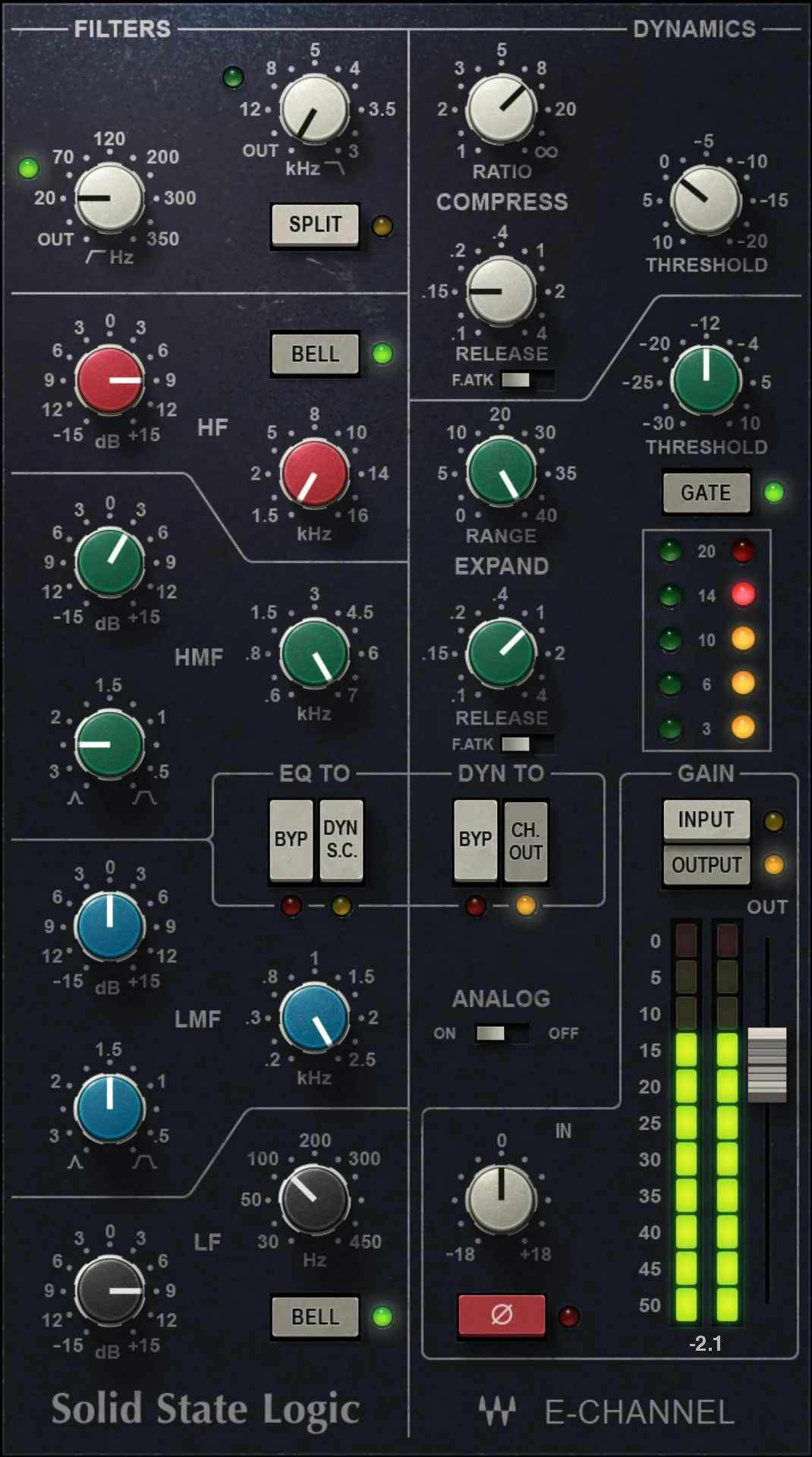
Waves SSL E-Channel is a modeled SSL 4000 E-series channel strip with the console's dynamics section and the 242 “Black Knob” four-band EQ. It combines high- and low-pass filters, four EQ bands, a soft-knee compressor/limiter, an expander/gate, internal sidechain routing, trim, output, phase and analog-emulation controls in one processor. [1][2]
The important thing to understand is that this is not simply an EQ followed by a compressor. The filters, EQ and dynamics can be rearranged, and the E-Channel can feed its filters and EQ into the dynamics sidechain instead of the audio path. [1]
About the imagery: the cover is an editorial illustration. The plugin interface is official Waves product artwork, not a capture of a listening or compliance test.
My Short Version
Use Input Trim to put the channel at a sensible operating level, then decide whether you want the default dynamics-first flow or CH OUT for dynamics after EQ. Use SPLIT when you specifically want the high- and low-pass filters before the dynamics section while leaving the four-band EQ after it. [1]
For the EQ, the outer HF and LF bands can be shelves or bells, while HMF and LMF are fully parametric with frequency, gain and Q. For dynamics, the compressor gives Ratio, Threshold, fast/program-dependent attack and Release; the lower section can act as either an expander or gate. [1]
If you need frequency-selective compression behavior, DYN S-C routes the E-Channel filters and EQ to the dynamics sidechain. That is different from simply putting EQ before compression in the audible signal path. [1]
Signal flow and routing
The manual documents three main E-Channel audio-path arrangements. In the default path, dynamics come first, then filters, then EQ. With CH OUT, the filters and EQ precede the dynamics section. With SPLIT, the filters move before dynamics while the four-band EQ remains after dynamics. [1]
The routing diagram also documents E-Channel sidechain modes. With DYN S-C, filters and EQ can shape the signal that controls the dynamics processor rather than simply acting as audible EQ. Combining SPLIT with DYN S-C leaves the filters in the audio path ahead of dynamics while the EQ can serve the sidechain. [1]
This routing flexibility is one of the E-Channel's defining features. It is also why the routing switches deserve to be understood before treating it like a fixed-order channel strip.
Compressor / limiter
The compressor is a soft-knee compressor/limiter. Waves documents automatic makeup gain calculated from the Ratio and Threshold settings, rather than a separate compressor makeup-gain knob. [1][2]
Ratio / Slope
Ratio/Slope ranges from 1:1 to infinity:1. At the top of the range the section functions as a limiter. [1]
Threshold
The compressor Threshold range is +10 to -20 dB in the control table. The manual's master-section note separately says plugin parameters are expressed as dBu while the level meter is dBFS; this guide preserves the manual's displayed range notation rather than silently changing units. [1]
Lowering Threshold causes more of the signal to enter compression. Because makeup gain is automatic, level can remain more stable while the compression amount changes. [1]
Attack / F.ATK
With F.ATK off, compressor attack is auto-sensing and program-dependent. With F.ATK on, attack is 1 ms. [1]
That switch is therefore not a continuously variable attack control. It chooses between the modeled program-sensitive behavior and a fixed fast attack.
Release
Compressor Release ranges from 0.1 to 4 seconds. [1]
Compressor activity indicator
The dynamics section provides a dedicated compressor gain-change/activity indicator. The manual describes separate level indicators for compressor/limiter and expander/gate activity, even though both use the same modeled gain-change circuitry. [1]
Expander / gate
The second dynamics processor can operate as an expander by default or as a gate when the GATE switch is enabled. [1]
Expander/gate Threshold
Threshold ranges from -30 to +10 dB in the manual's control table. [1]
Range
Range controls the maximum attenuation and runs from 0 to 40 dB. [1]
Attack / F.ATK
As with the compressor, F.ATK off gives auto-sensing, program-dependent attack, while F.ATK on selects a 1 ms fast attack. [1]
Release
Expander/gate Release ranges from 0.1 to 4 seconds. [1]
GATE switch
The GATE switch changes the section from its default expander behavior to gate behavior. [1]
Expander/gate activity indicator
A separate activity indicator shows the expander/gate's gain change. The manual also notes variable hysteresis in the dynamics threshold circuitry, allowing the signal to decay below the opening level before the processor changes state. [1]
DYN TO routing
The DYN TO area controls where the dynamics section sits in the strip.
BY PASS bypasses the dynamics processing, but Waves explicitly cautions that this does not make the plugin a mathematically flat transparent path; it mimics the flat response of the modeled SSL hardware channel. [1]
CH OUT moves dynamics to the E-Channel output, making the dynamics section post-EQ. With neither selected, dynamics are pre-EQ by default. [1]
High-pass and low-pass filters
The E-Channel has two dedicated filters.
The Low Pass filter is 12 dB/octave, adjustable from 3 kHz to 22 kHz at the -3 dB point. The High Pass filter is 18 dB/octave, adjustable from 16 Hz to 350 Hz at the -3 dB point. Turning either filter control fully left bypasses that filter. [1]
With SPLIT selected, both filters are placed before the dynamics processors in the chain. [1]
SPLIT
SPLIT changes the location of the filters, not the entire EQ section. In the E-Channel routing diagram, SPLIT puts HP/LP filtering before dynamics while the four-band EQ remains after dynamics. [1]
That makes SPLIT useful when you want to remove sub-bass or excessive top-end before the compressor/gate reacts, without giving up post-dynamics tonal EQ. This is an editorial use case derived from the documented routing, not a tested preferred setting.
High-frequency EQ
The red HF band covers 1.5 kHz to 16 kHz. Gain is ±16.5 dB in shelf mode and ±18 dB in bell mode. [1]
HF BELL
BELL changes the HF band from its shelving shape to a bell curve. The manual states that the HF/LF bell Q is calculated from frequency and is not user-adjustable. [1]
High-mid EQ
The green HMF band is fully parametric. Frequency ranges from 600 Hz to 7 kHz and Q ranges continuously from 0.1 to 3.5. [1]
Its available gain depends on Q: Waves documents ±18 dB at Q 3.5, decreasing to ±15 dB at Q 0.1. [1]
That relationship means the widest settings do not have the same maximum boost/cut range as the narrowest settings.
Low-mid EQ
The blue LMF band covers 200 Hz to 2.5 kHz, with Q from 0.1 to 3.5. Gain likewise varies from ±18 dB at Q 3.5 to ±15 dB at Q 0.1. [1]
Low-frequency EQ
The black LF band covers 30 Hz to 450 Hz. Gain is ±16.5 dB as a shelf and ±18 dB as a bell. [1]
LF BELL
The LF BELL switch changes the low band from shelf to bell shape. As with HF, the resulting bell Q is calculated from the frequency setting rather than exposed as an independent Q control. [1]
EQ TO routing and dynamics sidechain
The EQ TO area contains two important choices.
BY PASS bypasses the EQ section, but the manual again cautions that this modeled bypass does not produce a perfectly flat, coloration-free path; it mimics the SSL channel strip's flat response. [1]
DYN S-C switches the E-Channel filters and EQ into the dynamics sidechain. Waves explicitly identifies this as a way to create frequency-controlled dynamics behavior such as simple de-essing. [1]
When using DYN S-C, think of the EQ as shaping what the compressor/gate listens to, not necessarily what you hear as a static EQ curve.
Input Trim
Input Trim provides ±18 dB of channel input adjustment. Waves states that the plugin is aligned so -18 dBFS = 0 dBu. [1]
This is the cleanest place to establish operating level before deciding how hard the modeled dynamics and analog circuitry should be driven.
Input / Output meter selector and level meter
The master meter is expressed in dBFS. INPUT and OUTPUT switches above it choose which point the level indicator displays. [1]
The manual does not document a click-to-reset clip function for this meter, so this article does not invent one.
Output fader
The Output fader controls final processor output level. The retrieved manual does not publish a numerical output-fader range in the control text, so no range is inferred from the interface graphic. [1]
Use it for practical level matching after the channel-strip settings are established. Level matching here is editorial workflow advice; no listening comparison was performed for this manuscript.
ANALOG on/off
ANALOG enables or disables the modeled analog emulation. Waves' current product page emphasizes that the modeled circuitry contributes character even when EQ gain and dynamics reduction are nominally at zero; switching ANALOG off disables that analog emulation. [1][2]
Do not confuse individual EQ/dynamics bypass choices with the ANALOG switch or host/plugin bypass. They are different controls with different purposes.
Phase Reverse
The Ø Phase Reverse switch reverses the phase/polarity of the input signal. [1]
The manual uses “phase reverse” wording; this article does not add a measured phase-response claim.
One-sample documented latency
The current product-linked manual states that the E-Channel and G-Channel have one sample of latency. [1]
That is a documentation claim, not a new host measurement. No DAW, sample-rate or live-system latency test was run for this article.
WaveSystem toolbar
The shared WaveSystem toolbar provides preset save/load, settings comparison, undo/redo and plugin resizing. [1]
These toolbar functions are workflow controls rather than part of the modeled SSL signal path.
A practical setup order
Start with Input Trim and the input meter. Decide next whether dynamics should stay in the default pre-EQ position or move after EQ with CH OUT.
Set HP/LP filters and choose SPLIT only if you specifically want those filters ahead of dynamics. Shape the four EQ bands, then set compressor Threshold/Ratio, attack mode and Release, followed by the expander/gate if needed.
Use DYN S-C only when you deliberately want frequency-shaped detector behavior. Finish by checking the output meter and matching level with the Output fader. This is a logical workflow derived from the documented routing, not a tested preset or listening recommendation.
Best for / skip if
SSL E-Channel is a strong fit when you want a single modeled channel strip with four-band EQ, filters, compression/limiting, expansion/gating and flexible detector routing. Its routing controls make it more flexible than a simple fixed EQ-plus-compressor chain. [1][2]
Skip it when you need fully independent numerical control over every modeled parameter, continuously variable compressor attack, or a transparent processor with no modeled console behavior. The E-Channel deliberately preserves parts of the SSL channel topology and character.
Related guides
The live Renaissance Compressor guide covers a dedicated compressor with a different control model. The live F6 guide explains frequency-selective dynamic EQ when you need directly editable dynamic bands rather than the E-Channel's internal detector routing.
The live MV2 guide covers low- and high-level dynamics for a different gain-control task. The Waves Audio Post Resources hub collects the site's existing Waves workflow and licensing references.
Bottom line
SSL E-Channel is best understood as a routable console channel, not a collection of isolated knobs. The four-band Black Knob EQ and dual filters are only part of the design; the real flexibility comes from choosing where dynamics sit and whether EQ/filtering shape the audio path or the dynamics sidechain.
The documentation is specific about the important ranges and routing behavior. Where it is not specific—such as an explicit numerical Output-fader range or channel-component list—this guide leaves the detail undocumented rather than inferring it from the picture.
Sources
Checked September 20, 2026. No listening, host, latency, CPU or automation test was performed.
- Waves SSL 4000 Channel User Manual, especially pp. 4–12. The official E-Channel interface on p. 8 and routing diagrams on pp. 6–7 were visually inspected.
- Waves SSL E-Channel product page.
- Waves Graphic Library, current SSL E-Channel entry and attribution/backlink requirement.
Frequently Asked Questions
What does SPLIT change in SSL E-Channel?
SPLIT moves the high- and low-pass filters ahead of the dynamics section while leaving the four-band EQ after dynamics. It changes filter placement, not the position of the whole EQ section.
How does CH OUT differ from SPLIT?
CH OUT places the filters and EQ before the dynamics section, making dynamics post-EQ. SPLIT places only the filters before dynamics and leaves the four-band EQ after it; with neither selected, dynamics are first in the default path.
What does DYN S-C do in SSL E-Channel?
DYN S-C routes the filters and EQ to the dynamics sidechain, so they shape what the dynamics detector responds to rather than serving only as audible EQ. Waves identifies this routing as a way to create frequency-controlled behavior such as simple de-essing.
What do the compressor F.ATK and attack settings mean?
With F.ATK off, compressor attack is auto-sensing and program-dependent; with it on, attack is fixed at 1 ms. It is a choice between those behaviors, not a continuously variable attack control.
How does the E-Channel expander become a gate?
The lower dynamics section operates as an expander by default. Enabling GATE changes it to gate behavior; its separate Threshold and Range controls govern that section.
Does BY PASS make the E-Channel dynamics or EQ perfectly transparent?
No. Waves cautions that the section's BY PASS switch does not create a mathematically flat transparent path; it mimics the flat response of the modeled SSL hardware channel. EQ and dynamics BY PASS controls are separate from the ANALOG switch and host/plugin bypass.

About the Author
Joseph Nilo has been working professionally in all aspects of audio and video production for over twenty years. His day-to-day work finds him working as a video editor, 2D and 3D motion graphics designer, voiceover artist and audio engineer, and colorist for corporate projects and feature films.