
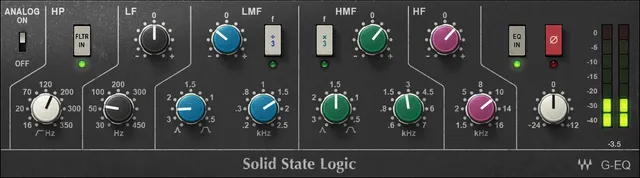
Waves SSL G-Equalizer is a four-band equalizer modeled on the Solid State Logic G Series console EQ, with a separate 18 dB/octave high-pass filter. Its low and high bands are shelves; the two middle bands are bell-shaped, with adjustable Q and frequency-step switches. This guide maps the controls and the important distinction between the EQ IN switch and the high-pass filter.
This is a manual-based explainer. Waves currently lists mono and stereo components and links a four-page guide. I did not install or audition the plug-in, compare it with hardware, or test a host. The manual describes the modeled design; it does not establish the behavior of every current build.
My Short Version
Use the LF and HF shelves for broad low- and high-frequency level changes; use LMF and HMF when you need bell-shaped adjustments between them. LMF spans 200 Hz–2.5 kHz and HMF spans 600 Hz–7 kHz. Each mid-band has a Q control and a frequency shortcut: ÷3 on LMF and ×3 on HMF. The selected band frequency is divided or multiplied by three; these buttons do not add another band.
The notable interaction is gain versus Q. At the narrowest documented Q setting of 3.5, a mid band can reach ±20 dB; at the broadest Q setting of 0.1, it can reach ±15 dB. The guide specifies this relationship for both middle bands. Do not assume the gain range stays constant as Q changes.
EQ IN bypasses the equalizer section, but it does not switch off the separately controlled high-pass filter. Check the filter’s own in/out switch if you want that processing removed. ø reverses signal polarity; it is not a phase-alignment control. The output meters show dBFS while the manual describes EQ parameter units in dBu—those are different readings and should not be conflated.
What the plugin is—and what the manual supports
Waves describes SSL G-Equalizer as a software model of the rack-mounted SSL G 292 equalizer. The manual characterizes its curve as slightly different from the E-Channel 242 and says the G design can make somewhat greater gain changes; it also says the E-Channel can use a narrower Q. Those are vendor descriptions, not a listening comparison I performed. Waves’ suggestion to use E-Channel for more detailed work and G EQ for added character is advice from the manual, not a guaranteed result.
Waves lists Mono and Stereo channel components and versions V9 through V17 on the checked product page. The manual’s control descriptions apply to the documented plugin; it does not provide a complete control-by-control default-state table. A screenshot or library image is not evidence of factory settings.
Bands and frequency ranges
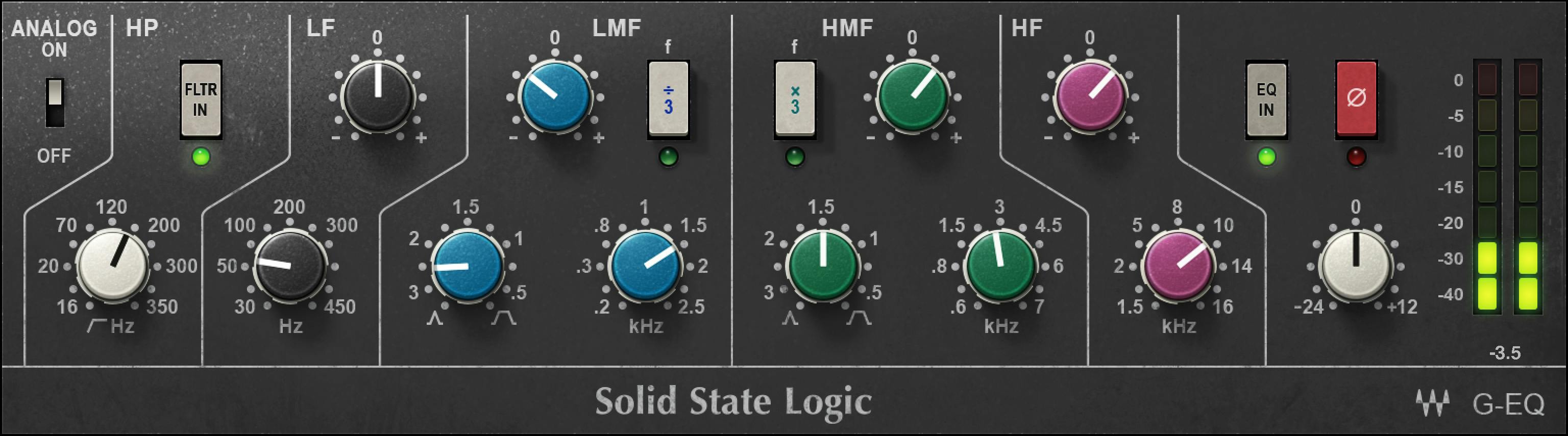
| Control | Shape and documented range | Additional behavior |
|---|---|---|
| High-pass filter (HP) | 16–350 Hz; 18 dB/octave | Separate filter in/out switch and status indicator. It remains available when the EQ section is bypassed. |
| LF | Low shelf, 30–450 Hz, ±17 dB | Broad low-frequency shelf. |
| LMF | Bell, 200 Hz–2.5 kHz | Q 0.1–3.5; maximum gain ±15 dB at Q 0.1 and ±20 dB at Q 3.5. ÷3 divides the selected frequency by three. |
| HMF | Bell, 600 Hz–7 kHz | Same Q and Q-dependent gain limits as LMF. ×3 multiplies the selected frequency by three. |
| HF | High shelf, 1.5–16 kHz, ±17 dB | Broad high-frequency shelf. |
The controls are not five interchangeable bell filters: LF and HF are shelves, the two middle sections are bells, and HP is a separate low-frequency filter. The manual states that plugin parameter values use dBu; this is not the dBFS scale used by the output meters. Keep the unit label with the quantity it describes rather than treating the meter scale as the band-gain unit.
Q, gain and the ×3/÷3 buttons
For either middle band, choose a center frequency within its range, then set Q for the width of the bell. The guide gives the gain limit as a function of Q: ±15 dB at Q 0.1 and ±20 dB at Q 3.5. It does not provide a separate gain maximum for every intermediate Q value, so do not interpolate a precise limit from those endpoints.
The listed LMF and HMF frequency ranges describe the base controls. Their ÷3 and ×3 switches extend frequency selection by the stated factor: Waves gives 300 Hz ÷ 3 = 100 Hz as its LMF example. They do not add another EQ band.
Filter, bypass and polarity
The high-pass filter has its own in/out control and indicator. Its 18 dB/octave slope and 16–350 Hz range are documented in the manual. The EQ IN switch controls the four-band EQ section. Because these are separate controls, switching EQ IN off does not imply that the high-pass filter is also bypassed.
The ø control reverses the input signal’s polarity. That may be useful when checking polarity relationships in a multi-microphone or multi-channel setup, but this guide does not claim it aligns phase or guarantees cancellation/improvement. Polarity and frequency-dependent phase response are not the same operation.
Output, analog option and meters
The Output fader adjusts overall output level. The linked manual does not specify its full range or a factory default; do not infer either from the artwork’s knob position or scale. The Analog switch toggles the console-emulation option. The manual states that analog emulation is enabled by default across the SSL collection. That is a manual-documented collection default, not a readback from an installed runtime or preset.
The output meters are read-only level displays in dBFS. They are not EQ-gain controls. The manual’s parameter-unit note refers to dBu; do not report the meter’s dBFS readout as the units of an EQ band. The guide does not document an output-gain reset button or a meter-reset procedure.
WaveSystem toolbar
The manual’s common WaveSystem toolbar provides preset save/load, setting comparison, undo/redo, interface resizing and access to the WaveSystem Guide. These are shared plugin-window utilities, not additional EQ bands or processing controls.
A conservative way to approach the controls
- Choose the Mono or Stereo component that matches the channel path; the product page lists those two configurations.
- If low-frequency filtering is part of the task, set HP with its own control and confirm the indicator. Remember it is independent of EQ IN.
- For a broad tonal change, start with the LF or HF shelf. For a more localized change, select LMF or HMF, set the center frequency and Q, and make a restrained gain adjustment.
- Use ÷3 or ×3 only as a frequency shortcut, then verify the selected frequency. Recheck the Q-dependent gain limit if the Q setting changes.
- Compare EQ IN on/off at a consistent listening level in your own session. Treat ø as a polarity reversal, not a phase-alignment tool.
- Watch output level while making changes; the manual does not promise headroom or a particular output range. Adjust the Output fader as needed in the host context.
This is an operating sequence inferred from the documented control functions, not a claim that the plugin was tested or that these settings are optimal for any source.
Who it may suit—and when to look elsewhere
The control layout may suit someone who wants a compact four-band console-style EQ with two shelves, two adjustable-Q mid bands, a dedicated high-pass filter and straightforward output metering. Someone seeking many narrow, independently tunable bands or a documented surgical-Q range should compare other tools; the manual itself says the related SSL E-Channel can provide a narrower Q. That distinction is Waves’ own description, not a comparative test.
If you need a documented output range, precise factory settings, multichannel components or verified compatibility with a specific host, the checked product page and manual do not answer all of those questions. Confirm current details with Waves before relying on them.
Related Waves tools
The manual positions the G EQ alongside the SSL E-Channel as a related console-EQ option, and describes the E-Channel’s narrower-Q capability. For a different workflow, Waves also offers the F6 Floating-Band Dynamic EQ, whose product page describes dynamic EQ rather than this plugin’s fixed four-band layout. On this site, the Waves F6 guide covers that distinct dynamic-EQ workflow, while the Waves Audio Post Resources hub links broader Waves guides. These links identify product differences; they are not recommendations based on side-by-side tests.
Sources
Primary sources checked October 18, 2026. Waves SSL G-Equalizer product page, which lists Mono/Stereo components and links the manual; SSL G-Equalizer User Guide, four pages; and the Waves Graphic Library. No plug-in installation, compatibility check, audio processing, listening test, or measurement was performed.
FAQ
What is Waves SSL G-Equalizer?
Waves describes SSL G-Equalizer as a software model of the SSL G Series four-band EQ, with LF and HF shelves, two adjustable-Q mid bells and a separate high-pass filter. This guide follows the current product page and linked manual; it is not a hardware or sound-quality comparison.
What are the SSL G-Equalizer band ranges?
The manual lists LF at 30–450 Hz, LMF at 200 Hz–2.5 kHz, HMF at 600 Hz–7 kHz and HF at 1.5–16 kHz. The LF and HF bands are shelves; LMF and HMF are bells. Their gain and Q details are described in the article.
How does Q affect the G-Equalizer’s mid-band gain?
For both LMF and HMF, the guide gives a maximum of ±15 dB at Q 0.1 and ±20 dB at Q 3.5. The documented gain limit therefore depends on Q; the manual does not specify every intermediate limit.
What do LMF ÷3 and HMF ×3 do?
LMF ÷3 divides the selected LMF frequency by three, while HMF ×3 multiplies the selected HMF frequency by three. Waves gives 300 Hz ÷ 3 = 100 Hz as an LMF example, extending below its base frequency range. These are frequency switches, not additional bands.
Does EQ IN bypass the high-pass filter too?
No. The manual gives the high-pass filter its own in/out switch, separate from EQ IN. EQ IN bypasses the four-band equalizer section, so check the filter’s separate control if you also want HP processing out.
What does the ø switch do?
The ø switch reverses signal polarity. The manual does not describe it as a phase-alignment control, and this guide makes no claim that polarity reversal will improve or cancel a particular signal relationship.
What does the Analog switch do, and is it on by default?
Analog toggles the console-emulation option. The SSL collection manual says analog emulation is enabled by default across the collection; that is a documented default, not a check of an installed plugin or saved preset.
What are the Output fader range and factory default?
The linked manual identifies the Output fader as overall output-level control but does not specify its full range or factory default. The artwork’s position should not be treated as proof of either value.

About the Author
Joseph Nilo has been working professionally in all aspects of audio and video production for over twenty years. His day-to-day work finds him working as a video editor, 2D and 3D motion graphics designer, voiceover artist and audio engineer, and colorist for corporate projects and feature films.