
Waves Sub Align splits a signal into Tops and Subs frequency ranges, adjusts the low-frequency path's polarity, delay and gain, then recombines them. It is intended for situations where subs and tops are tied together and the system processor is not accessible.
The current product describes inserting it on the master bus to move the subs “virtually” relative to the tops. That is a way of describing the signal processing, not physical loudspeaker movement.
This guide follows the complete official manual and genuine Stereo panel. I have not tested a PA, measured alignment, auditioned the plugin or verified a live installation.
My Short Version
Set the frequency split deliberately. X-Over selects which frequencies receive the Subs processing.
Phase is a polarity flip. It is not a continuously adjustable phase-rotation control.
The moving Subs pictures are delay faders. Their position is not a gain reading.
Stereo links are separate by function. Solo, polarity, delay and gain do not become one universal linked control.
There is no documented automatic measurement routine. The guide supplies manual controls and a routing diagram, not an alignment result.
Best for and when to choose another tool
Best for: a manual adjustment workflow when the low/high system feeds are tied together and you cannot reach the house system's processor.
The controls provide a defined frequency split and a small set of low-band adjustments rather than an entire loudspeaker-management system.
Choose another tool when: you need automatic acoustic measurement, microphone analysis, an adjustable phase-rotation curve, detailed crossover slope selection or a complete system-calibration workflow.
Those capabilities are not established by the guide. Neither are guaranteed SPL changes, measured alignment accuracy or a universal setting for every room.
Mono, Stereo and the signal path
The guide lists Sub Align Mono and Sub Align Stereo.
The Stereo panel provides separate left/right controls with link icons for documented functions. It is not described as a mono-to-stereo generator or a Mid/Side processor.
The block diagram shows Input→X-Over, then two branches:
- High frequencies continue through the Tops path to the mixer.
- Low frequencies pass through Phase→Delay→Gain in the Subs path before reaching the mixer.
The branches recombine at Mixer→Output. This is low-band processing inside one signal path, not a claim that the plugin gains access to a venue's separate amplifier controls.
No crossover slope, order, filter Q or specific latency/lookahead implementation is supplied.
Tops Solo, Subs Solo and stereo links
Tops Solo isolates the Tops range; Subs Solo isolates the Subs range. Both have On/Off options and explicit defaults of Off.
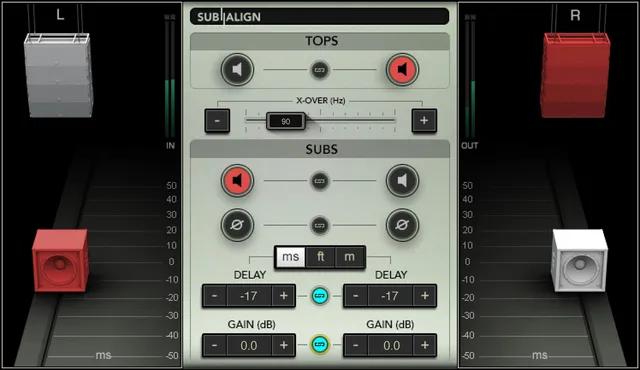
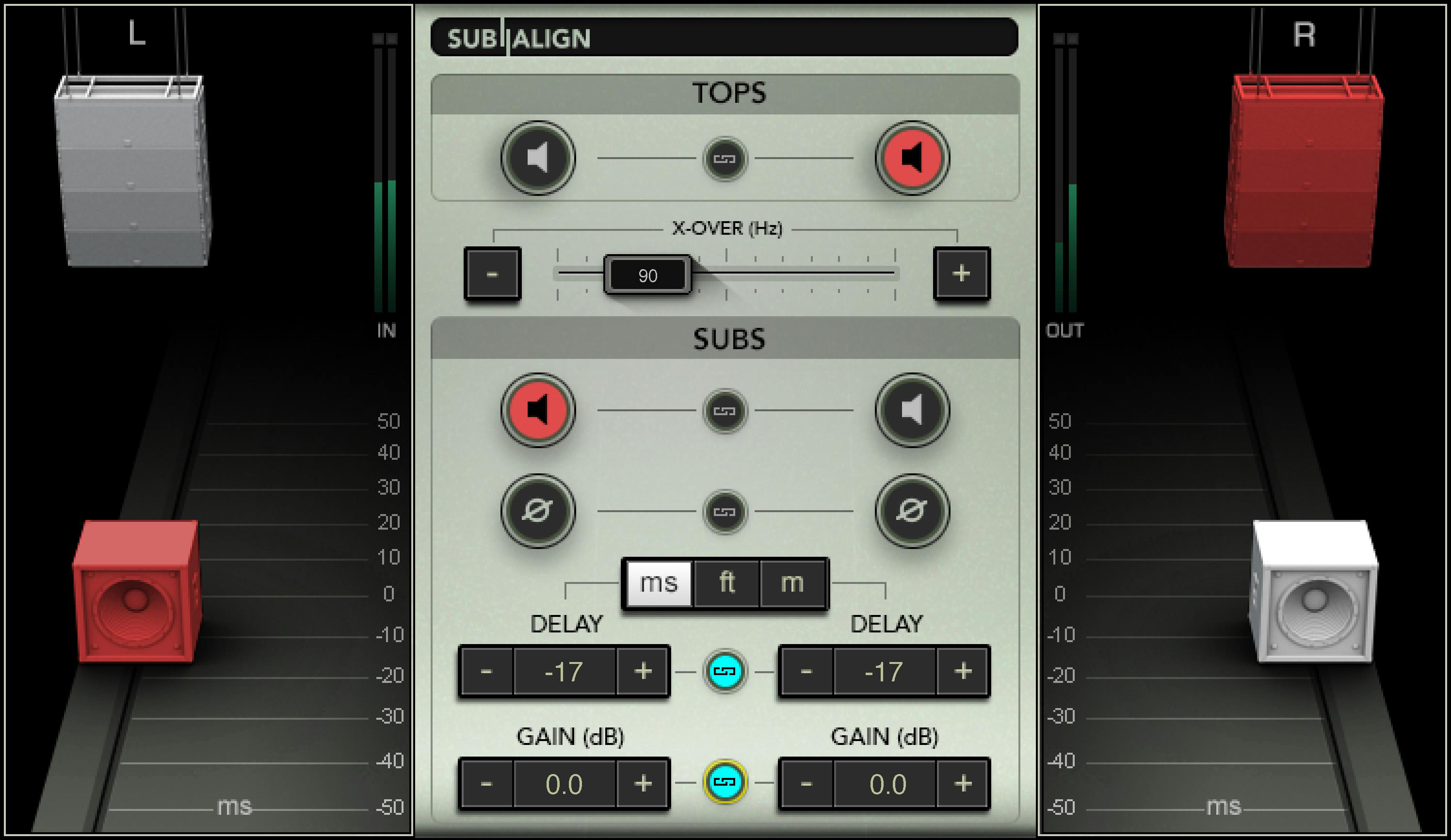
The guide says the corresponding speaker icons turn orange when solo is active. Example artwork appears strongly red; that visual difference should not be turned into a separate clipping or signal-state system.
In the Stereo component, each Solo function has its own left/right Link icon.
The sources do not specify exclusive-solo behavior, a combined Solo All function, a modifier gesture or the initial link state. Those should not be inferred from a pictured preset.
The Tops icons are displayed in the interface legend, but only the Subs icons are explicitly documented as movable faders.
X-Over and its fine controls
X-Over sets the crossover point between Tops and Subs, from 40 to 250 Hz, with a stated default of 90 Hz.
Move its fader left or right; the −/+ controls provide fine tuning. The size of a fine step is not specified.
The guide recommends using the Solo controls to hear the change more clearly. That is a source workflow suggestion, not a report that this article measured the crossover or tried it on a PA.
X-Over changes which frequencies enter the low-band processing. It is not a separate output-level control or an adjustable crossover-slope selector.
Subs Phase: polarity, not continuous rotation
Subs Phase flips the Subs polarity by 180 degrees. Its options are On/Off, with an explicit default of Off.
The Stereo component has a left/right Link for this function.
Despite the control's Phase label, the guide does not establish a continuous phase-angle adjustment, an all-pass frequency response or an automatic phase-search function.
Its Off default is a documented switch state, not evidence of a general plugin bypass or a particular measured relationship between loudspeakers.
Subs icons, Delay and the three display units
The large Subs icons are movable faders. Dragging them up or down changes delay, and the scale reflects that timing adjustment.
The separate Subs Delay control also adjusts the delay between Subs and Tops. In Stereo, a Link connects left/right Delay, and the −/+ controls provide fine tuning.
The documented ranges are:
| Delay display | Stated range |
|---|---|
| ms | −50 to +50 milliseconds. |
| ft | −56 to +56 feet. |
| m | −17 to +17 meters. |
The stated Delay default is 0 ms. The separate display-unit selector offers ms, ft and m, with ms as its default.
These are three ways of showing delay, not three independent time offsets. The scale changes with the selected unit.
The manual does not give a precise conversion constant, temperature/speed-of-sound calibration, fine-step size or complete negative-delay implementation. A negative value does not prove physical motion or a particular change to global host latency.
The genuine image's −17 readout is an example, not a replacement for the documented 0 ms default.
Subs Gain and its stereo link
Subs Gain adjusts the low-band output from −infinity to +18 dB, with an explicit default of 0 dB.
It has −/+ fine-tuning controls and, in Stereo, a dedicated left/right Link.
The gain control is separate from the movable speaker icons, which adjust delay. The guide does not publish a gain fine-step size or define whether link changes preserve relative offsets or force equal values.
No separate master Tops-gain control or overall output-gain parameter is established.
Input/output indicators and what they do not establish
The genuine panel and guide figure show In and Out bars.
The complete guide does not specify their numeric scale, peak/RMS or true-peak behavior, clipping thresholds or reset gesture. Another Waves plugin's meter specifications do not establish those details here.
The speaker colors illustrate solo selections; they are not documented SPL readings or automatic alignment indicators.
The guide also supplies no test-tone generator, microphone input procedure, automatic sweep, acoustic analyzer or measurement wizard. A control value is not evidence that a room or system has been calibrated.
Full Reset, toolbar and a conceptual sequence
The guide explicitly offers the Sub Align Full Reset preset to reset controls.
The WaveSystem toolbar provides preset save/load, settings comparison, undo/redo, resizing and access to its guide through the upper-right icon.
The guide figure shows the toolbar; the Library panel does not. That difference does not establish software removal or image-editing history.
A useful conceptual sequence is to identify the intended low-band split, distinguish the two Solo functions, then consider polarity, delay and gain as separate decisions. In Stereo, decide which specific left/right functions should be linked.
This is an explanation of control roles, not a tested acoustic-calibration method or a universal set of live settings.
Related Waves guides
The F6 guide covers independently specified EQ parameters; those filter controls should not be assumed to exist in Sub Align's crossover.
The WLM Plus guide covers separate level and loudness analysis, not automatic acoustic alignment.
More live articles are in the Waves resources hub. Subscription versus perpetual licensing is a separate topic from these manual signal controls.
Sources and documentation limits
Checked October 19, 2026, America/New_York. The official Sub Align page links the complete eight-page guide, read in full.
Page 3 covers purpose/components; page 4 covers presets and utilities; pages 5–8 cover the interface, controls, explicit defaults and full block diagram. Actual pages 5–8 and the genuine Graphic Library original were inspected.
Missing meter specifications, link-offset behavior, crossover slopes and delay implementation are not invented. The product's virtual-movement wording is not promoted into physical, automatic-measurement or acoustic-performance evidence.
FAQ
What does Sub Align actually process?
The guide shows an artificial crossover splitting the input into a high Tops branch and a low Subs branch. The low branch passes through polarity, delay and gain, then both branches recombine at a mixer and output. It is intended for tied subs/tops when system-processor access is unavailable, not physical loudspeaker movement.
Which channel components and stereo links are documented?
Sub Align has Mono and Stereo components. Stereo provides separate left/right links for Tops Solo, Subs Solo, Subs Phase, Subs Delay and Subs Gain. The guide does not establish a universal Link All, initial link states, a relative-offset rule, mono-to-stereo generation or a Mid/Side mode.
What is the X-Over range and default?
X-Over ranges from 40 to 250 Hz with a stated default of 90 Hz. Its fader moves left/right and minus/plus controls provide fine tuning. The exact fine step, crossover slope, order and Q are not specified. It selects the frequency division rather than a separate gain or automatic measurement.
Is Subs Phase a continuously variable phase control?
No. The guide describes an On/Off switch that flips Subs polarity by 180 degrees, with a default of Off and a left/right link in Stereo. It does not establish a continuous phase-angle adjustment, an all-pass rotation curve or an automatic phase-search process.
Do the movable Subs icons adjust level?
No. The guide explicitly describes the large Subs icons as movable delay faders. Moving them up/down changes timing on the selected delay scale. Subs Gain is the separate level control. The Tops icons are not independently documented as movable timing faders.
What are the delay units, ranges and defaults?
Delay can display minus 50 to plus 50 milliseconds, minus 56 to plus 56 feet, or minus 17 to plus 17 meters. Delay defaults to 0 ms and the unit selector defaults to ms. These are alternative displays, not independent delays; exact conversion calibration and negative-delay implementation are not specified.
What does Subs Gain control?
It adjusts the Subs low-band output from minus infinity to plus 18 dB, with a stated default of 0 dB. It has minus/plus fine controls and a Stereo left/right link. The guide does not define the fine-step size, link-offset behavior or an additional master Tops-gain control.
Does Sub Align measure or automatically calibrate the PA?
The guide supplies manual crossover, solo, polarity, delay and gain controls, plus a Full Reset preset and toolbar utilities. It does not document microphone analysis, an automatic sweep, an alignment wizard or guaranteed SPL improvement. The In/Out bars also have no published numeric meter or acoustic-calibration contract.

About the Author
Joseph Nilo has been working professionally in all aspects of audio and video production for over twenty years. His day-to-day work finds him working as a video editor, 2D and 3D motion graphics designer, voiceover artist and audio engineer, and colorist for corporate projects and feature films.