
Waves Submarine is a subharmonic generator, not an equalizer: it creates new content one and two octaves below frequencies in a selected input range. Its two generators have separate level and on/off controls; Drive and Dynamics process the generated sub signal, and Mix blends that signal with the dry input. The stereo component also has a Mono Sub switch for the generated subs.
This guide follows Waves’ current product page and its linked ten-page manual. The manual is older than the current product page and is a source for the documented controls, not proof of every current build’s behavior. I did not install or audition the plugin, measure a system, or verify host compatibility.
My Short Version
Choose Mono or Stereo component to match the track. Submarine’s Min and Max controls define the frequency range of the input used by the generators; they do not set the resulting sub frequencies directly. Sub Generator −1 creates content one octave below that range, while Sub Generator −2 creates content two octaves below it. Both generators are on by default and each level defaults to 0 dB.
Set Min between 20–120 Hz (default 20 Hz) and Max between 40–240 Hz (default 150 Hz). The manual documents a 48 dB/octave slope for Min and a 24 dB/octave slope for Max. If Max is too low, the source fundamental may sit outside the generator’s selected input range; if it is too high, upper harmonics can be included. These are manual-described operating considerations, not a guarantee of a particular result.
The two generator controls can be linked: the manual says to drag a rectangle around both controls to select and link them. Mono Sub appears only in the Stereo component and defaults to Mono; it changes the generated sub output’s mono/stereo presentation, not the original input. Waves lists Mono and Stereo components—not a separate LFE component.
Drive and Dynamics affect generated subs only. Mix blends dry input and generated subs, defaulting to 50% (an even mix); Output Gain ranges from −18 to 0 dB, default 0 dB. Added low-frequency energy can raise the output level, so watch the input/output meters. Each meter displays both a peak and a slower Digital VU reading, with one infinite-hold clip indicator above it; clicking either meter’s clip indicator clears both.
What Submarine does
Waves describes Submarine as using its proprietary Organic ReSynthesis (ORS) to generate one- and two-octave subharmonics from selected input frequencies. The manual and product page describe the intended operation; they do not disclose enough to reverse-engineer the processing algorithm or promise a particular bass response. It is not simply boosting bass already present in the input: it generates additional subharmonic content.
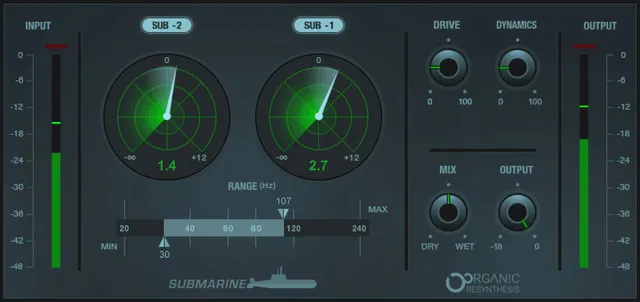
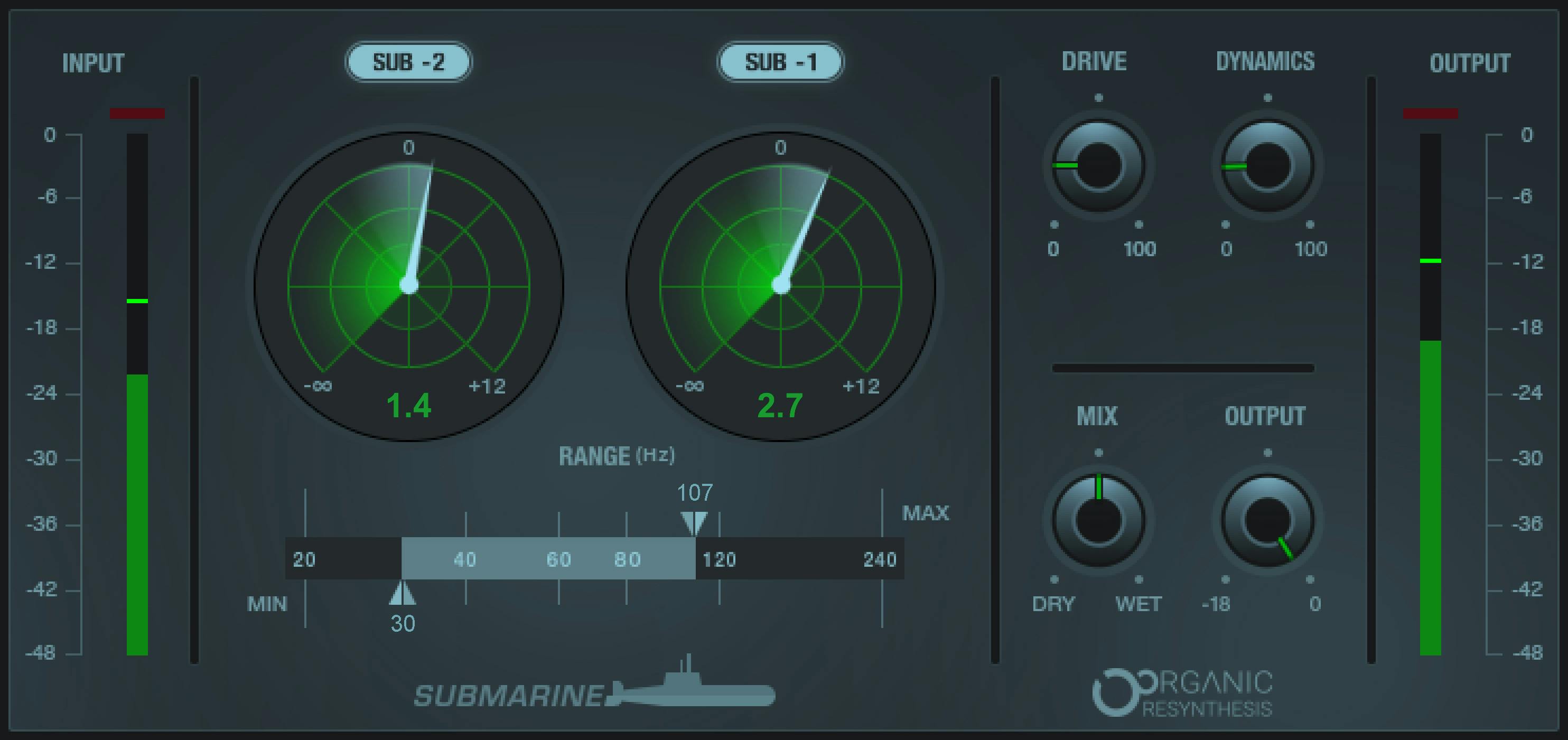
The product page currently lists Mono and Stereo components. The linked guide uses older interface artwork and documentation. The official Graphic Library image omits the Mono Sub button, which the manual documents as Stereo-component-only; the image alone does not prove the component configuration or the appearance of a current installed build.
Components and full control map
| Control | Documented range/options and default | What it affects |
|---|---|---|
| Mono / Stereo component | Current product page lists Mono and Stereo; V10–V17. | Plugin channel configuration. Mono Sub is a control inside the Stereo component, not a separate Mono Sub component. |
| Min | 20–120 Hz; default 20 Hz; 48 dB/octave. | Lower edge of the input-frequency range used by both generators. |
| Max | 40–240 Hz; default 150 Hz; 24 dB/octave. | Upper edge of the input-frequency range used by both generators. |
| Sub Generator −1 | Level −∞ to +12 dB; default 0 dB; On by default. | Generates content one octave below frequencies inside the selected range. Separate level and On/Off. |
| Sub Generator −2 | Level −∞ to +12 dB; default 0 dB; On by default. | Generates content two octaves below frequencies inside the selected range. Separate level and On/Off. |
| Link both generators | Select both by dragging a rectangle around the two controls (manual p. 7). | Links the generator controls so they can be adjusted together. The guide does not specify a numeric linked range or exact gesture tolerance. |
| Drive | 0–100; default 0. | Adds harmonic distortion to the generated sub signal only. Waves warns high settings may make distortion audible. |
| Dynamics | 0–100; default 0. | Compression applied to generated sub only; 0 means no compression and 100 maximum compression per manual. |
| Mono Sub (Stereo component only) | Mono or Stereo; default Mono. | Sets the generated sub signal’s mono/stereo presentation; it does not collapse or switch the original input. |
| Mix | Dry (0) to Wet (100); default 50. | Balances original dry input and generated wet sub signal. Manual recommends 100% wet for its direct-LFE/aux routing example. |
| Output Gain | −18 to 0 dB; default 0 dB. | Lowers plugin output level. Added sub energy may raise overall level, so monitor output. |
| Input and output meters | Each meter displays both a full-scale peak reading (−48 to 0 dBFS) and a slower Digital VU reading (−48 to 0 dBFS). | Read-only meters. One infinite-hold clip indicator sits above each input/output meter; clicking either clip indicator clears both meters. |
Set the input range before choosing a generator
Min and Max bracket the source frequencies that feed the subharmonic generators. The resulting one- or two-octave content is below those selected frequencies. Min’s range is 20–120 Hz with a 48 dB/octave slope; Max’s is 40–240 Hz with a 24 dB/octave slope. Their defaults are 20 Hz and 150 Hz respectively.
The manual advises choosing a range that includes the source fundamentals of interest while avoiding unnecessary upper harmonics. It also cautions that too-low a Max setting can omit the fundamental. Start by identifying the source range that matters, then watch the generated signal and output level. The guide does not establish that any particular settings work for a given instrument, room or playback system.
The two generators, link gesture, Drive and Dynamics
Sub Generator −1 adds generated content one octave below the selected range; Sub Generator −2 adds content two octaves below it. Each has its own level from −∞ to +12 dB, default 0 dB, and each generator is on by default. You can switch them individually; the manual does not say that the screenshot’s control positions are default evidence.
To link both generator controls, the manual instructs dragging a rectangle around them. This is a control-selection gesture, not an external sidechain or host sync. The sources do not document an external sidechain input for Submarine.
Drive (0–100, default 0) adds a small amount of harmonic distortion to the generated signal; Waves notes that higher settings may make distortion audible. Dynamics (0–100, default 0) compresses the generated sub, with 0 meaning no compression and 100 the maximum. Neither control is documented as processing the original dry input.
Mono Sub, Mix and Output Gain
The Mono Sub option exists only in the Stereo component. It selects Mono or Stereo for the generated subs and defaults to Mono. It does not create a standalone mono-sub plug-in component or change the original stereo input. Waves lists only Mono and Stereo components on its current product page; do not infer a dedicated LFE component.
Mix runs from Dry (0) to Wet (100), with a documented default of 50%—an even dry/wet mix. For the manual’s direct-LFE or auxiliary-send routing example, it recommends 100% wet. That recommendation depends on the routing context and is not a universal setting.
Output Gain ranges from −18 to 0 dB and defaults to 0 dB. Its purpose is to reduce the plugin output level. Because generated subs add energy, monitor the output meter and clipping state rather than assuming the input and output levels will match.
Read the meters and clear peak clips
Submarine has two types of read-only meters. The Full-Scale peak meters show input and output levels over a −48 to 0 dBFS scale. Their clip indicators trigger at 0 dBFS; clicking either of those full-scale clip lights clears both meters’ clip state.
Each input and output meter contains two readings: a full-scale peak bar and a slower Digital VU reading. The manual describes the VU reading as a slower indication of overall energy compared with the peak reading; both are marked −48 to 0 dBFS. One infinite-hold clip indicator appears above each meter. Clicking either the input or output clip indicator clears both meters’ clip indications. Do not interpret these level displays as measurements of a room or playback system.
WaveSystem toolbar
The manual documents the common WaveSystem toolbar for saving/loading presets, comparing settings, undoing/redoing changes, resizing the interface and opening the WaveSystem Guide. These are shared host/interface tools, not additional Submarine processing controls.
A careful operating sequence
- Select Mono or Stereo component to match the signal path. If using Stereo, note that Mono Sub is a separate choice for the generated sub signal only.
- Set Min and Max to bracket the source frequencies you intend to use. Begin with the documented defaults only as starting points, not as universal settings.
- Enable the −1 generator, −2 generator or both as needed. Set levels deliberately; both default to 0 dB and both are on by default.
- If adjusting both generators in tandem, use the manual’s rectangle-selection gesture to link their controls.
- Keep Drive and Dynamics conservative at first; both affect the generated signal, and high Drive may make distortion audible according to Waves.
- Choose a dry/wet balance that matches routing. In a parallel aux/LFE-style path, Waves’ manual describes a 100%-wet setup; check your own routing before adopting it.
- Monitor the peak and Digital VU readings shown in each input/output meter. If the infinite-hold clip indicator lights, address the level and click either input/output clip indicator to clear both meters’ clip indications.
This sequence summarizes the manual’s control relationships; it is not a tested preset or promise of a particular result.
Where it may fit—and when to skip it
Submarine may be worth considering when you specifically want generated one- or two-octave subharmonic content beneath a selected input range and need separate control over generator level, processing, blend and output. It is not the right description for ordinary bass EQ: it creates additional content rather than merely raising existing low frequencies.
Waves’ manual advises using Submarine on one or two tracks rather than generally on the master bus, and notes that playback systems may not reproduce very low frequencies; it suggests monitoring the added low-frequency energy. These are vendor recommendations, not independent test findings. Skip or verify further if you need a documented multichannel/LFE component, a promised low-frequency result on a system that may not reproduce those frequencies, a host-specific compatibility guarantee, or a measured output/latency figure. The current product page lists Mono and Stereo components, and the older linked manual is not a substitute for confirming current-build details.
Related Waves tools
Submarine’s generated-low-frequency task is distinct from equalization. For conventional fixed-band tone shaping, see Waves’ SSL G-Equalizer; for a dynamic frequency-selective tool, see F6 Floating-Band Dynamic EQ. The site’s Waves F6 guide explains that different EQ workflow. For a separate bass-enhancement approach, see the live Waves Renaissance Bass guide; the Waves Audio Post Resources hub links broader Waves guides. These are category distinctions, not comparative listening findings.
Sources
Primary sources checked October 18, 2026. Waves Submarine product page, which lists Mono and Stereo components and links the manual; Submarine User Guide, ten pages; and the Waves Graphic Library. The product page is the source for current component listings; the linked manual is older and is used for its detailed controls. No installed plugin, host compatibility, audio processing, listening test, measurement or latency test was performed.
FAQ
What does Waves Submarine do?
Waves describes Submarine as generating new subharmonic content one or two octaves below frequencies in a selected input range, using its proprietary Organic ReSynthesis process. It is a generator rather than an EQ that only boosts existing bass; this guide does not claim a measured or guaranteed result.
What do Submarine’s Min and Max controls select?
Min and Max bracket the input frequencies used by the generators. Min ranges from 20–120 Hz and defaults to 20 Hz with a 48 dB/octave slope; Max ranges from 40–240 Hz and defaults to 150 Hz with a 24 dB/octave slope. Generated subs sit one or two octaves below the selected input range.
What is the difference between Sub Generator −1 and −2?
Sub Generator −1 generates content one octave below the selected range; Sub Generator −2 generates it two octaves below. Each has a −∞ to +12 dB level range, defaults to 0 dB and is on by default.
How do I link the two Submarine generators?
The manual says to drag a rectangle around both generator controls to select and link them so they can be adjusted together. This is a control gesture, not an external sidechain or host-sync feature; the manual does not specify a numeric linked range.
What do Drive and Dynamics process?
Drive adds harmonic distortion to the generated sub signal and ranges from 0–100, default 0; Waves warns higher settings may make distortion audible. Dynamics compresses generated sub only, ranges from 0–100 and defaults to 0, which the manual defines as no compression and 100 as maximum.
Is Mono Sub a separate plugin component?
No. The current product page lists Mono and Stereo components. Mono Sub is a Mono/Stereo selector inside the Stereo component, defaults to Mono and changes the generated subs’ presentation, not the original input. The official Graphic Library image omits this Stereo-only button; that image alone does not prove the component configuration or a current installed interface.
What is Submarine’s default Mix and Output Gain?
Mix defaults to 50%, an even dry/wet balance, and ranges from Dry (0) to Wet (100). Output Gain defaults to 0 dB and ranges from −18 to 0 dB. Waves’ manual recommends 100% wet for its direct-LFE/aux routing example, not for every use.
How do the Submarine meters and clip resets work?
Each input/output meter shows both a full-scale peak reading and a slower Digital VU reading, each over −48 to 0 dBFS. One infinite-hold clip indicator sits above each meter. Clicking either the input or output clip indicator clears both meters’ clip indications.

About the Author
Joseph Nilo has been working professionally in all aspects of audio and video production for over twenty years. His day-to-day work finds him working as a video editor, 2D and 3D motion graphics designer, voiceover artist and audio engineer, and colorist for corporate projects and feature films.