
Waves V-Comp combines an input-driven compressor, a separate limiter and modeled analog character. Its compressor has no dedicated Threshold knob: Input changes how hard the signal drives it, while the limiter has its own Limit Level.
This guide follows the complete current product-linked V-Series manual and authentic current interface artwork. I have not run or auditioned the plug-in; the operating descriptions are documentary, not measurements or listening judgments.
My Short Version
Keep Input, Output and post-mix Trim separate in your thinking. Input affects the signal entering the process; Output sets the processed output; Trim adjusts level after the dry/wet Mix.
The compressor and limiter have different switches and timing controls. Do not mistake the limiter's Fast/Slow Attack for an independently adjustable compressor attack.
Auto Makeup is approximate and nonlinear. It links Input movement to Output in one direction, rather than providing a guarantee that every setting change is level-matched.
Best for and when to choose something else
Best for: a bus or track workflow where a small set of ratios, selectable release settings and input-driven compression suit the task.
Choose another tool when: you need a separate compressor Threshold and Attack, continuously variable timing, or a documented true-peak delivery ceiling. Those are workflow distinctions, not an auditioned claim about which processor sounds better.
The modeled 2254 hardware reference and descriptions of vintage character come from Waves. They do not establish an independently verified match to a particular hardware unit.

Components, input calibration and editing
The current product metadata lists Mono and Stereo components. It does not establish a Mid/Side component or publish a separate stereo-link adjustment.
Input ranges −24 to +18 dB in 0.1 dB increments. The manual describes vertical dragging, double-click numerical entry, and up/down arrows for incrementing or decrementing a selected value.
Because there is no compressor Threshold knob, raising Input changes how the signal drives the modeled compressor. That does not make Input interchangeable with limiter Limit Level or final Trim.
The guide uses the reference 0 dBu = −22 dBFS and recommends roughly −22 to −17 dBFS as an operating-level context. This is vendor calibration guidance, not a numerical startup default or a requirement demonstrated by this article.
No global set of default switch/knob positions is published. Static selections in the official image are not a substitute.
Output, meter modes and the clip light
Output is continuously adjustable over ±18 dB, using the same documented entry methods as Input. It is distinct from the later post-mix Trim control.
The Meter switch selects Input, Output or Gain Reduction, showing one at a time. The manual calls its single scale dBFS and says Gain Reduction is shown without makeup.
The guide says the meter is disabled when V-Comp is bypassed. A red clip light indicates over-level, but the V-Comp section does not document exact meter ballistics, a separate clip threshold or a click-reset gesture.
Do not import the equalizers' explicitly documented clip-reset and peak-Trim behavior from another section of this combined manual.
Analog: Off, 25%, 50%, 100%
Analog selects Off, 25%, 50% or 100%. Waves describes it as controlling the modeled device's harmonic distortion and noise characteristics.
These are analog-modeling amounts, not the final dry/wet Mix. The guide gives no quantitative distortion/noise curve for each position and no initial Analog setting.
Turning Analog off is also not the same operation as switching the compressor or limiter off, or selecting host bypass.
Compressor switch, Ratio and Release
Compress On/Off enables or disables the compressor. The manual does not state its default.
Ratio offers 1.5:1, 2:1, 3:1, 4:1 and 6:1. Unlike the other controls, the source says a ratio change takes effect when the mouse is released, because the plug-in accesses large tables when changing ratios.
This is not a continuous ratio sweep that the guide promises you can hear while dragging.
Compressor Release offers 400 ms, 800 ms, 1.5 s and Auto. Auto adapts to the input signal for what the manual calls a nominal release; it does not supply an exact adaptive timing law or a default selection.
There is no separately exposed compressor Attack in the documented panel. The limiter's Attack control belongs to a different stage.
De-Esser
The De-Esser switch changes the compressor into what the manual calls a simple de-esser.
No frequency, sidechain filter, threshold or listen control is separately documented for this function. The guide does not publish the detection band or a complete de-essing algorithm, so none is assigned here.
The independent limiter
Limiter On/Off controls the limiter independently of Compress.
Limit Level sets its threshold from +4 to +12 dBu in 0.5 dB steps. Preserve the guide's reference: +22 dBu equals 0 dBFS. The knob is not labeled as an unqualified dBFS ceiling.
Limiter Attack has two settings: Fast = 1 microsecond and Slow = 1 millisecond.
Limiter Release offers 100 ms, 200 ms, 800 ms and Auto. This is separate from the compressor's Release selector, even where a timing label appears in both lists.
The guide does not specify a complete compressor/limiter internal tap diagram, true-peak mode or final post-Trim ceiling. A limiter section is not an end-to-end clipping guarantee.
Auto Makeup: a one-way, nonlinear link
The source's setup sequence is to set Input and Output with Auto Makeup off, then engage it. Increasing Input then reduces Output correspondingly, aiming to keep volume approximately steady.
The link works from Input to Output, not the reverse. You can adjust Output without automatically changing Input.
The guide also says this relationship is not linear. At very low or high input settings, changing Input can move Output relatively little; the relationship is more direct in the compressor's described operating region.
No exact transfer equation, compensation accuracy or initial Auto Makeup state is given. For an evaluation, do not assume its approximate compensation already makes a fair level-matched comparison.
Mix and post-mix Trim
Mix blends the plug-in input and output, enabling a dry/processed balance.
Trim controls output level after Mix. This is the documented place to adjust the combined signal when comparing it with bypass.
The manual publishes no numerical Mix range/default or Trim range/default. It also does not establish a particular mix taper or a dry-signal latency relationship.
This Trim is a level control, not the V-EQ3/V-EQ4 button that adjusts output using a stored peak. The current V-Comp image and manual distinguish the two.
Presets, toolbar and a conceptual workflow
The WaveSystem toolbar saves/loads presets, compares settings, undoes/redoes changes, resizes the plug-in and opens the WaveSystem Guide from the upper-right icon. A global V-Comp reset command is not separately documented.
A conservative way to understand a setting is to identify which stages are enabled, set Input in the source's stated operating context, then select Ratio and compressor Release. Treat limiter setup as a separate decision.
If using Auto Makeup, follow its documented setup order. Set Mix, then use the post-mix Trim for the combined output level. Compare at a suitable listening level and keep downstream headroom visible.
That is a suggested evaluation order, not a tested preset or a promise of a particular sonic result.
Related Waves guides
The Renaissance Compressor guide covers a dedicated compressor workflow with more individually exposed controls. The WLM Plus guide covers loudness and level metering as a separate task, not functionality built into V-Comp.
The Waves Audio Post Resources hub collects other live guides. For the separate licensing topic, see Waves subscription versus perpetual licensing.
Sources and documentation limits
Checked October 19, 2026, America/New_York. The official V-Comp product page links the complete 20-page V-Series guide, read in full.
V-Comp controls are on printed pages 15–19, with the overview on 14 and toolbar on 20. The book also covers V-EQ3/V-EQ4; their Trim/reset functions are not imported into V-Comp.
The linked guide is labeled V16. Waves lists newer versions on the product page. The descriptions of Auto Makeup, Mix and Trim follow the linked guide.
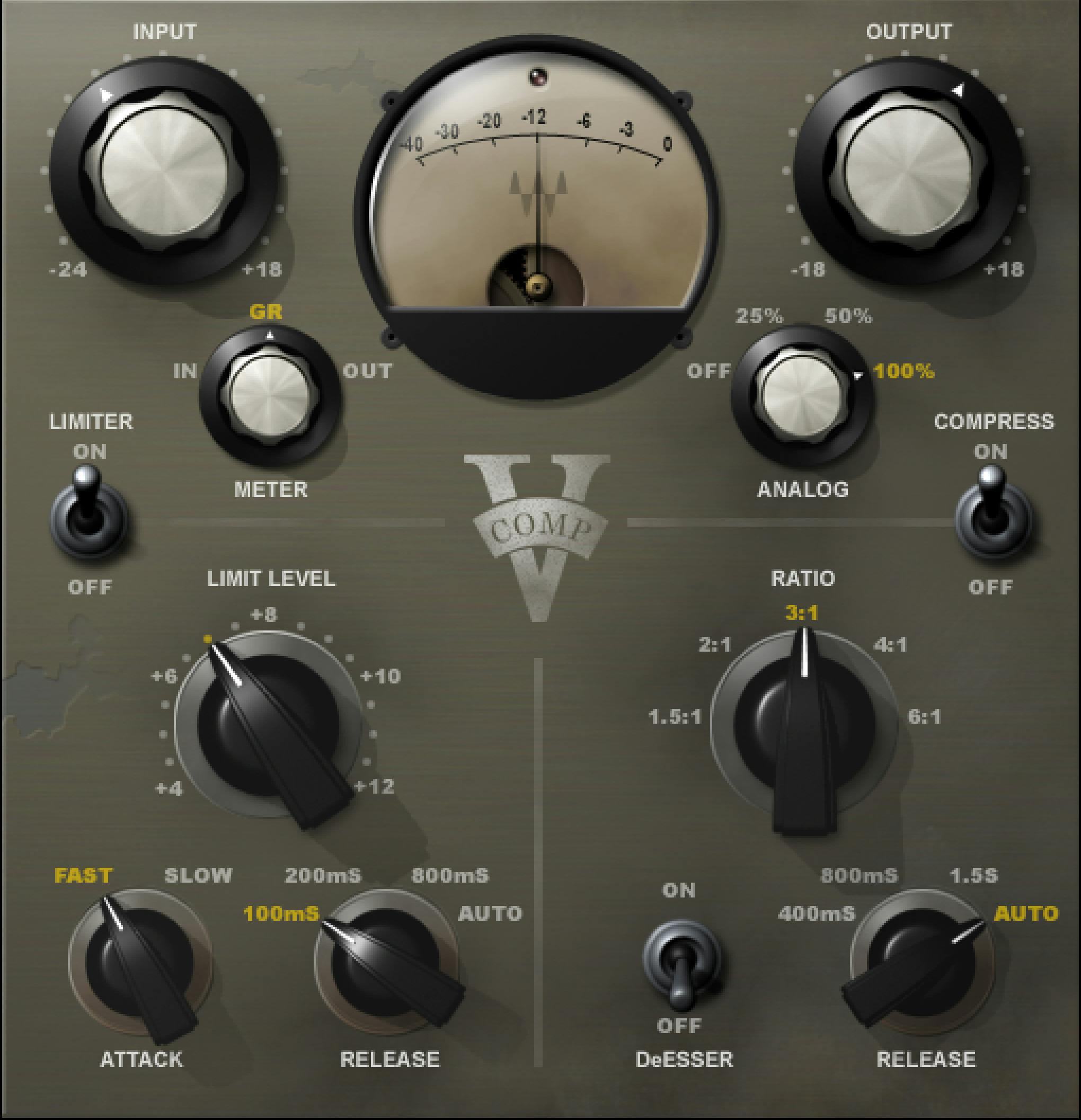
The Graphic Library illustration above shows an earlier panel. Refer to the linked guide for the controls absent from that image.
FAQ
Does V-Comp have a compressor Threshold control?
No separate compressor Threshold knob is documented. Input gain changes how the signal drives the modeled compressor. The Limiter has its own Limit Level control, so the absence of a compressor Threshold knob must not be generalized to the entire plug-in.
How do V-Comp's compressor and limiter differ?
They have separate On/Off switches and Release controls. The compressor offers five ratios and a De-Esser switch. The limiter has Limit Level and Fast/Slow Attack controls. Limiter Attack is not an independently adjustable compressor Attack control.
What does Auto Makeup actually link?
It links Input changes to Output in one direction; changing Output does not move Input. The manual describes a nonlinear relationship that keeps level approximately steady, not guaranteed level matching. It instructs setting Input and Output with Auto Makeup off before engaging it.
What do Mix and Trim do?
Mix blends the plug-in input and output. Trim adjusts output level after that mix, allowing a post-mix comparison with bypass. The guide does not publish numeric Mix or Trim ranges/defaults. This Trim is not the V-EQ equalizers' peak-reset button.
Why does changing Ratio wait until I release the mouse?
The guide explicitly says Ratio changes take effect when the mouse is released because changing ratios accesses large processing tables. It lists 1.5:1, 2:1, 3:1, 4:1 and 6:1. It does not document continuous ratio changes during dragging.
How is Limit Level calibrated?
Its documented range is +4 to +12 dBu in 0.5 dB steps. The manual supplies the reference +22 dBu equals 0 dBFS, with 0 dBu corresponding to -22 dBFS. Those referenced settings are not a true-peak ceiling or an unconditional final-output safety guarantee.
What does the meter show?
The Meter switch selects Input, Output or Gain Reduction, one at a time. The guide says the scale is dBFS, Gain Reduction excludes makeup, and the meter is disabled in bypass. A red light indicates over-level; a V-Comp-specific click-reset gesture and exact ballistics are not documented.
Which V-Comp interface does this guide use?
The illustration shows an earlier V-Comp panel from the Waves Graphic Library. The control explanations follow the product-linked V16 update guide, which documents Auto Makeup, Mix and Trim. Those three controls are absent from the pictured panel.

About the Author
Joseph Nilo has been working professionally in all aspects of audio and video production for over twenty years. His day-to-day work finds him working as a video editor, 2D and 3D motion graphics designer, voiceover artist and audio engineer, and colorist for corporate projects and feature films.