
Waves Voltage Amps combines a five-amp Guitar processor and a separate two-amp Bass processor. Guitar adds channel selection, Focus, a gate and cabinet-pair selection; Bass combines parallel Direct and Drive paths with its own amp-voice controls.
The controls are not identical across those two processors. Knowing which panel you have open matters more than treating every knob as another way to add gain.
This is a documentary guide based on Waves' complete linked manual, current product page and actual official interface image. I have not run or auditioned the plug-in; descriptions of tone, modeling and limiting are vendor statements, not listening results.
My Short Version
For Guitar, choose an amp and Clean/Drive/Lead channel first. Then separate the jobs of Input, Focus, preamp Gain, channel Volume and final Output.
For Bass, think in parallel paths: Direct and Drive both start from the input. Drive's Fat/Tight/Sharp choices are not the numbered Amp Voice modes.
Room means early reflections, not a long reverb tail. Cab Bypass is the documented route when using an external cabinet loader after Voltage Amps.
The guide supplies many ranges, but not a universal default preset. Static knob positions in the official artwork do not fill that gap.
Best for and when to choose something else
Best for: comparing several amp characters without loading a different plug-in for every amp, or building a Bass sound with separately adjustable Direct and Drive contributions.
Consider another workflow when: you need a specifically identified hardware reproduction, detailed microphone placement, or user-defined cabinet IR loading inside the amp itself. Waves describes these amps by musical style and era rather than as models of named hardware units.
The manual's quick starts are useful suggested orders, not tested recipes. An appropriate input level and downstream headroom still matter.
Components and the real interface
The guide explicitly lists mono-to-mono, mono-to-stereo and stereo components for both Guitar and Bass. It does not describe a Mid/Side component.
Guitar: Royal-X, Aggro, Blue Flame, Arena and Silverado. Each offers Clean, Drive and Lead.
Bass: Vintage Velvet and Dark Mass. Its panel has Direct, Drive, Amp Voice and EQ controls; it does not have the Guitar processor's three-channel selector.
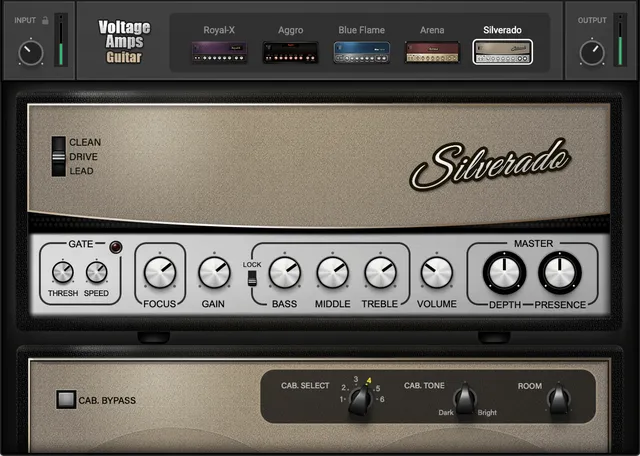
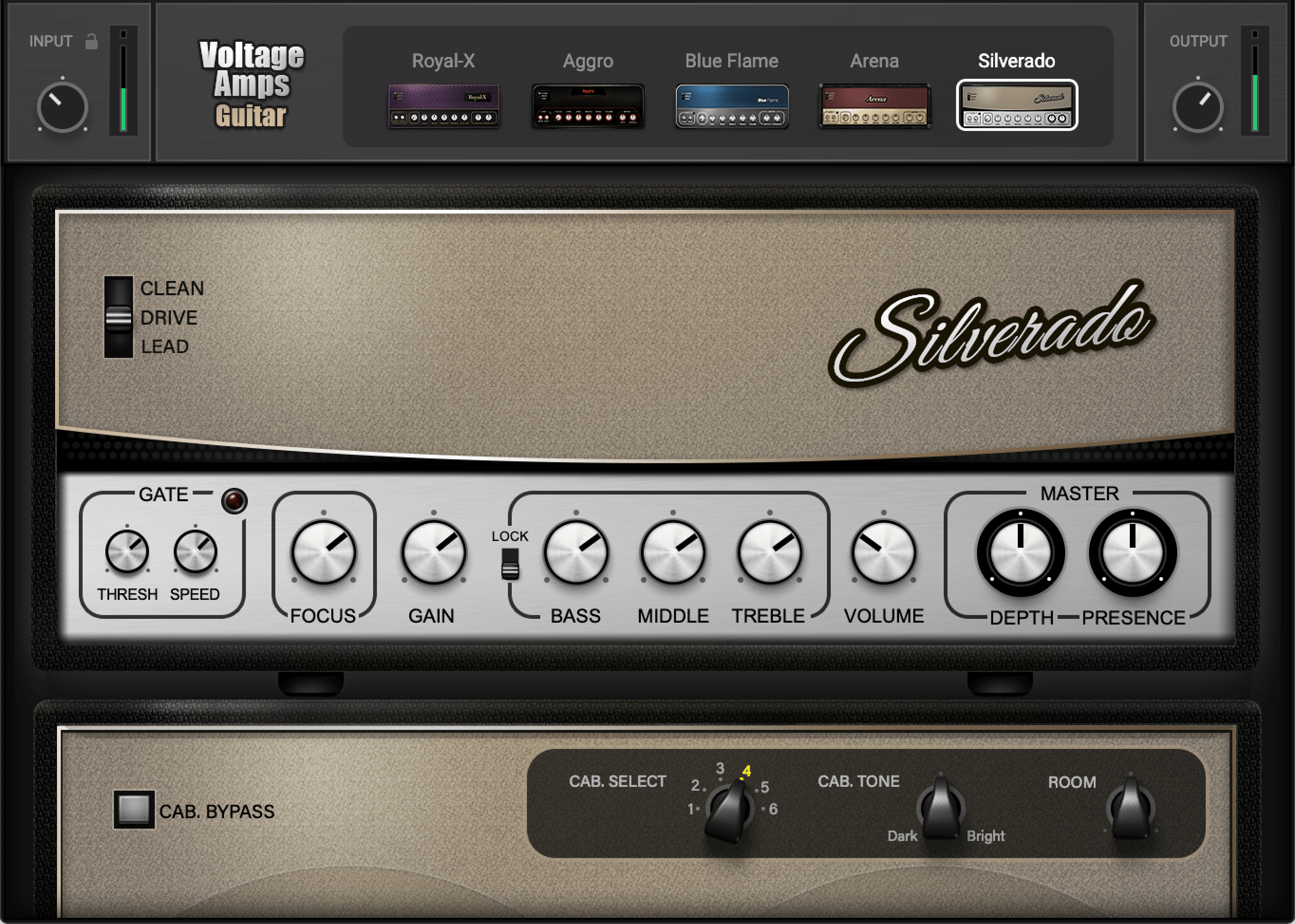
The official illustration used for this guide depicts Guitar, with Silverado selected. It is not an image of the Bass panel or a record of startup settings.
Guitar Input, input Lock and amp channels
Input adjusts level entering from the audio interface over −12 to +12 dB. The nearby Lock prevents that setting changing when a preset is loaded.
The input meter uses the guide's −12 to +12 dB scale. Blank means no input; green indicates a low signal, orange an acceptable signal and red a hot signal. Waves says occasional red may be acceptable, while constant red calls for reducing input. These are qualitative guide descriptions, not a calibrated clipping threshold.
The five amp buttons select different amp characters. The Clean, Drive and Lead channel selector changes each amp's gain structure.
Waves describes Clean as less driven, Drive as stronger and Lead as the hardest-driven channel. Its individual descriptions on pages 9–10 distinguish each amp/channel combination; they are not proof that a particular setting will sound the same on every guitar.
No initial amp, channel, Input or Lock selection is explicitly established as a universal default.
Guitar Gate and Focus
The Gate is described between the amp's tubes and EQ. Threshold sets its opening/closing level from −60 to 0 dB.
Speed jointly controls attack and release over 0–10. The source does not translate that scale into milliseconds or give separate timing knobs.
The manual's suggestion that values below −40 dB can remove low-level noise without affecting notes is setup guidance, not a guaranteed threshold or a default.
Focus ranges 0 to +10 and acts before EQ. Its footnote describes a sweepable bell affecting the low and high frequencies entering the amp, influencing the early harmonic stages.
Focus addresses the selected amp and channel, so its settings change with those selections. It is not merely a final bright/dark finishing control, and no exact frequency/Q mapping is published.
Guitar EQ, channel Volume and EQ Lock
The five controls in this section use 0–10:
- Gain: input level to the preamp.
- Bass, Middle and Treble: the respective tonal regions.
- Volume: EQ-section output for the selected amp channel.
Volume provides a way to balance different amp/channel settings. It is separate from preamp Gain and the plug-in's final Output.
EQ Lock has a specific documented behavior. With Lock On, each amp's individual EQ settings are retained when switching amps or channel types. With Lock Off, the same EQ settings remain regardless of the selected amp.
That distinction qualifies the broader description of settings persisting during comparisons. It does not mean that every parameter always stays fixed, or that loading a preset cannot change anything.
The guide gives no default Lock state, fixed EQ center frequencies or numeric Q settings.
Guitar Master and cabinet controls
Depth shapes the low end sent to the speakers; Presence shapes the high end. Both use 0–10, in what the source calls the last harmonic stage before the cabinet speakers.
Cab Select chooses among six cabinet pairs. The source describes positions toward the left as generally darker and those toward the right as brighter, without naming six hardware models.
Cab Tone blends the two cabinets in the selected pair. Counterclockwise is described as thicker/darker, clockwise as brighter/thinner; the midpoint is an equal blend.
Room adds early reflections around the cabinet. It does not add a reverb tail. Fully counterclockwise bypasses Room; higher settings are described as increasing the sense of space.
No numerical Cab Tone or Room range, wet percentage or startup default is stated.
Cab Bypass removes the built-in cabinet contribution for an external-cabinet workflow. The manual's example places an IR loader after Voltage Amps Guitar. It does not describe importing a custom IR into Voltage Amps itself.
Guitar Output and metering
Output sets plug-in output level. Its knob's numeric range and default are not provided.
The output meter is described over −24 to +24 dB, with low/acceptable/hot color indications. That meter scale is not a substitute for the missing knob range.
Waves states that output is limited to −0.1 dB, with a red LED at that level, and says clicking the clip LED resets it. This does not establish a measured true-peak ceiling or guarantee that later processing cannot clip.
Bass Input, amplifier choice and recall
Bass Input ranges −12 to +12 dB. Its input Lock protects this setting when a preset loads.
The adjacent LED gives approximate low/moderate, aggressive and hot indications. Constant red calls for reducing input in the manual's guidance; no quantitative color thresholds are published.
Choose Vintage Velvet or Dark Mass with the amp buttons. The guide says settings belong to the selected amp and return when that amp is reselected.
Bass does not gain a Clean/Drive/Lead selector merely because some later sentences reuse Guitar channel terminology.
Bass Direct and Phase Reverse
The Direct section shapes a DI contribution alongside the amp path.
Tone, Level and Amp–DI each range 0–10. Tone changes Direct's color; Level changes its gain before the Direct mix; Amp–DI balances Direct against the rest of the chain.
Phase Reverse changes the Direct signal's polarity. It is not a continuously adjustable phase or delay control.
The guide explicitly warns that Direct Tone at zero is not a full bypass: audio still passes through the plug-in and limiter, so input and output need not be identical.
Direct and Drive are parallel, both fed from the input. They are not a serial Direct-then-Drive effect chain.
Bass Drive and numbered Amp Voice
Drive offers Fat, Tight, Sharp and Off. Click the name box to cycle choices or use its drop-down menu.
Drive Tone changes color; Gain sets the drive level feeding its mix and then the amp; Mix adjusts the Drive contribution relative to the amp.
Those three Drive knobs have no explicitly supplied numerical ranges or defaults. The separate Direct and EQ 0–10 statements are not automatically their specifications.
Amp Voice is a different selector: buttons 1, 2 and 3. The detailed controls page describes bell-filter shapes progressing from narrow Q at Voice 1 to wider Q at Voice 3, without numerical Q or frequency values.
An overview caption calls Amp Voice “Fat, Tight, Sharp,” but the actual numbered controls and detailed page 19 distinguish Amp Voice from Drive. That caption does not rename the buttons or establish additional modes.
Bass EQ, cabinet and output
Bass Gain, Bass, Mid, HiMid and High each use 0–10. Gain adds harmonic distortion at the input to the mix; the other controls shape their named frequency regions.
The guide associates these settings with the selected amp. No fixed band frequencies, numeric Q values or startup defaults are stated.
Cab Tone blends two cabinet IRs, with an equal mix at midpoint. Bass's documented panel does not have Guitar's six-pair Cab Select.
Room adds early reflections, not a tail, and is dry/bypassed fully counterclockwise. Cab Bypass supports placing another IR loader after Bass.
Bass also has Output and an output meter. The text gives the meter's −24 to +24 dB scale and vendor −0.1 dB limiting claim, plus click reset for the clip LED. It does not give the Output knob's numerical range/default.
Presets and a practical evaluation order
The WaveSystem toolbar saves/loads presets, compares settings, undoes/redoes changes, resizes the window and opens its guide from the upper-right menu. Input Lock and Guitar EQ Lock have different jobs from these shared utilities.
For Guitar, a useful conceptual order is amp/channel → Focus and gate → Gain/EQ/Volume → Master and cabinet → Output. Revisit earlier controls when a later adjustment changes the balance.
For Bass, start with the amp, then judge Direct and Drive separately before settling the Amp–DI/Drive balance. Use Amp Voice and EQ to shape the amp contribution, then address cabinet and output.
These are suggested ways to isolate decisions, not auditioned presets. Keep downstream headroom visible; the documented limiter is not a substitute for checking the rest of the chain.
Related Waves guides
The F6 guide explains separately controlled filtering and dynamic EQ when you need a frequency-focused task outside an amp's broad tone controls.
The WLM Plus guide covers level and loudness metering as a separate workflow. Neither relationship implies these tools reproduce Voltage's amp character.
See the Waves Audio Post Resources hub for other live guides, or subscription versus perpetual licensing for the separate licensing topic.
Sources and documentation limits
Checked October 19, 2026, America/New_York. The official Voltage Amps product page links the complete 20-page Guitar/Bass guide, read in full.
Guitar controls are on pages 7–14; Bass controls on 17–20. The descriptions above keep the two processors distinct, preserve the Bass Amp Voice caption difference and qualify the general settings-retention language with the detailed Lock behavior.
The Guitar overview's stray “bass sound” wording and Bass paragraphs reusing channel terms do not establish extra controls. Numeric defaults and mappings not published by the guide remain unspecified.
The Graphic Library provides the authentic Guitar image. Product version listings and static art do not identify an installed build or prove runtime behavior.
FAQ
What does Voltage Amps include?
It includes separate Guitar and Bass processors. Guitar has Royal-X, Aggro, Blue Flame, Arena and Silverado, each with Clean, Drive and Lead channels. Bass has Vintage Velvet and Dark Mass. The guide explicitly lists mono-to-mono, mono-to-stereo and stereo components for each processor; it does not describe a Mid/Side component.
How do Input, Gain, Volume and Output differ in Guitar?
Input adjusts the signal entering the plug-in. Gain controls the preamp input, Volume controls the EQ-section output for the selected amp channel, and Output sets plug-in output level. Their jobs differ even though several can change level. Input is documented as -12 to +12 dB; the five EQ-section controls use 0 to 10. The Output knob's numeric range is not supplied.
What does Guitar EQ Lock do?
The manual says On retains each amp's individual EQ settings when changing amps or channels. Off carries the same EQ settings regardless of the selected amp. This conditional behavior is more specific than the general description that settings persist when comparing amps. No default Lock state is documented.
Does Room add a long reverb tail?
No. Both Guitar and Bass describe Room as adding early reflections, not a reverb tail. Fully counterclockwise bypasses the Room effect. Cab Tone instead blends the selected cabinet pair, with an equal blend at its midpoint. Room and Cab Tone do not have documented numerical ranges or startup defaults.
How are Bass Direct and Drive connected?
They are parallel paths fed from the input, not a serial Direct-then-Drive chain. Direct has Tone, Level, Amp-DI balance and Phase Reverse. Drive has Fat, Tight, Sharp and Off choices plus Tone, Gain and Mix. Direct Tone at zero does not bypass the entire plug-in or its limiter.
Are Bass Amp Voice and Drive the same selector?
No. The detailed Bass controls page and actual panel identify Amp Voice buttons 1, 2 and 3, with bell-filter widths described from narrow to wide. Fat, Tight, Sharp and Off belong to Drive. An overview caption applies the three Drive names to Amp Voice, so that caption is not used to rename the numbered buttons or invent extra Bass channels.
How do I use an external cabinet or impulse response?
The manual says to enable Cab Bypass and place an external cabinet or IR loader after Voltage Amps in the DAW chain. Guitar's Cab Select chooses among six built-in cabinet pairs; Bass's documented cabinet section does not include that six-pair selector. No cabinet model identities or IR-loading operation inside Voltage Amps are established.
Does the output limiter guarantee a safe final peak level?
No independent safety guarantee follows from this guide. Waves states that output is limited to -0.1 dB and describes a red indication and click reset. This is vendor documentation, not a measured true-peak ceiling, downstream clipping test or proof that every signal chain remains safe. The displayed meter scale is also not the Output knob's control range.

About the Author
Joseph Nilo has been working professionally in all aspects of audio and video production for over twenty years. His day-to-day work finds him working as a video editor, 2D and 3D motion graphics designer, voiceover artist and audio engineer, and colorist for corporate projects and feature films.