
Waves Abbey Road RS56 is a three-band passive equalizer with Bass, Treble and Top controls. Each band has an amount, a filter shape, selectable frequency and On/Off control; the Stereo component also offers Stereo, Duo and MS processing modes. Its meter range and VU calibration are separate scales, and the guide states no band or Output Level defaults.
This is a documentary control guide, not a listening review. I have not run the plugin or tested it in a host. The current product page lists Waves versions V9–V17 and Mono and Stereo components. Those listings do not prove installation support or behavior in a particular system.
My Short Version
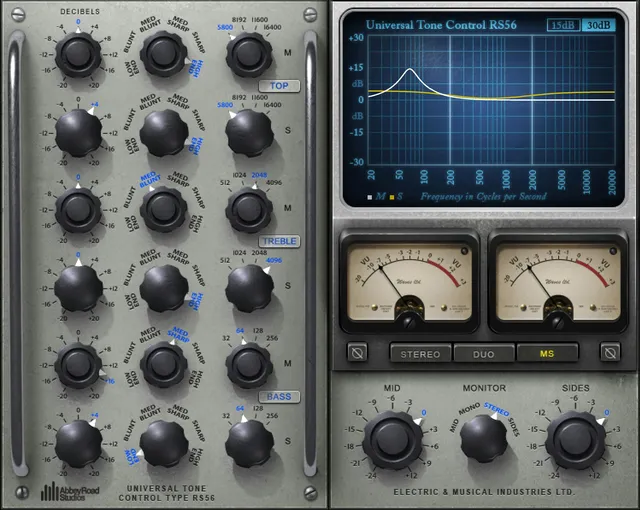
The RS56 organizes its tone shaping into Bass, Treble and Top bands. Each band has a Decibels control, six Width/filter-shape choices, four selectable frequencies and an On/Off switch. The guide gives each Decibels control a ±20 dB range in 0.1 dB increments. Because the processor is described as passive, the manual explains boost-like shaping as attenuation of the rest of the signal rather than amplification of the selected band.
The manual lists two host components: RS56 Mono and RS56 Stereo. The Stereo component adds processing modes: Stereo relatively links the channels, Duo unlinks them for independent settings, and MS encodes, processes Mid and Side separately, then decodes back to stereo. Its Monitor choices depend on that mode. They are not additional host components.
The output controls also depend on mode. In Stereo and Duo, Output Level acts on left/right at the plugin output; in MS it acts on Mid/Sides after matrix encoding. The VU meter's −20 to +3 dB display range is distinct from the −24 to −8 dBFS calibration setting for the level that appears as 0 VU. Neither scale establishes runtime calibration or measurement accuracy.
A passive EQ with three bands
Waves describes the RS56 as a passive equalizer. The manual says a passive design attenuates rather than amplifies; the plugin still labels its band controls as boost/cut amounts. The guide explains that boost-like frequency shaping is created by attenuating the rest of the signal. This is the manual's circuit explanation, not a claim about a measured analog device or about gain outside the plugin.
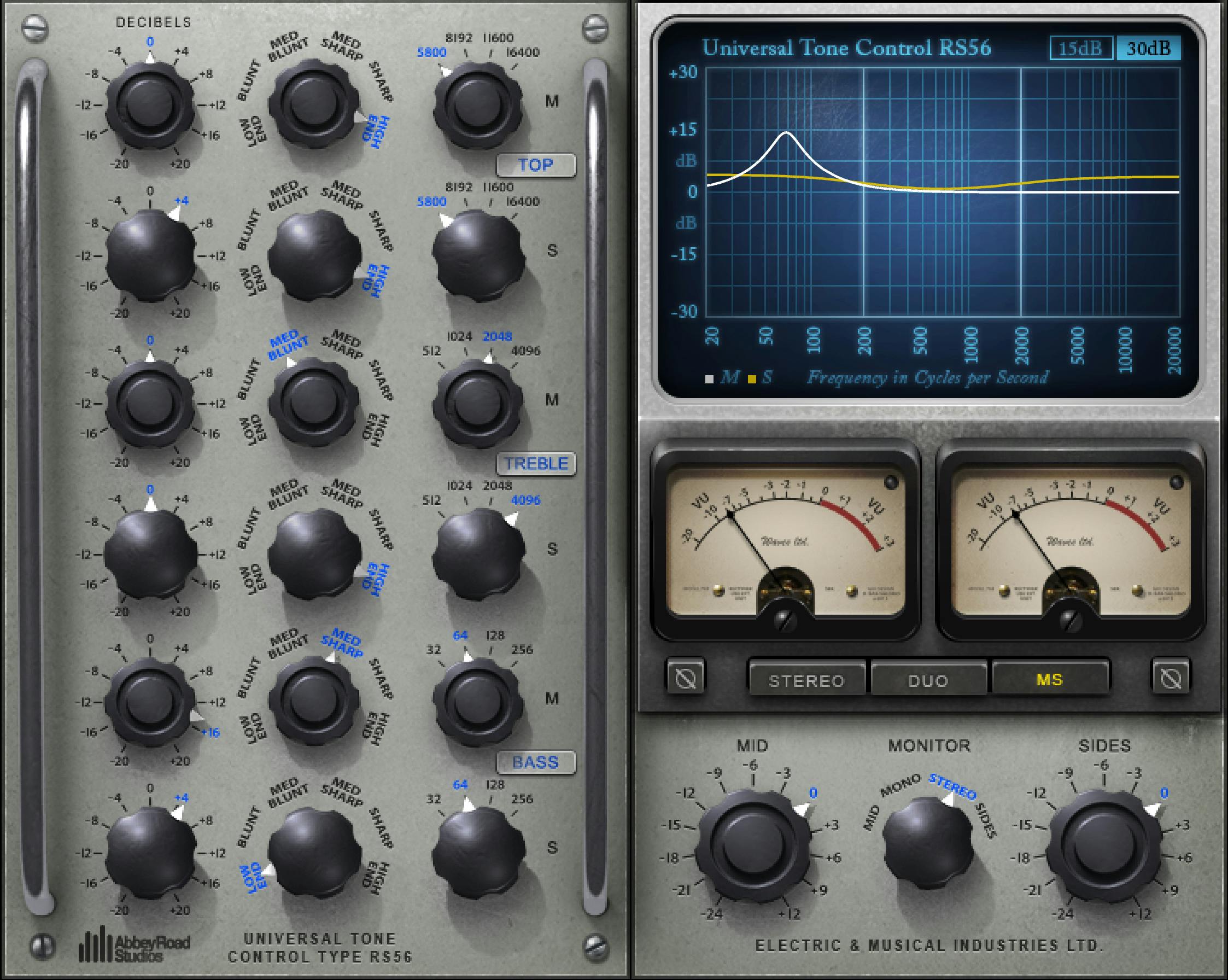
The three bands share the same six Width choices. Each Decibels control ranges from −20 to +20 dB in 0.1 dB steps, and each band has an On/Off switch. No default values are stated.
| Band | Frequency choices | Width choices | Amount and switch |
|---|---|---|---|
| Bass | 32, 64, 128 or 256 Hz | Low End, Blunt, Med Blunt, Med Sharp, Sharp, High End | ±20 dB in 0.1 dB steps; On/Off |
| Treble | 512, 1024, 2048 or 4096 Hz | Low End, Blunt, Med Blunt, Med Sharp, Sharp, High End | ±20 dB in 0.1 dB steps; On/Off |
| Top | 5800, 8192, 11600 or 16400 Hz | Low End, Blunt, Med Blunt, Med Sharp, Sharp, High End | ±20 dB in 0.1 dB steps; On/Off |
The manual defines Low End as a low shelf, Blunt as a very wide bell, Med Blunt as a moderately wide bell, Med Sharp as a moderately narrow bell, Sharp as a very narrow bell, and High End as a high shelf. The guide calls the band frequency a cutoff point; it does not provide a shelf slope, bandwidth value, or default frequency.
Mono and Stereo components
The manual lists RS56 Mono and RS56 Stereo. In the Stereo component, EQ controls can be set independently for left and right channels. The current product page likewise lists Mono and Stereo. The MS processing mode described below is within the Stereo component, not a separate MS host component.
Stereo, Duo and MS modes
The Stereo component's EQ Mode selector changes how the two channels are handled:
- Stereo relatively links the channels and applies the same processing to both.
- Duo unlinks the channels so different settings can be applied to each.
- MS applies an M/S encoding matrix, processes Mid and Side separately, and decodes back to stereo at the output.
These are manual descriptions of the component's modes. They do not establish how a specific host exposes or routes the component.
Monitor and output controls
The Stereo component's Monitor selector chooses what is heard at its monitor output. In Stereo and Duo modes the choices are L (left only), Mono (stereo summed to mono), Stereo, and R (right only). In MS mode the choices are Mid (left plus right), Mono (stereo summed to mono), Stereo, and Sides (left minus right). Monitor selection is distinct from the EQ Mode selector.
Output Level ranges from −24 to +12 dB; the manual states no default. In Stereo and Duo modes it controls left and right levels at the plugin output. In MS mode the left knob controls Mid and the right knob controls Sides directly after matrix encoding. Phase offers In and Out and is described as inverting phase. The guide does not describe a continuously adjustable phase angle or phase-alignment tool.
Graph and VU calibration
The interface's EQ Graph and Output are hidden when the plugin is collapsed. The graph range can be set to ±15 or ±30 dB. The VU Meters display output VU readings over −20 to +3 dB. VU Level Calibration sets the dBFS level that appears as 0 VU, with a range of −24 to −8 dBFS. That calibration setting is not the meter's displayed range, and the manual does not establish measurement accuracy in a current build.
Presets and shared toolbar
The WaveSystem toolbar provides preset save/load, Compare, Undo, Redo, Resize and access to the WaveSystem Guide. No separate reset control is documented. The manual's product image and interface drawings are not proof of a default setting; the source does not state band, phase, output or monitor defaults.
A practical way to read the mode choices
The mode descriptions offer a conceptual distinction: Stereo keeps settings relatively linked, Duo allows different left/right settings, and MS provides separate Mid/Side processing within the Stereo component. The Monitor selector then chooses which signal view is monitored. These explanations follow Waves' manual; they are not host setup instructions or a comparison of sound quality. The six band shapes, documented ranges and frequency choices are available above without assuming a starting preset.
Related tools
For a different equalization workflow with dynamic bands, see the live Waves F6 Floating-Band Dynamic EQ guide. For stereo placement rather than EQ, the live Waves S1 Stereo Imager guide covers a separate task. The Waves Audio Post Resources hub is the site's live index for related Waves guides. These are topic distinctions, not listening comparisons.
Sources and documentation limits
Checked October 19, 2026 (America/New_York). The official Abbey Road RS56 product page links the 8-page Abbey Road RS56 User Manual. The manual was read in full and its band, graph, mode, monitor, meter and toolbar pages were visually reviewed. Product-page component/version listings and guide descriptions are attributed to their respective sources; neither verifies the installed state of a particular system.
The Waves Graphic Library requires attribution and a link from each product image to its relevant Waves.com product page. Artwork is a vendor reference, not a current plugin build or verified default. No plugin, host, or audio test was performed. Defaults not stated in the linked manual remain unspecified.
FAQ
What does “passive EQ” mean in the RS56 guide?
The manual says a passive EQ attenuates rather than amplifies. It explains boost-like shaping as attenuation of the rest of the signal around the selected frequency. That is the guide's circuit description, not a measured analog-device test.
What controls are available on each RS56 band?
Bass, Treble and Top each have Decibels, Width, Frequency and On/Off controls. Decibels range from −20 to +20 dB in 0.1 dB steps; the guide lists four frequency choices for each band and no default settings.
What are the six RS56 Width choices?
Low End is a low shelf; Blunt is a very wide bell; Med Blunt is moderately wide; Med Sharp is moderately narrow; Sharp is very narrow; and High End is a high shelf. The manual does not state bandwidth values or shelf slopes.
What is the difference between the Stereo and Duo modes?
Stereo relatively links the channels and applies the same processing to both. Duo unlinks them so different processing can be applied to left and right. Both are modes of the Stereo component, not separate host components.
How does the RS56 MS mode work?
The guide describes MS as encoding the input, processing Mid and Side separately, then decoding back to stereo. It is a mode of the Stereo component; the manual lists only Mono and Stereo host components.
What can the Monitor selector listen to?
Stereo and Duo modes offer L, summed Mono, Stereo and R. MS mode offers Mid (left plus right), summed Mono, Stereo and Sides (left minus right). The selector is available on the Stereo component.
How do the VU meter range and calibration differ?
The meter displays −20 to +3 dB. VU Level Calibration selects the dBFS level that appears as 0 VU, from −24 to −8 dBFS. These are separate ranges; the guide does not establish runtime calibration accuracy.
Is the Phase control a continuous phase-alignment knob?
No. The manual describes an In/Out switch that inverts phase. It does not document a continuous phase angle or an alignment control.

About the Author
Joseph Nilo has been working professionally in all aspects of audio and video production for over twenty years. His day-to-day work finds him working as a video editor, 2D and 3D motion graphics designer, voiceover artist and audio engineer, and colorist for corporate projects and feature films.