
Waves Linear Phase EQ gives you a Broadband component for general equalization and a Lowband component for focused work in the bass. Linear-phase filtering is designed to preserve relative phase between frequencies while applying a common delay. The two components give you different band layouts for different jobs.
This guide is based on Waves’ documentation. I did not audition the plug-in. The cover is an AI-generated editorial illustration.
My Short Version
Choose Broadband when you need to work across the spectrum. Start with Lowband if the whole job concerns the low end. Set one band’s shape and Frequency, then refine Gain and Q while checking the response curve and the output meter.
Choose Broadband or Lowband
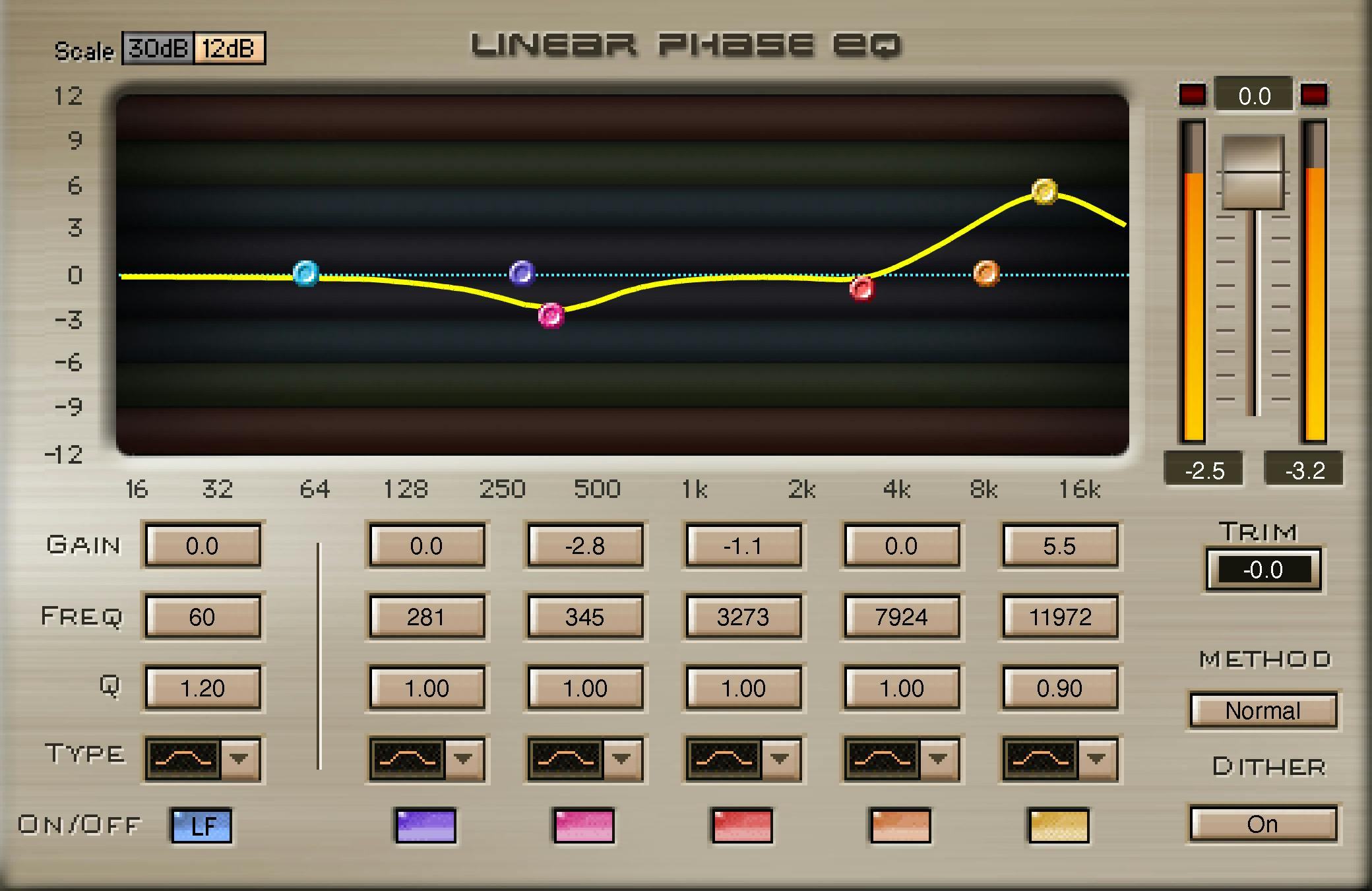

Broadband has six bands. Five are general-purpose bands and the separate LF band is for low-frequency shaping. Lowband has three dedicated low-frequency bands. Waves documents Mono and Stereo versions of both components.
Use Broadband when a low-end change is part of a wider tone adjustment. Try Lowband when you would benefit from several separate bands in the bass. The official figure shows Broadband’s one LF column and five main columns.
Choose a shape, then set the band
Use the band’s On/Off button to include it and choose an available Type. A bell is useful for a focused boost or cut, while a shelf changes the balance toward one end of the spectrum. A pass filter attenuates frequencies outside its cutoff region. The guide gives different options to the dedicated LF band and the main Broadband bands, so check the selected band’s Type menu.
Use Frequency to place the filter. For a bell, use Gain to set how much to change the signal and Q to adjust the width of the change. On supported shelf and cut shapes, Waves describes Q as affecting slope or resonance according to the selected shape. Use the graph to confirm the curve you are making.
Read the response and output
The graph shows how the bands combine. Scale changes the vertical display span. Use it to see small changes more clearly. Watch the output meters after applying boosts, then adjust the overall Gain if the level needs more headroom.
Make one change at a time
Play a section that exposes the tone problem. Set one band and compare the same passage in bypass at a similar level. Check whether the change makes sense in the mix before adding another band. If you are working only in the bass, compare the same task in Lowband to see which band layout suits the adjustment.
Related Waves guides
Waves Q10 covers general parametric EQ and stereo editing. Waves F6 covers bands that react to the incoming signal.
Sources
See the Linear Phase EQ user guide and official Waves product page. The interface image comes from the Waves Graphic Library.
Frequently Asked Questions
How many bands does Broadband have?
It has six bands. Five are general-purpose bands and one is dedicated to low frequencies.
What is the Lowband component for?
It provides three bands for dedicated low-frequency equalization.
What does Q do on a bell filter?
It changes the width of the boost or cut around the selected frequency.
Does Scale change the EQ curve?
It changes the vertical scale of the graph display. The band settings determine the EQ curve.
Which component is pictured?
The Waves Library image shows Broadband, with one LF column and five main band columns.

About the Author
Joseph Nilo has been working professionally in all aspects of audio and video production for over twenty years. His day-to-day work finds him working as a video editor, 2D and 3D motion graphics designer, voiceover artist and audio engineer, and colorist for corporate projects and feature films.