
My Short Version
Waves B360 Ambisonics Encoder turns conventional tracks or a surround mix into four-channel AmbiX B-format. Choose a component for the input, use Rotation and Elevation to place the signal, and monitor through a compatible Ambisonics decoder. Keep the four encoded channels together as they pass to the monitor or export route.
This guide is based on Waves’ documentation. I did not audition the plug-in. The cover is an AI-generated editorial illustration.
Choose the component for the input
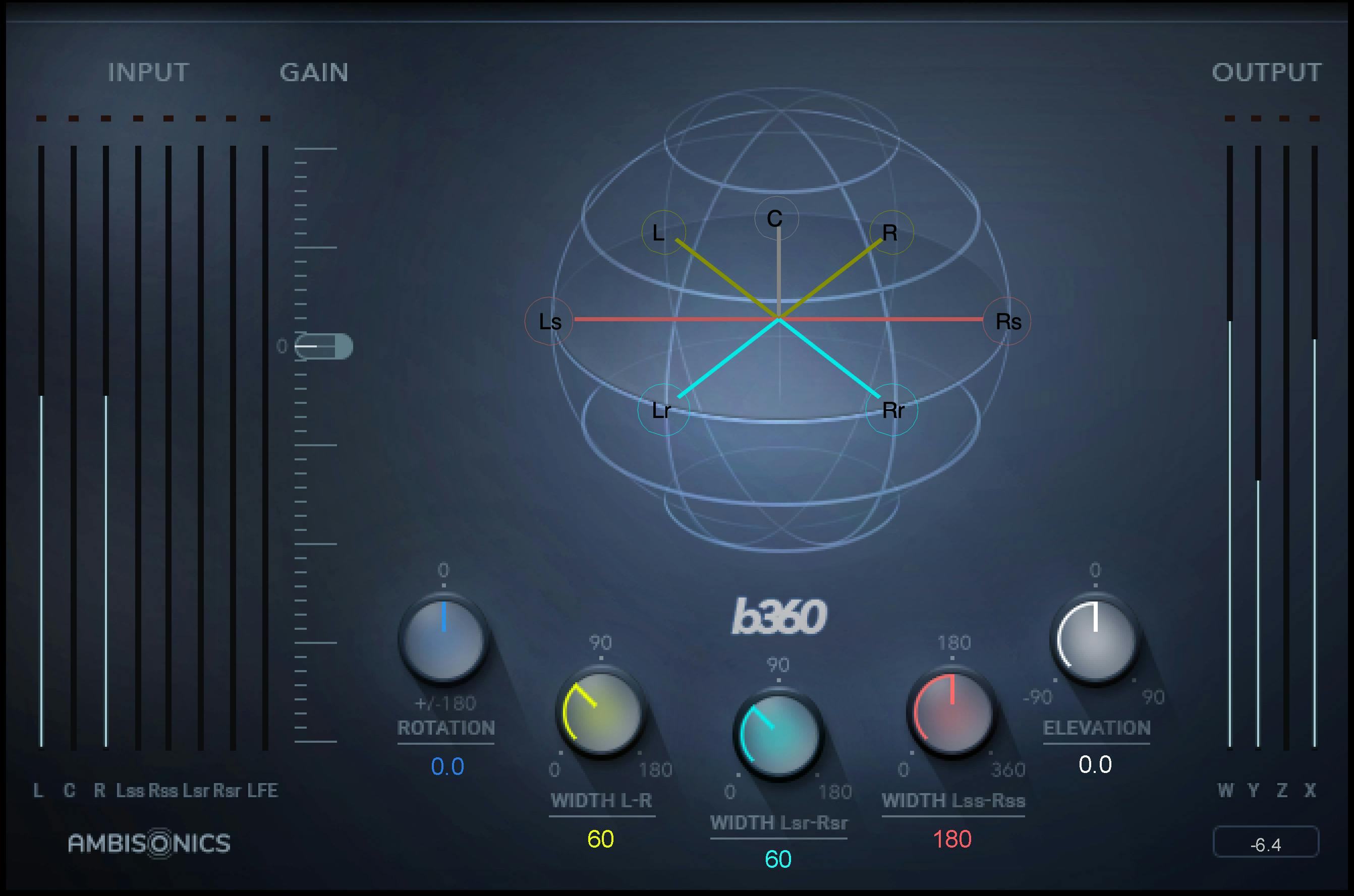

Waves documents mono, stereo, 5.0, 5.1 and 7.1 input components. The pictured 7.1 component shows the wider control set, including separate widths for different speaker pairs. Match the component to the source and consult the manual’s host-specific routing notes. B360 outputs four encoded channels from each supported input configuration.
Position the sound with Rotation and Elevation
Rotation moves the source elements together around the sphere. Elevation moves them up or down. Start with a simple source, then make one change and listen through the decoder to hear where the sound sits. The sound sphere illustrates the placement. Use the width controls available in your component to adjust separation where appropriate.
Route the four-channel AmbiX output
Waves lists the AmbiX sequence as W, Y, Z, X in the numbered routing table. The pictured right-hand meter labels show the same order. Keep the four channels together and send them to a decoder that expects AmbiX. Waves documents separate conversion utilities for FuMa and AmbiX when bringing differently formatted B-format material into the project.
Monitor through a decoder
AmbiX is encoded audio. Route it to a compatible decoder for monitoring, as shown in Waves’ session diagrams. Do ordinary track processing before B360 in the documented track workflow, then keep the encoded channels aligned. Watch the output meters while changing placement and trim the input if the encoded output clips.
Related Waves guides
Waves DTS Neural Surround UpMix covers a separate upmixing workflow. Waves IR360 Convolution Reverb covers a reverb for conventional surround routing.
Sources
Frequently Asked Questions
What is Waves B360 Ambisonics Encoder?
It is a plug-in that encodes conventional mono, stereo and surround audio to four-channel AmbiX B-format.
Which AmbiX channel order does Waves document?
The numbered sequence in the Waves guide is W, Y, Z, X. The pictured output meter labels show the same order.
What do Rotation and Elevation do?
Rotation moves the channel elements together around the sound sphere. Elevation moves them up or down.
Do I need a decoder to monitor the output?
Yes. Route the encoded stream to a compatible Ambisonics decoder for playback or monitoring.
Can I use FuMa B-format in the same project?
Waves supplies separate FuMa and AmbiX conversion utilities. Use the appropriate conversion to match the project’s B-format convention.

About the Author
Joseph Nilo has been working professionally in all aspects of audio and video production for over twenty years. His day-to-day work finds him working as a video editor, 2D and 3D motion graphics designer, voiceover artist and audio engineer, and colorist for corporate projects and feature films.