
My Short Version
Waves Dorrough Surround is a multichannel meter. It shows peak and average behavior so you can check how individual channels respond during a surround mix. Start by confirming the channel labels for your session, then use the peak controls or compare selected channel pairs when a passage needs closer inspection.
This guide is based on Waves’ documentation. I did not audition the plug-in. The cover is an AI-generated editorial illustration.
Read the peak and average display
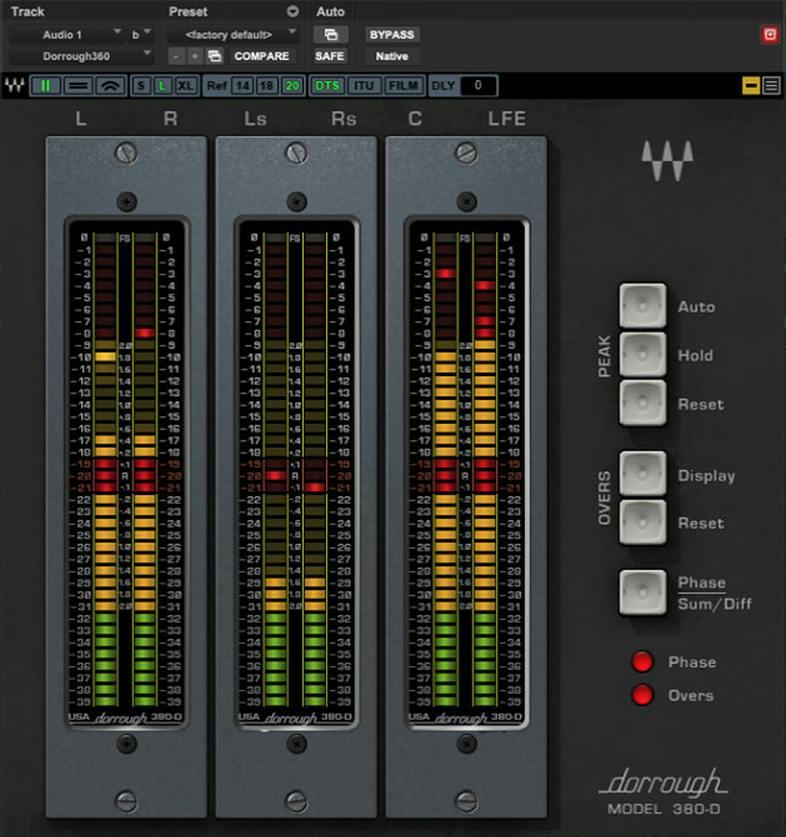

The meter shows short peaks alongside a time-integrated average. A strong transient can lift the peak rapidly while the average changes less. Watch the two readings during a cue with a sharp effect and sustained ambience to see how they respond. Use the visible labels to identify the channel before interpreting a reading.
Match Meter Order to the session
The Surround edition provides Film, ITU and DTS meter-order choices. Pick the display order that fits the session and confirm the labels channel by channel. For a multichannel handoff, use those labels and your host’s routing to check where signals are arriving. Meter Order arranges the meters you see.
Use Peak Hold to inspect a moment
Peak offers Auto, Hold and Reset. Hold keeps a peak indication available to inspect after it happens. Use it while playing a short cue, note which channel retains the strongest peak and reset before comparing the next pass. For regular playback, switch back to Auto when you want the indication to refresh.
Compare selected channel pairs
The Surround edition’s Sum & Diff and Phase page lets you select channel pairs for comparison. Pick a pair that corresponds to the sound you are checking, such as the left and right front channels. Use the display alongside what you hear, and inspect the source routing when a result is unexpected.
Related Waves guides
Waves Dorrough Stereo covers the separate stereo meter. Waves IR360 Convolution Reverb covers a surround effects workflow where labeled channel meters also matter.
Sources
Frequently Asked Questions
What is Waves Dorrough Surround?
It is a surround metering plug-in for inspecting peak and average readings on individual channels.
What does Meter Order change?
It selects the arrangement of the displayed surround meters. The documented choices are Film, ITU and DTS.
When is Peak Hold useful?
It retains a peak indication so you can inspect it after a transient or a short cue has passed.
Can I compare a pair of channels?
Yes. The Surround edition provides a page for comparing selected channel pairs in its Sum & Diff and Phase displays.
Does Dorrough Surround change the audio?
It is a monitoring tool. Its metering controls help you inspect the signal.

About the Author
Joseph Nilo has been working professionally in all aspects of audio and video production for over twenty years. His day-to-day work finds him working as a video editor, 2D and 3D motion graphics designer, voiceover artist and audio engineer, and colorist for corporate projects and feature films.