
What is Waves eMo Q4 Equalizer?
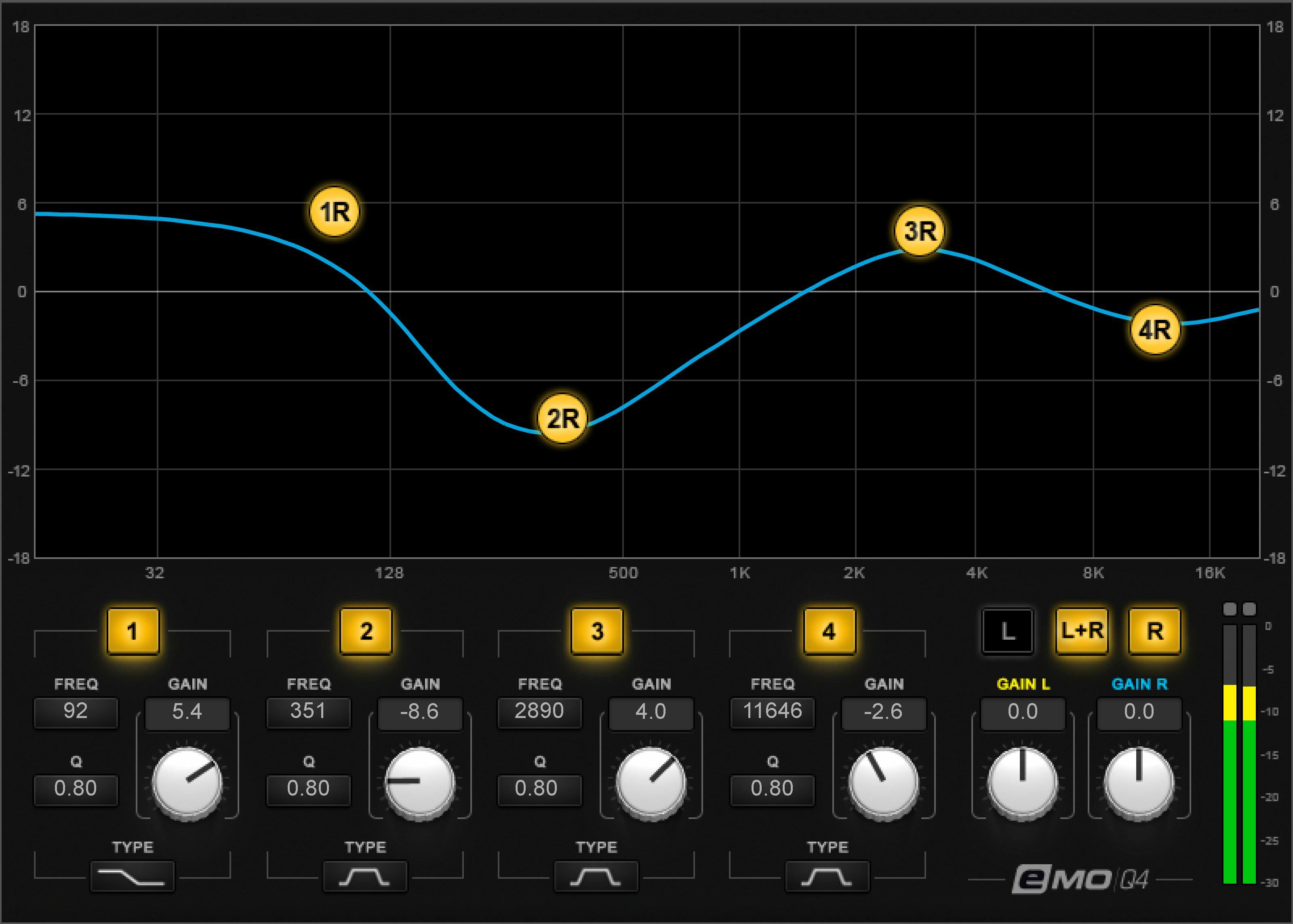

Waves eMo Q4 is a four-band equalizer with a response graph. Move the band markers to shape the curve or set values directly in the controls below the graph. The plug-in is useful for everyday shaping when you want to see the changes you are making.
Start with frequency and gain
Enable a band and choose a frequency to work on. For a bell adjustment, Gain raises or cuts that part of the spectrum. Set a small change and compare it by ear before adding another band. The curve gives you a visual reference while you listen.
Pick a filter shape
The manual documents parametric bell and shelf options across the four bands. Low-pass, high-pass and resonant shelf options are available on the outer bands, 1 and 4. Use a bell for a localized adjustment, a shelf for a broader low or high region, and a pass filter when you need a cutoff.
Keep pass-filter slope separate from Q
On a bell, a higher Q narrows the affected region. For the outer bands’ pass filters, the guide gives a fixed response slope of 12 dB per octave. Decibels per octave describe how fast the response changes with frequency. That figure is a slope and supplies no numerical value for Q.
Work with the Stereo component
The Stereo component supports independent or linked left and right adjustments. Check which channel’s graph markers are visible before changing one side. The two output meters help you watch the resulting levels. Compare the result in stereo before deciding whether an independent change helped.
A starting workflow for dialogue
Play a section with normal speech and a louder phrase. Start with a modest bell cut if you hear a persistent resonance. If you need a separate cutoff for noise outside the useful vocal range, use an outer band. Compare bypassed and processed speech at similar loudness and revisit the cutoff if the voice loses weight.
Related guides and sources
See Waves Q10 for another parametric EQ workflow and Waves Linear Phase EQ for a documented linear-phase option.
Sources: Waves eMo Q4 product page and eMo Q4 User Guide. This guide is based on Waves’ documentation. I did not audition the plug-in. The cover is an AI-generated editorial illustration.
Frequently asked questions
How many EQ bands does eMo Q4 have?
Four. You can adjust them from the graph or their individual controls.
Which bands offer pass filters?
The manual lists low-pass and high-pass options on bands 1 and 4.
What does raising the Q do on a bell?
It narrows the frequency region affected by the bell adjustment.
What does 12 dB per octave describe?
It describes the documented slope of the pass-filter response.
Can I adjust the left and right channels independently?
Yes. The Stereo component supports separate or linked left and right adjustment.

About the Author
Joseph Nilo has been working professionally in all aspects of audio and video production for over twenty years. His day-to-day work finds him working as a video editor, 2D and 3D motion graphics designer, voiceover artist and audio engineer, and colorist for corporate projects and feature films.