
My Short Version
Waves IR-L Convolution Reverb uses an impulse response, or IR, to apply the sound of a captured space or device to a track. Start by loading a response that fits the arrangement. Then use Convolution Start, Convolution Length and Predelay to adjust when the response begins and how long it lasts. Use Dry/Wet to place it in the mix.
This guide is based on Waves’ documentation. I did not audition the plug-in. The cover is an AI-generated editorial illustration.
Choose and load an impulse response
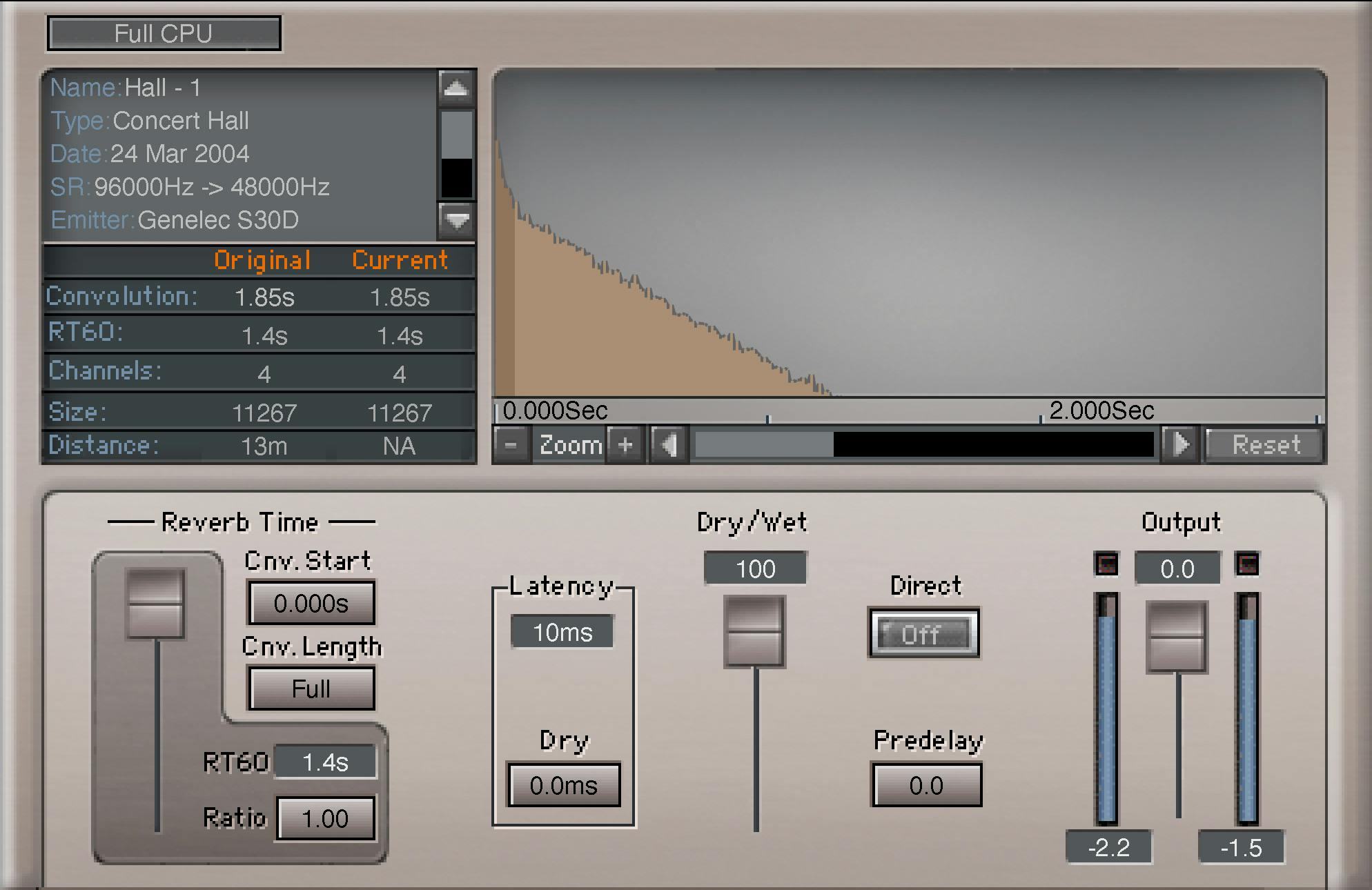

Load a response from the library or use Import IR for a compatible existing impulse-response file. The guide also describes different preset load options. Use the IR-only choice when comparing a response while keeping your current controls, or choose the reset option when you want to start from the documented reset state. Read the response information and graph to check which space is loaded before adjusting it.
Separate Convolution Start, Length and Predelay
Convolution Start moves the start point into the loaded response, which can remove unwanted lead-in. Convolution Length limits how much of the response is used, so you can shorten an ending that hangs over the next phrase. Predelay shifts the whole response later, which can help leave room for the dry attack. Try one change at a time on a short passage with space between notes.
Set the mix and understand Direct
Dry/Wet sets the balance between the unprocessed input and the convolution signal. On an insert, bring in the effect until the sound sits where you want it. On an auxiliary return, use the wet signal and set the reverb amount from the send or return. The Direct switch concerns the direct arrival inside the recorded response. Waves recommends switching it off when you’re substituting the unprocessed dry signal.
Check the return against the full arrangement
Choose a brief phrase with a clear ending and hear whether the response carries into the next line. If the reverb starts at the right moment but hangs on, try reducing Convolution Length. If a phrase loses definition at the front, compare a longer Predelay or a lower return level. Save the plug-in settings and keep any imported IR file accessible so the project can locate it again.
Related Waves guides
Waves Atlas Reverb and Waves Renaissance Reverb describe two other Waves reverb workflows.
Sources
Frequently Asked Questions
What is Waves IR-L Convolution Reverb?
It is a convolution reverb plug-in that applies an impulse response to the input to reproduce the reverberation of a space or another captured response.
Can I import my own impulse response in IR-L?
Yes. The Waves guide documents Import IR for compatible existing impulse-response files.
What is the difference between Convolution Start and Predelay?
Convolution Start changes where playback begins inside the loaded response. Predelay shifts the whole response later in time.
How do I shorten the reverb tail in IR-L?
Reduce Convolution Length to use less of the loaded response, and listen through the transition into the next phrase.
What does Direct do in IR-L?
It controls whether the recorded direct arrival in the impulse response is used. The unprocessed dry signal is set with the Dry/Wet balance.

About the Author
Joseph Nilo has been working professionally in all aspects of audio and video production for over twenty years. His day-to-day work finds him working as a video editor, 2D and 3D motion graphics designer, voiceover artist and audio engineer, and colorist for corporate projects and feature films.