
Waves Renaissance Reverb, also called RVerb, gives you separate control over early reflections and the reverb tail. Pick the type of space first. Then set when the tail starts, how long it lasts and how much of it you hear.
This guide is based on Waves’ documentation. I did not audition the plug-in. The cover is an AI-generated editorial illustration.
My Short Version
Choose a Room, Hall or Plate as a starting point. Use Size to adjust the sense of space. Set positive Pre-delay if you want more separation before the tail, then choose a Time that leaves room for the next phrase. Balance Early Reflections and Reverb separately before using Damping to address buildup.
Choose a type and shape the space
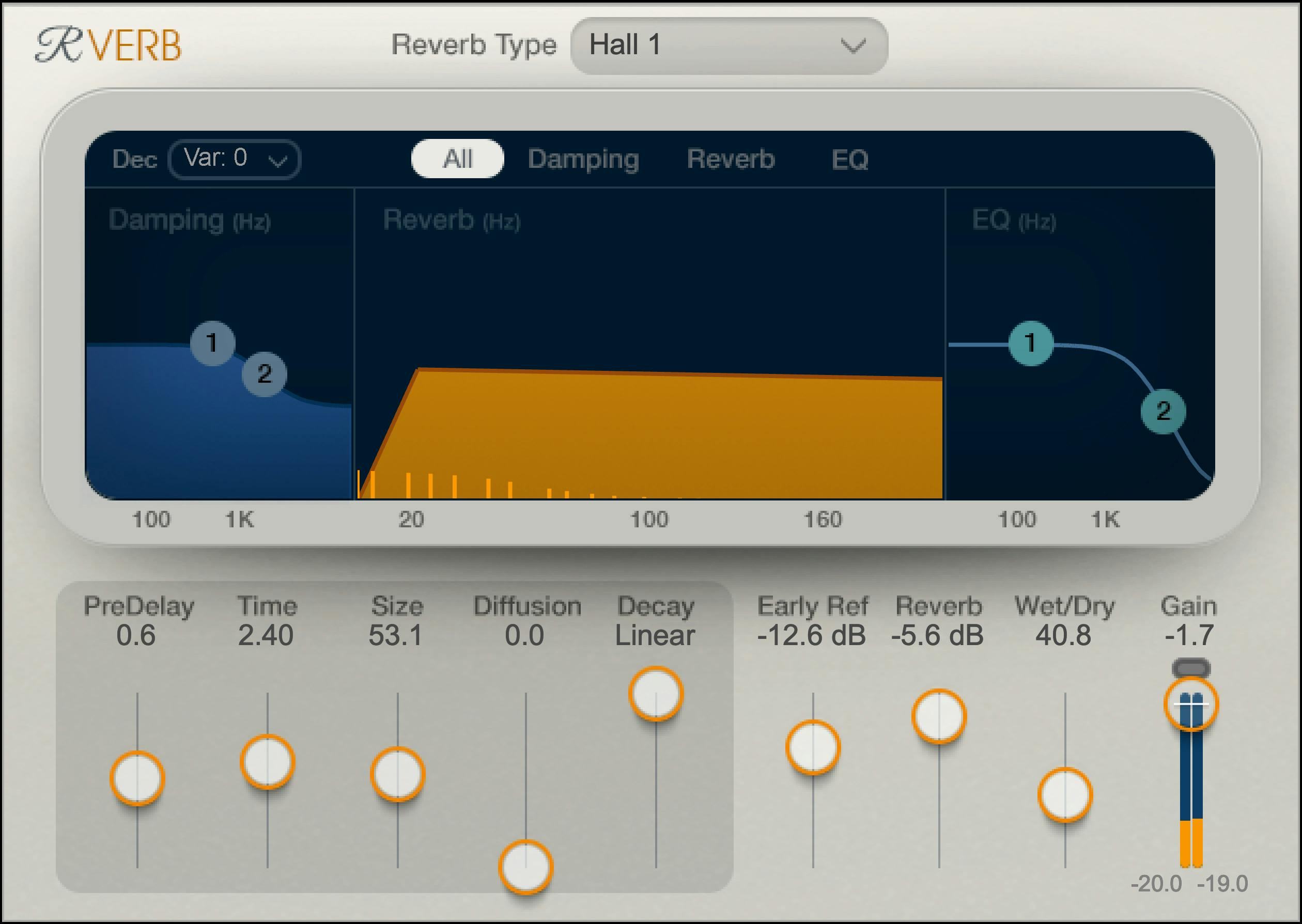

Reverb Type determines the overall character of the early reflections and tail. Changing Type can substantially change that character, so choose it before fine adjustments. Size changes the parameters that simulate the size of the room. Its exact effect depends on the selected Type and can include the spacing of the reflections.
The manual describes separate Damping, Reverb and EQ views, plus the combined All view shown here. Use the view that makes the control you are working on easiest to see.
Place the tail in time
A positive Pre-delay places the start of the tail later relative to the dry sound and early reflections. A little separation can help leave room for the onset of a word or a note. Time controls the tail’s duration. Use a short phrase with a pause so you can hear both its beginning and how long the tail remains audible.
Balance the levels and use damping
Early Reflections changes the level of the first reflections. Reverb changes the tail level. If the whole effect sounds too distant, compare different balances before changing Time. If the tail itself lasts too long, revisit Time.
Use Damping to address low- or high-frequency buildup in the reverb. Switch to its dedicated graph and compare changes on the same phrase. Leave the source playing so you can hear whether the space complements the track.
Check the space in the mix
Start with a phrase that has a clear transient and a quiet gap. Choose Type, Size and timing, then compare more early reflection level with more tail level. If the next word or hit loses definition, try reducing the tail level or shortening Time and compare those changes one at a time.
Related Waves guides
Waves TrueVerb covers room distance and a linked reflections-and-tail workflow. Waves Atlas Reverb explains another approach to building reverberant spaces.
Sources
See the Renaissance Reverb user guide and the official Waves product page. The interface image comes from the Waves Graphic Library.
Frequently Asked Questions
What does Reverb Type change?
It changes the overall behavior of the early reflections and the reverb tail. Choose it before refining the other controls.
What does positive Pre-delay do?
It adds a gap before the reverb tail starts relative to the dry sound and early reflections.
Does Time change how loud the tail is?
Time sets the duration. Use the Reverb level control to change how prominently the tail is heard.
Can I adjust the early reflections separately?
Yes. The Early Reflections and Reverb controls set the level of the reflections and tail independently.
When should I use Damping?
Use it when low- or high-frequency buildup in the reverberation makes the result less clear.

About the Author
Joseph Nilo has been working professionally in all aspects of audio and video production for over twenty years. His day-to-day work finds him working as a video editor, 2D and 3D motion graphics designer, voiceover artist and audio engineer, and colorist for corporate projects and feature films.