
My Short Version
Waves IR1 is a convolution reverb. It uses an impulse response to apply the acoustic character of a space or device to a track. You can load an existing response and then shape how much of it you use, where it starts and how its early reflections and tail sit in the mix.
This guide is based on Waves’ documentation. I did not audition the plug-in. The cover is an AI-generated editorial illustration.
Pick a component and load an IR
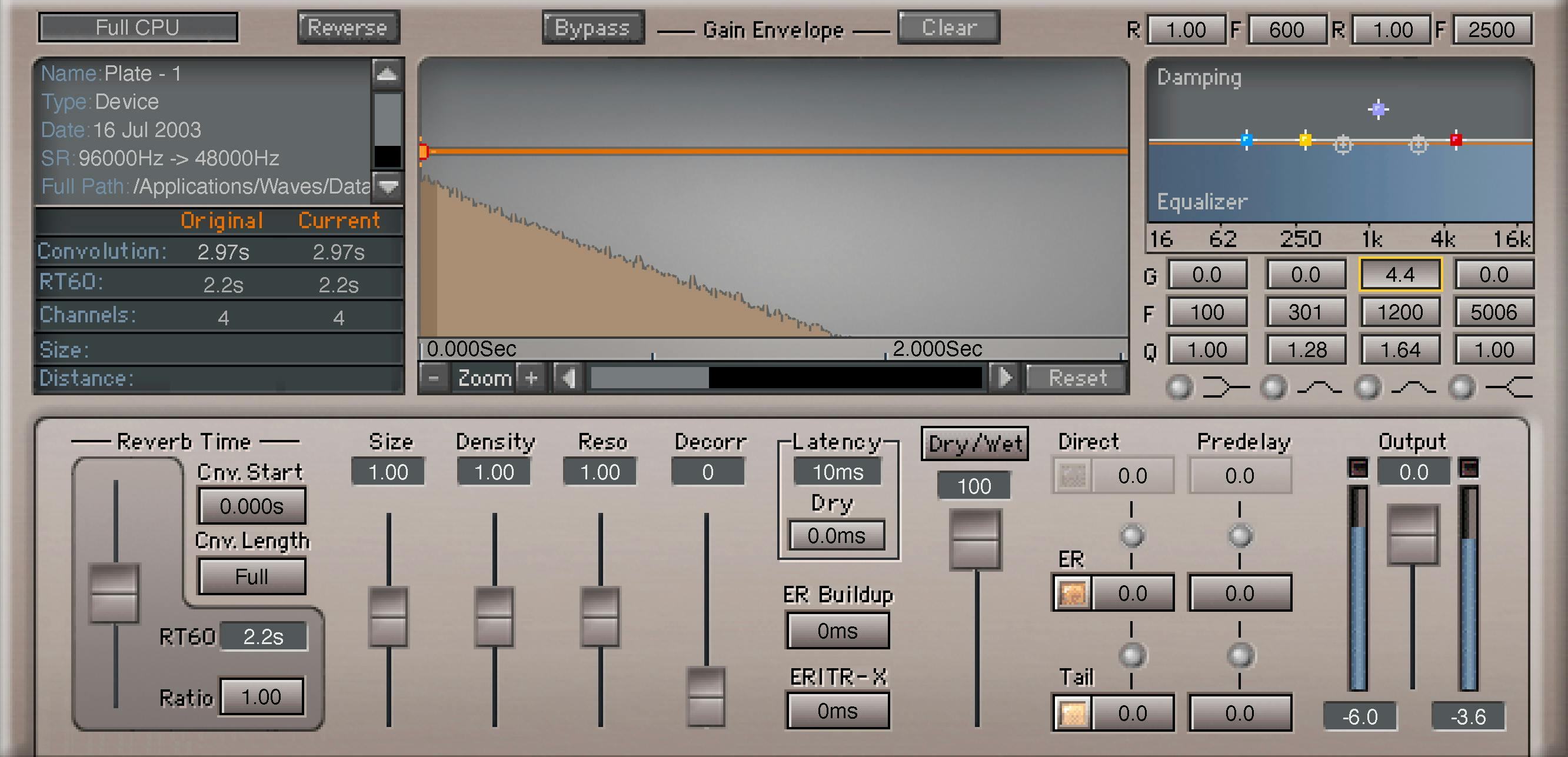

Waves documents mono, mono-to-stereo, Efficient Stereo and Full Stereo configurations. Pick the component for the channel setup before choosing a library response or importing a compatible existing IR file. The preset menu provides an IR-only option so you can compare a response while preserving current settings. Check the response properties and graph before adjusting it.
Set the timing around the dry attack
Convolution Start determines where the plug-in begins using the response. Convolution Length limits how much of it is used. Predelay moves the reverb later relative to the input. For a short vocal phrase, set the start and length first, then compare a little more Predelay if the first syllable needs room. Listen through the gap after the phrase to judge the length.
Balance the early reflections and tail
IR1 provides separate gain and timing controls for the early reflections and the tail. Reduce early-reflection gain if they distract from the dry onset. Adjust the tail separately if the space hangs over the next phrase. The recorded Direct arrival and unprocessed Dry input are distinct. Waves also notes that the loaded response may limit how cleanly these parts can be separated.
Shape the wet sound in context
Use Dry/Wet for the overall balance on an insert. On an auxiliary send, use the wet signal and adjust its contribution at the return. The EQ shapes the wet signal, and damping changes the frequency-dependent decay. If the reverb cloud builds up between phrases, compare a modest EQ change with a shorter response rather than changing several controls at once.
Related Waves guides
Waves IR-L Convolution Reverb covers the separate IR-L workflow. Waves Renaissance Reverb explains another Waves reverb and its room, reflection and tail controls.
Sources
Frequently Asked Questions
What is Waves IR1 Convolution Reverb?
It is a plug-in that applies an impulse response to an input and lets you edit the timing and character of the resulting reverb.
Can I import an existing impulse response?
Yes. Waves documents importing a compatible impulse-response file as well as loading a response from the library.
What does Convolution Length do?
It sets how much of the loaded response IR1 uses. Shortening it can reduce the part of the response heard after the source stops.
Can I adjust early reflections and tail separately?
Yes. IR1 documents individual early-reflection and tail gain and timing controls. The available separation depends on the response.
Does the IR1 EQ affect the dry input?
The guide describes it as EQ for the wet signal.

About the Author
Joseph Nilo has been working professionally in all aspects of audio and video production for over twenty years. His day-to-day work finds him working as a video editor, 2D and 3D motion graphics designer, voiceover artist and audio engineer, and colorist for corporate projects and feature films.