
My Short Version
Waves M360 provides two tools for surround monitoring. Surround Manager adjusts the monitoring path, and Mixdown lets you hear how the mix translates to a smaller channel layout. Decide whether you are adjusting the playback setup or checking a different playback format before changing controls.
This guide is based on Waves’ documentation. I did not audition the plug-in. The cover is an AI-generated editorial illustration.
Use Manager on the monitoring path
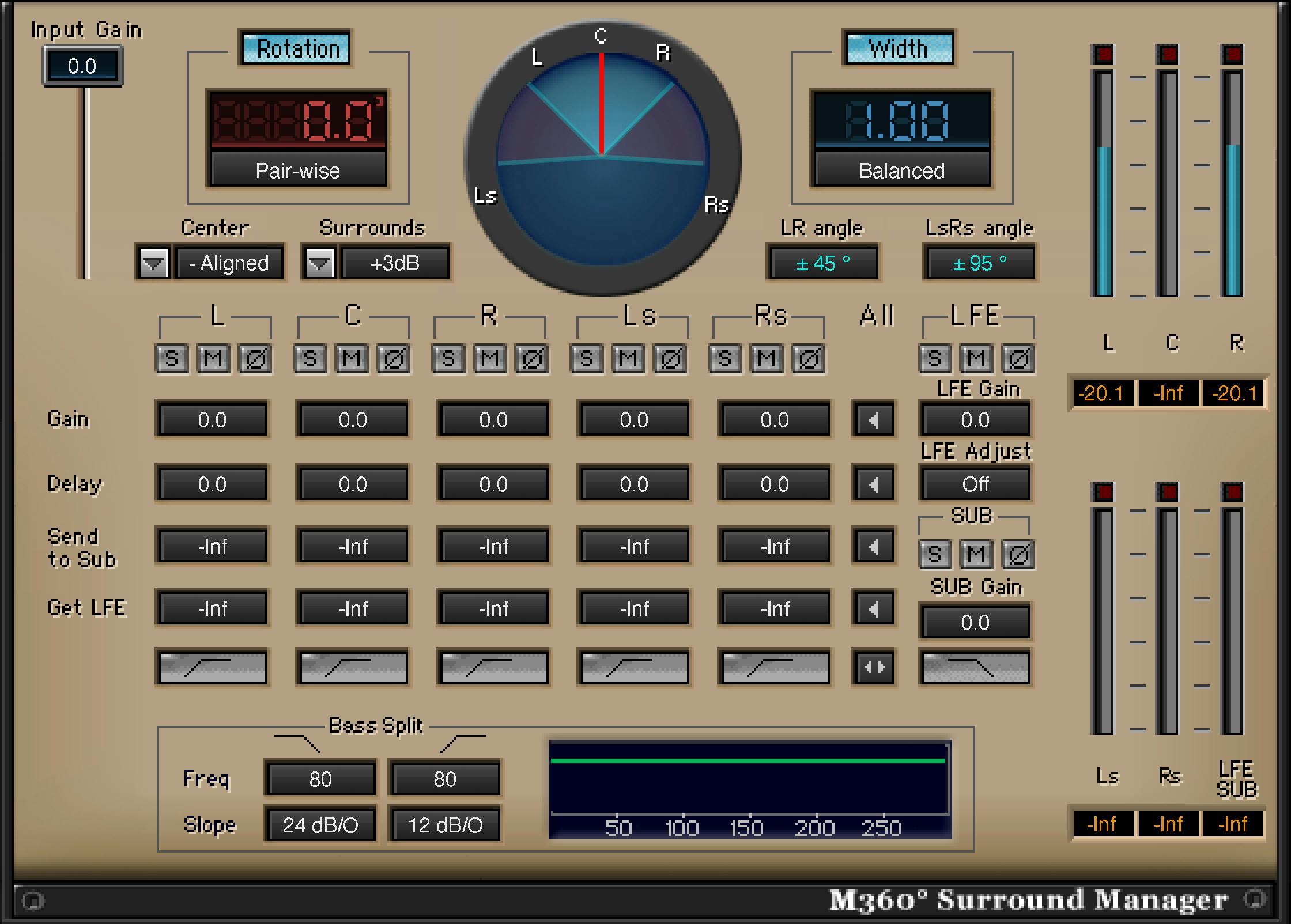

Surround Manager provides channel gain and delay, speaker angle controls, and an imaging display. Rotation and Width change the presented sound field. Confirm which signal path feeds the speakers before using it. Waves’ calibration workflow puts the calibration on the monitoring path and calls for bypassing that calibration before printing the mix.
Keep LFE and redirected bass distinct
The LFE is an effects channel in the mix. SUB is the bass redirected by the monitoring setup. On an applicable component, Bass Split and the related high- and low-pass controls determine how the redirection works. Check which path you are adjusting before changing the level of low-frequency material.
Audition a smaller layout with Mixdown
Mixdown follows Manager in Waves’ monitoring example. Its selector includes stereo and mono choices. Audition the same short cue in the original surround layout and the intended smaller layout. Listen for a buried center element, a crowded stereo image or a major balance change. Use the playback result to guide a check of the original mix.
Keep monitoring and print decisions separate
A change to the monitoring path can help you understand the playback system. Check the intended print path separately, and bypass the monitoring calibration when the Waves workflow calls for it. Confirm the required delivery layout in the host before making a final export.
Related Waves guides
Waves Dorrough Surround explains multichannel metering. Waves B360 Ambisonics Encoder covers a separate workflow for encoding conventional inputs to AmbiX.
Sources
Frequently Asked Questions
What does M360 Surround Manager do?
It provides surround monitor adjustments, including channel gain and delay and bass-management controls where available.
What is M360 Mixdown used for?
It lets you audition how a surround mix translates to a smaller channel layout, including stereo or mono.
What is the difference between the LFE and SUB controls?
LFE concerns the mix’s effects channel. SUB concerns bass redirected by the monitoring setup.
Which component is shown in the Waves figure?
The pictured interface is M360 Surround Manager.
Should monitoring calibration be included in the printed mix?
The Waves workflow calls for bypassing the monitoring calibration before printing.

About the Author
Joseph Nilo has been working professionally in all aspects of audio and video production for over twenty years. His day-to-day work finds him working as a video editor, 2D and 3D motion graphics designer, voiceover artist and audio engineer, and colorist for corporate projects and feature films.