
Waves Manny Marroquin Distortion gives you separate controls for the direct signal and the distorted return. Set Drive for the character of the distortion, shape the signal going into it, then set the two levels independently.
This guide is based on Waves’ documentation. I did not audition the plug-in. The cover is an AI-generated editorial illustration.
My Short Version
Keep some Direct Level when you want the original attack to stay clear. Set Drive for the texture you want, then use Distortion Level to decide how much of it to add. Adjust the tone controls to focus what feeds the distortion. Check the combined level before comparing with bypass.
Set Drive and the distorted return
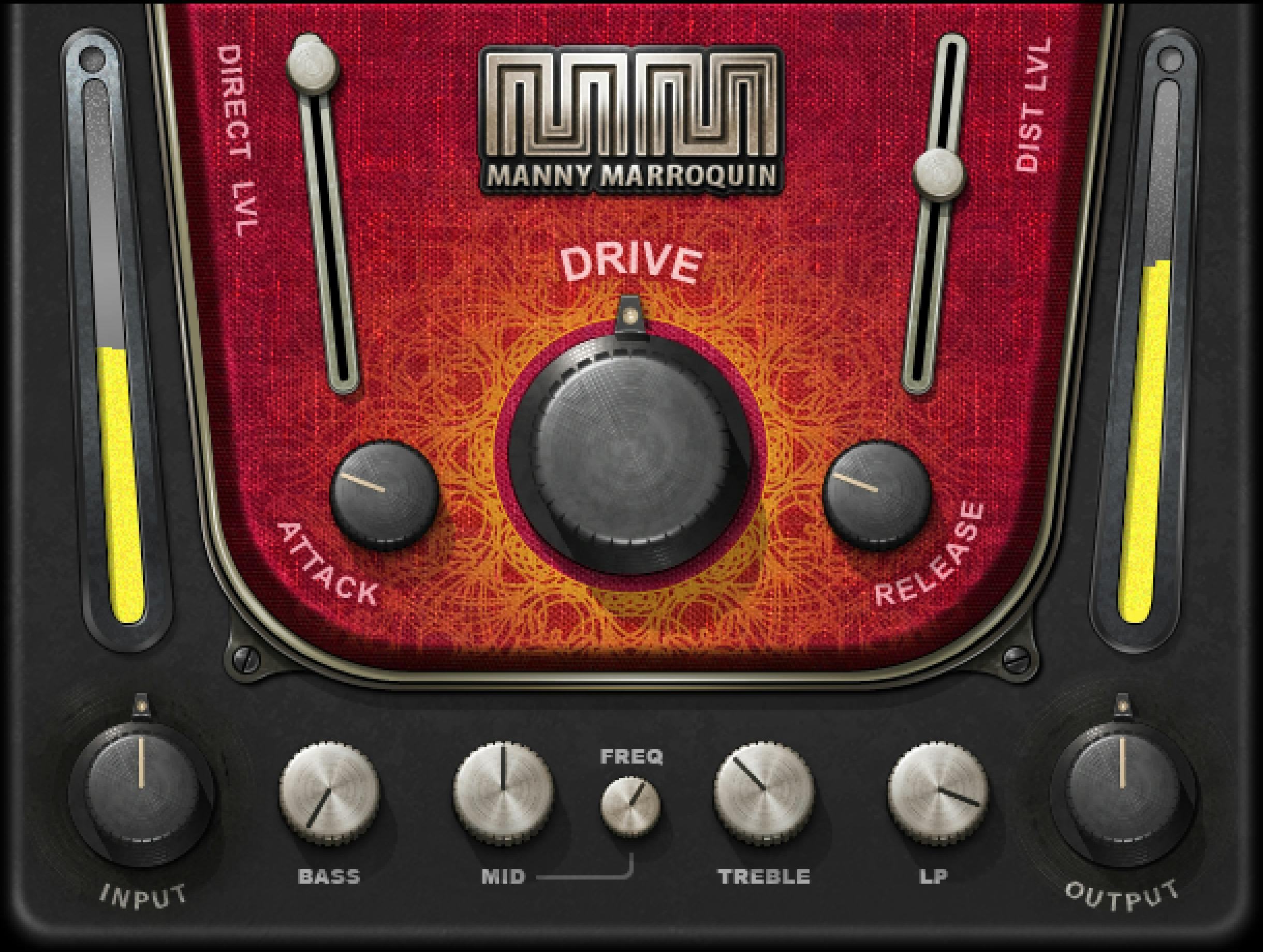

Drive controls how much signal is sent to distortion. Distortion Level sets the return level of that branch after Drive. Raising Drive changes the amount of distortion, while raising Distortion Level brings more of the processed branch into the mix. Direct Level sets the separate clean path. The two branches are summed at the output.
If the character works but it dominates the clean part, lower Distortion Level first. If you want less breakup within the processed sound, change Drive and then revisit the balance.
Shape the signal before distortion
The guide places the EQ section before distortion in the processed branch. Use Bass and Treble to change how those areas feed the effect. Use Mid Frequency to choose where the Mid control works, then set Mid to emphasize or reduce that area. Compare the same passage after each adjustment so you can hear how the tonal change affects the distortion texture.
Adjust Attack and Release
Attack and Release affect how the distortion follows a note. The guide describes longer Attack settings as leaving less distortion at the start. Longer Release settings extend the distortion into the tail. Compare those changes separately on a phrase with a clear onset and decay.
Blend and compare levels
Try a short guitar, drum or vocal phrase with a clear attack. Set Drive and the tone controls on the processed branch. Bring the direct sound back into the balance until the transient has the clarity you want. Use Output to match the comparison level so you can judge the texture and the clean attack without a large loudness change.
Related Waves guides
Waves Manny Marroquin EQ covers a separate equalizer for shaping tone. Waves Berzerk is another Waves distortion tool with a different workflow.
Sources
See the Manny Marroquin Distortion user guide and Waves product page. The interface image comes from the Waves Graphic Library.
Frequently Asked Questions
What is the difference between Drive and Distortion Level?
Drive changes how much signal goes into distortion. Distortion Level changes how much of that processed branch returns to the output.
Can I retain the clean signal?
Yes. Use Direct Level to set the clean path separately from Distortion Level.
Does the tone section act before distortion?
Yes. The input to the distorted branch passes through the EQ section before distortion, as shown in the Waves guide.
What happens when I lengthen Attack?
The guide describes longer Attack settings as producing less distortion at the beginning of a note.
How can I keep the distortion on a note’s tail?
Try a longer Release and compare at a similar output level. Longer Release settings keep the effect present farther into the tail.

About the Author
Joseph Nilo has been working professionally in all aspects of audio and video production for over twenty years. His day-to-day work finds him working as a video editor, 2D and 3D motion graphics designer, voiceover artist and audio engineer, and colorist for corporate projects and feature films.