
My Short Version
Waves Maserati GTi is a guitar-track processor built around five selectable Types. Choose the Type for the musical role, set Sensitivity using its indicator, and adjust the controls that are available in that configuration. If you want a chorused clean part, Clean Chorus is the Type with dedicated Depth and Mix controls.
This guide is based on Waves’ documentation. I did not audition the plug-in. The cover is an AI-generated editorial illustration.
Choose a Guitar Type
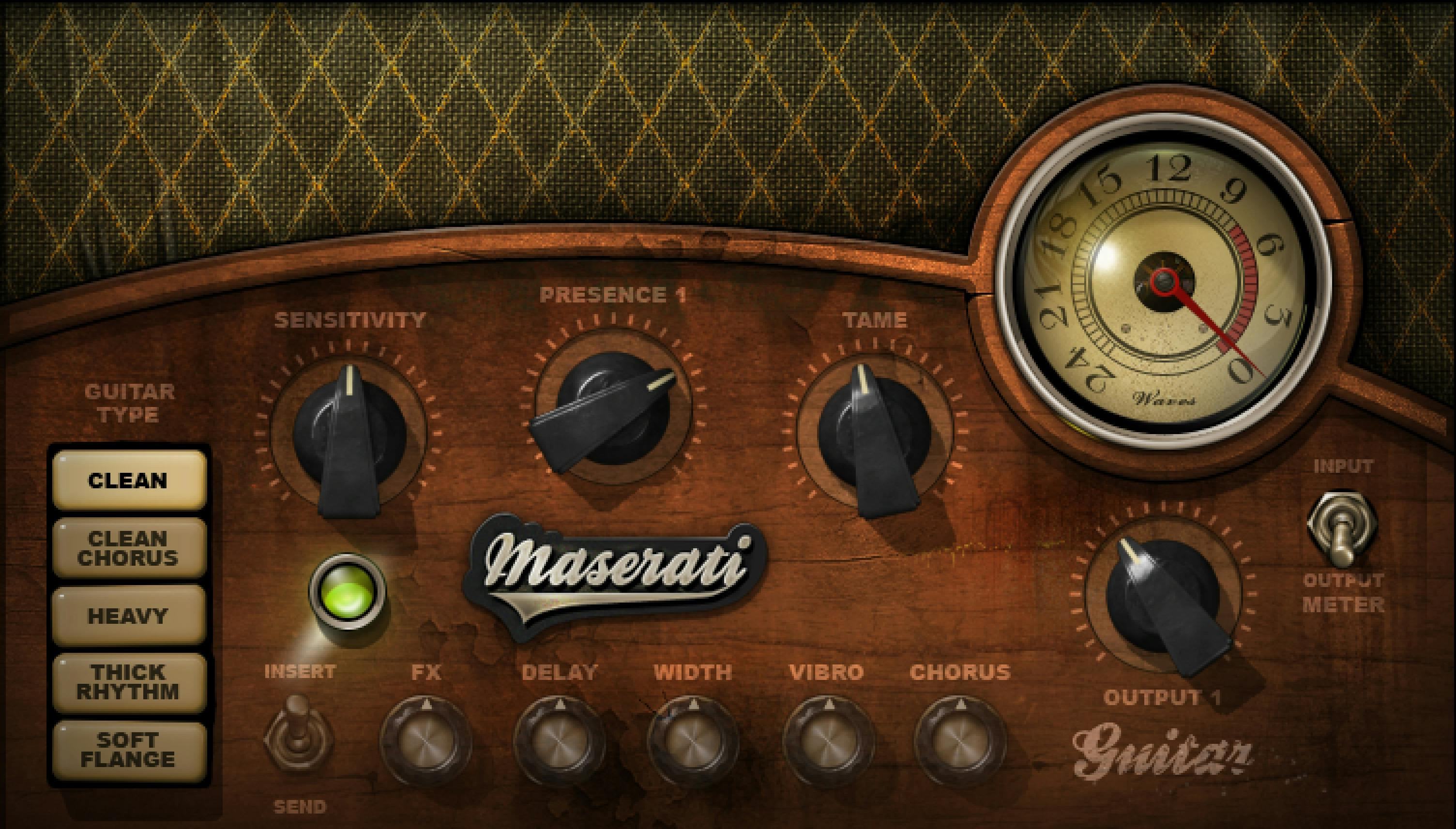

GTi provides Clean, Clean Chorus, Heavy, Thick Rhythm and Soft Flange. Start with Clean for a part you want to keep straightforward, or Clean Chorus if the arrangement calls for audible modulation. Compare those choices with the rhythm or effect-oriented Types using the same phrase. The selected Type determines which controls are relevant, so make the choice before fine-tuning the processor.
Set Sensitivity on the part you are mixing
Use Sensitivity while playing a representative section of the track. Waves describes green as good, yellow as optimal and red as very hot. Include the loudest strums or accents in that check. The meter can monitor input or output, so check its selector when investigating a level change. Compare Types at a similar listening level when making tone decisions.
Adjust Depth and Mix in Clean Chorus
In Clean Chorus, Depth governs how deeply the chorus modulates and Mix adjusts how much chorus is added. Set one, then the other. For example, adjust Depth until the motion suits a sustained chord, then pull Mix back for more definition on picked notes. Thick Rhythm and Soft Flange have their own effect controls, so check which Type is active before reaching for a particular parameter.
Use Insert or Send where the Type offers it
The guide documents the Insert/Send switch for Thick Rhythm and Soft Flange. Insert uses the Type’s processing, including its effects. Send provides the effects for a send/return setup, with some controls inactive. Keep the guitar’s main track audible when setting up a return, then bring that return up in the context of the mix.
Related Waves guides
Waves CLA Guitars also focuses on shaping a guitar track. Waves Eddie Kramer Guitar Channel offers another guitar-focused workflow.
Sources
Frequently Asked Questions
What is Waves Maserati GTi?
It is a guitar-track processor with five selectable Types and Type-dependent controls.
What are the five Maserati GTi Types?
They are Clean, Clean Chorus, Heavy, Thick Rhythm and Soft Flange.
How should I set Sensitivity?
Play a representative passage and use the Sensitivity indicator. Waves describes green as good, yellow as optimal and red as very hot.
Which Type has dedicated chorus Depth and Mix?
Clean Chorus provides Depth for the chorus modulation and Mix for the amount of chorus.
Which Types support Send mode?
Waves documents the Insert/Send switch for Thick Rhythm and Soft Flange. Send uses the effects for a return rather than the full insert chain.

About the Author
Joseph Nilo has been working professionally in all aspects of audio and video production for over twenty years. His day-to-day work finds him working as a video editor, 2D and 3D motion graphics designer, voiceover artist and audio engineer, and colorist for corporate projects and feature films.