
Waves MDMX Distortion Modules is a set of three distortion plug-ins: Screamer, Overdrive and Fuzz. They share some labels, including Gain and Mix, while giving you different ways to shape the distorted sound. Choose the processor by the controls you want to use.
This guide is based on Waves’ documentation. I did not audition the plug-ins. The cover is an AI-generated editorial illustration.
My Short Version
Start with Screamer for a compact Gain, Boost and Tone workflow. Choose Overdrive if you want to compare its Type settings and shape the result with four-band EQ. Pick Fuzz when the octave controls are part of the sound you’re after.
Choose the component
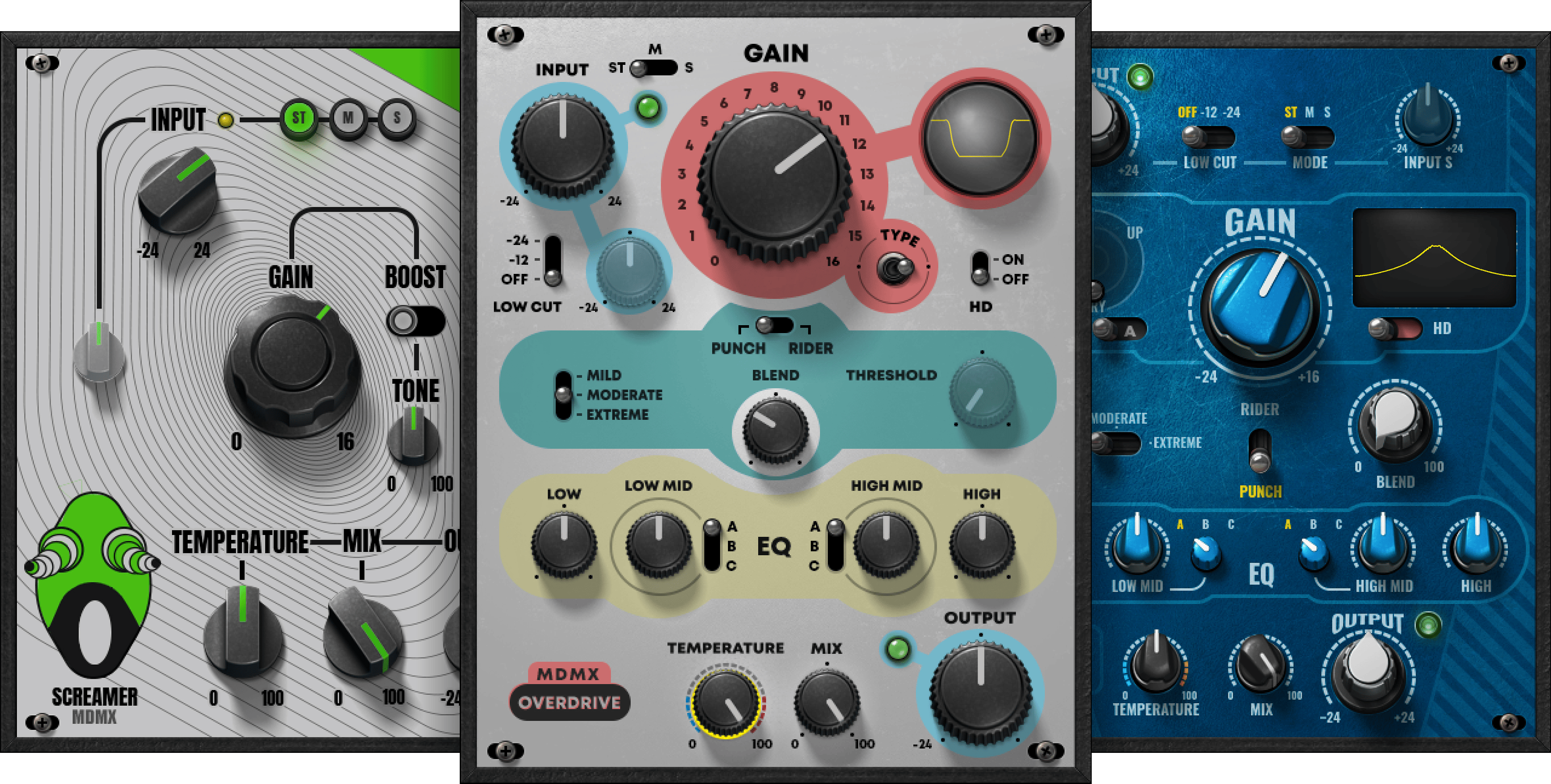

Load Screamer, Overdrive or Fuzz as its own plug-in. Use the same source passage for comparisons. Start with one change, listen, and then compensate for any loudness difference before moving to another component.
Shape Screamer with Gain and Tone
Raise Gain to change the amount of drive and use Tone to adjust the brightness of the result. Compare Boost at a similar output level, since the manual describes a level change as well as added midrange emphasis. Use Mix to balance dry and processed sound.
Explore Overdrive’s Type and EQ
Set Gain and compare the available Type settings on the same passage. Use Low Cut if you want to change the low-frequency content entering the effect. Adjust the four-band EQ to shape the result, then check Mix and compare levels.
The manual documents Punch and Rider in the Overdrive dynamics section. Check one mode at a time and keep the effect level comparable while you decide how much dynamics processing to use.
Add octave color with Fuzz
Start with Gain and compare the Type choices. The Octave control lets you blend the modeled octave-up and octave-down contributions. Adjust it while listening to how those contributions interact with the source. Use the EQ and Mix controls to fit the result into the arrangement.
Related Waves guides
Waves Manny Marroquin Distortion covers another way to shape tone and blend the direct and distorted sounds. Waves Berzerk explains a different distortion plug-in with selectable shapes.
Sources
See the MDMX Distortion Modules user guide and official Waves product page. The interface composite comes from the Waves Graphic Library.
Frequently Asked Questions
Are Screamer, Overdrive and Fuzz separate plug-ins?
Yes. Waves documents them as three distinct distortion processors.
Which processor has a Tone control and Boost switch?
Screamer offers Tone and Boost alongside Gain.
Which MDMX processor has octave controls?
Fuzz includes a control for blending octave-up and octave-down contributions.
Can I shape Overdrive with EQ?
Yes. Its four-band EQ lets you shape the tonal balance.
What does the figure show?
It shows Overdrive in the center, with part of Screamer on the left and part of Fuzz on the right.

About the Author
Joseph Nilo has been working professionally in all aspects of audio and video production for over twenty years. His day-to-day work finds him working as a video editor, 2D and 3D motion graphics designer, voiceover artist and audio engineer, and colorist for corporate projects and feature films.