
What is Waves PRS SuperModels?

PRS SuperModels is a set of three guitar amp plug-ins based on PRS amplifiers. Each models an amp and offers cabinet impulse responses, or IRs, to shape the amplified result. You can use a recorded direct guitar and compare amp or cabinet choices without recording the performance again.
Choose an amp model
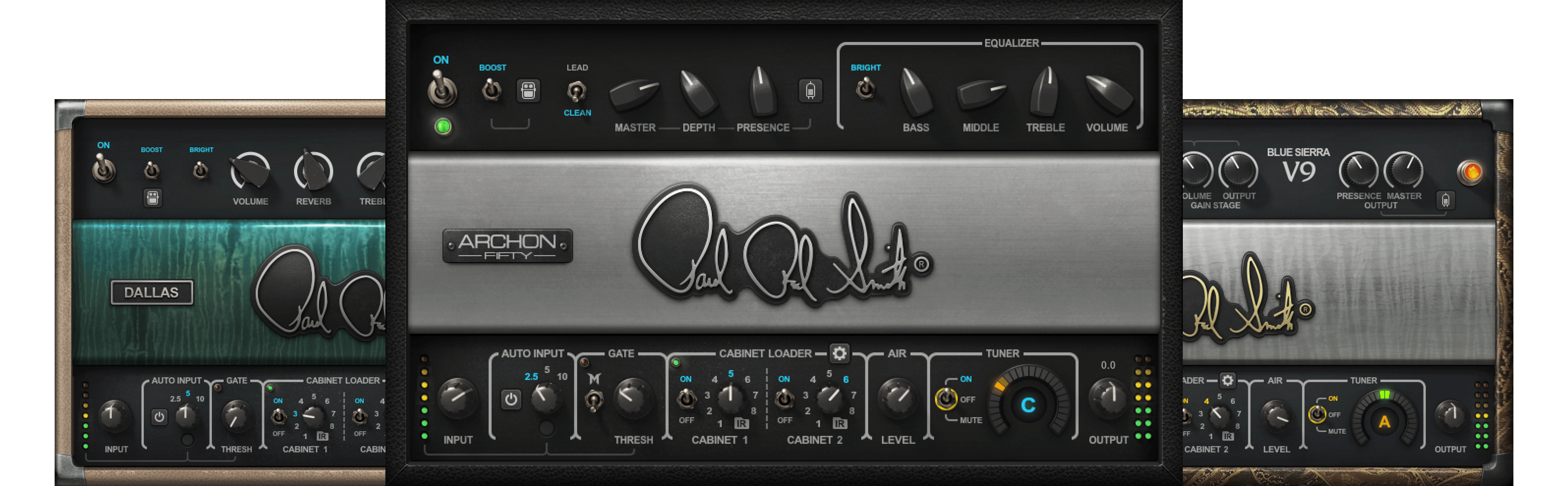
The models are Archon 50, Dallas and Blue Sierra V9. Their amplifier controls differ. Use the labeled amp in your host and start with its own controls. The Waves collage shows the Archon in the center, with partial views of Dallas and Blue Sierra V9 at the sides.
Establish the input first
Record a clean guitar signal through a suitable instrument input. Set the level into the plug-in before judging how the amp responds. Play both a soft and a strong passage while comparing the setup. If you are comparing models, use the same recording so input changes do not obscure the differences.
Work with the Cabinet Loader
The Cabinet Loader selects cabinet IRs. An IR captures the response of a speaker cabinet setup. Try one cabinet first, then compare a different one while keeping the amp and performance fixed. Waves also documents combining cabinet responses. Check the resulting level and tone in the mix before keeping the blend.
Shape the amp before adding effects
Start with a modest tone adjustment on the selected model, then listen to how its response changes with your playing. If a sound becomes too bright or dense, compare a different cabinet before adding another EQ. Keep level similar when comparing options so a louder patch does not win by default.
A starting workflow for a recorded guitar
Loop a clean section with a chord and a single-note phrase. Choose the amp, adjust the sound using its own controls, and compare cabinets one at a time. Then check the part against drums and bass. Keep the version that leaves the guitar’s attack clear without crowding the mix.
Related guides and sources
See Waves Maserati GTi for another guitar-processing workflow and Waves MDMX for separate distortion tools.
Sources: Waves PRS SuperModels product page and PRS SuperModels User Guide. This guide is based on Waves’ documentation. I did not audition the plug-ins. The cover is an AI-generated editorial illustration.
Frequently asked questions
Which amps are in PRS SuperModels?
Archon 50, Dallas and Blue Sierra V9.
What does the Cabinet Loader do?
It lets you select cabinet impulse responses that shape the amplified sound.
Can I use more than one cabinet response?
Waves documents the option to combine cabinet responses. Compare the blend against each cabinet alone at a similar level.
Do the three models all have identical controls?
Their amp controls vary by model. Start with the controls on the selected amp and compare it using the same performance.
Can I use a guitar track I already recorded?
Yes. A clean direct guitar recording is a useful starting point for comparing the amp and cabinet choices.

About the Author
Joseph Nilo has been working professionally in all aspects of audio and video production for over twenty years. His day-to-day work finds him working as a video editor, 2D and 3D motion graphics designer, voiceover artist and audio engineer, and colorist for corporate projects and feature films.