

Waves TrueVerb places a track in a virtual room by combining direct sound, early reflections and a reverb tail. Room Size changes the virtual space and Distance changes the apparent spacing between source and listener. Link coordinates the tail with the reflections.
This guide is based on Waves’ documentation. I did not audition the plug-in. The cover is an AI-generated editorial illustration.
My Short Version
Put TrueVerb on an insert when you want it to control all three paths. Use an aux send with Direct off when the dry track is already reaching the mix. Adjust Room Size and Distance first. Keep Link on to have the tail follow the reflections, or turn it off when you need to set PreDelay yourself.
Set the room and source distance
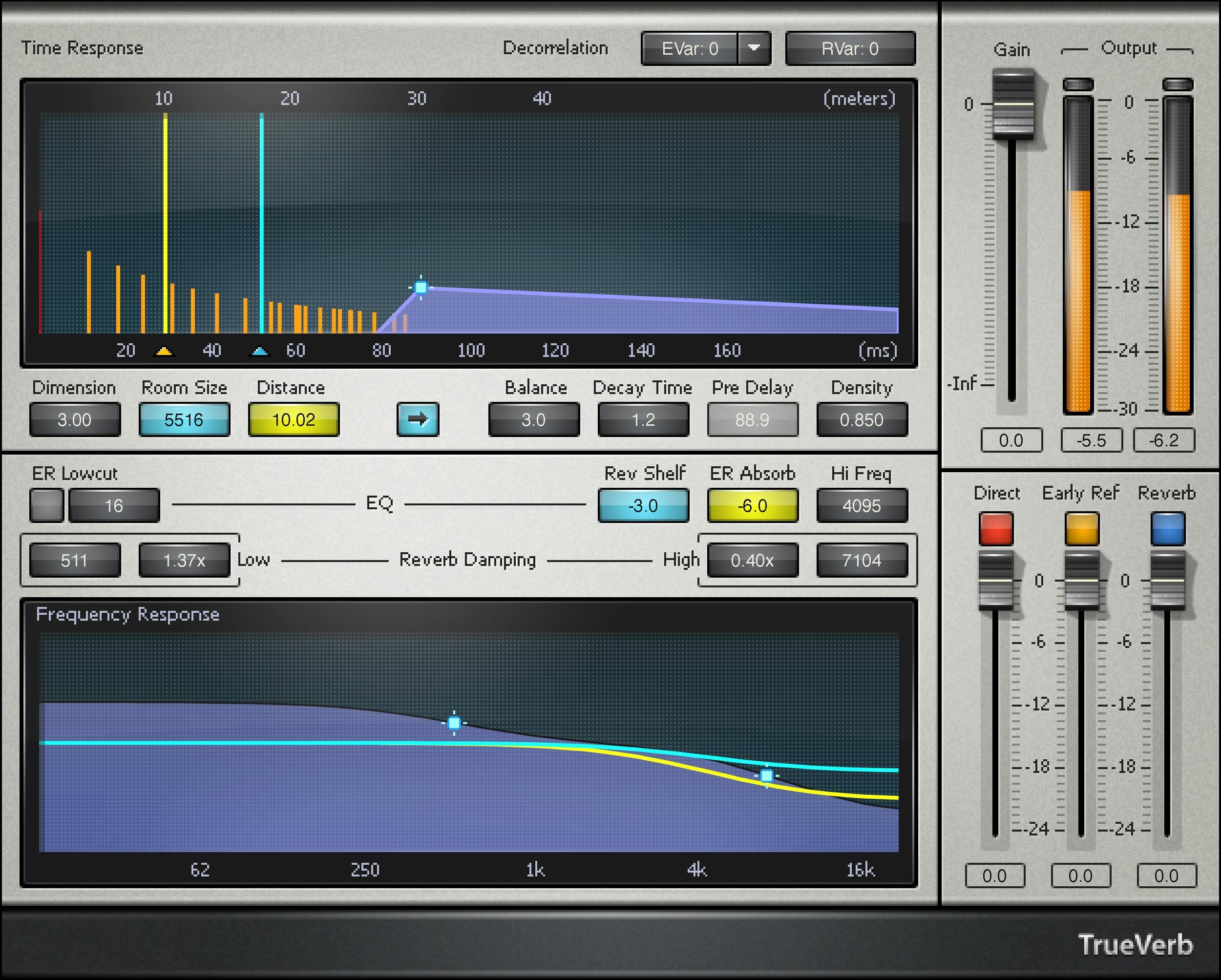

Room Size represents room volume. Changing it affects the timing and levels of the early reflections. Distance affects the apparent separation from the source by changing the reflection pattern and the relative levels. Use the Time Response graph to see how the direct arrival, early reflections and reverb tail are arranged. Moving the Room Size or Distance marker adjusts the corresponding control.
Use Link and PreDelay
Link matches the reverb level and PreDelay to the last early reflections as the room changes. Turn Link off to adjust PreDelay independently. PreDelay changes when the reverb tail starts. Use Balance to change the relative prominence of the tail and the earlier sound. The manual uses different Balance reference points depending on Link, so compare the sound after changing the relationship.
Use Decay Time to change how long the room sound takes to die away. If the tail crowds a busy passage, shorten the decay and compare the next few notes or words in context.
Choose an insert or a send
Waves calls the insert arrangement Thru. It uses Direct, Early Reflections and Reverb together. For Send use, route a track to an aux that has TrueVerb and turn off Direct in the plug-in. The original track supplies the dry signal while the aux returns the reflections and reverb. Try the send arrangement when several tracks need a shared space.
Build a room in three passes
Start with a short phrase containing clear transients. Set the room and source distance with Link on. Then adjust how prominently the reverb tail comes through. Finally, compare the effect within the mix at similar listening levels. If you need space between the dry attack and tail, unlink and adjust PreDelay while listening to that phrase again.
Related Waves guides
Waves Atlas Reverb offers another approach to shaping space. Waves Doubler uses voices to create a sense of width or doubling.
Sources
See the TrueVerb user guide and the official Waves product page. The panel comes from the Waves Graphic Library.
Frequently Asked Questions
What are TrueVerb’s three signal paths?
TrueVerb combines direct sound, early reflections and a reverb tail. You can set their relationship to suit the virtual room.
What does Distance affect?
It changes the apparent source distance by changing the timing and relative levels of early reflections. Room linking can carry that change through to the tail.
When should I turn Link off?
Turn it off when you want to set PreDelay yourself and adjust the tail independently of the automatic match to the last early reflections.
How do I use TrueVerb on an aux send?
Send the track to an aux with TrueVerb and turn off Direct in the plug-in. Keep the dry track routed to the mix.
Does the graph show the reverb tail?
Yes. The Time Response graph shows the direct arrival, early reflections and the reverb envelope relative to each other.

About the Author
Joseph Nilo has been working professionally in all aspects of audio and video production for over twenty years. His day-to-day work finds him working as a video editor, 2D and 3D motion graphics designer, voiceover artist and audio engineer, and colorist for corporate projects and feature films.